
How to choose between Notion vs ClickUp in 2025: a complete feature comparison

Imrul
- February 16, 2026
10 min read

Table of Contents
Key Takeaways
What They’re Best For:
- ClickUp: Structured project management, time tracking, team capacity planning, complex workflows, agencies tracking billable hours
- Notion: Flexible project systems, knowledge bases, documentation, custom workflows, teams wanting to build their own structure
Pricing:
- ClickUp Unlimited $10/user/month billed monthly (base price)
- Notion Plus $12/user/month billed monthly (base price)
AI Pricing:
- ClickUp Brain Standard $14/user/mo billed monthly along with regular platform price, billed monthly
- Notion AI comes with Notion Business plan at $24/user/month billed monthly
Setup Time:
- ClickUp: Ready to use immediately
- Notion: 2-4 weeks to build your system properly
The Key Difference:
- ClickUp: Pre-structured system for project management – start working day one
- Notion: Building blocks to create your own system – maximum flexibility, requires initial investment
What is ClickUp?
ClickUp is a comprehensive project management platform designed to replace multiple tools with one unified workspace. It focuses on task management, team collaboration, and workflow automation. With features like time tracking, goal setting, and built-in chat, ClickUp aims to be complete convergence platform to reduce work sprawl.
What is Notion?
Notion is a block style, flexible workspace that combines notes, databases, wikis, and project management in one place. Originally built as a note-taking app, Notion evolved into a customizable platform where you can build almost anything from scratch. It’s known for beautiful design and endless flexibility.
3-step process to choosing between Notion vs ClickUp
Step 1: Identify Your Primary Need – Project Management or Knowledge Management
Choose ClickUp if your focus is on managing projects, tracking time, and collaborating with your team on tasks. ClickUp offers a structured, task-centric environment.
Choose Notion if your primary goal is to build custom workflows, manage knowledge, and create a collaborative, flexible workspace. Notion works best for organizing documents, SOPs, and creative workflows.
Step 2: Understand the Level of Flexibility You Need
Choose ClickUp if you need a pre-built, structured platform that offers everything you need to start working immediately. ClickUp is tailored for project management and scalability without requiring too much customization.
Choose Notion if you prefer the freedom to design your system from scratch. Notion is ideal for businesses that want to build a system around their unique needs and workflows, with full control over customization.
Step 3: Evaluate Budget and Setup Time
Choose ClickUp if you need quick setup and want a tool that’s easy to implement immediately.
Choose Notion if you are willing to invest 2-4 weeks to build a custom system that fits your exact needs.
ClickUp vs Notion: complete feature comparison
Use this Custom GPT to choose the best PM tool for you
The main difference: ClickUp is structured and project-focused, while Notion is flexible and knowledge-focused. ClickUp comes ready for project management out of the box. Notion requires you to build your own system.
Consider ClickUp as fully loaded Swiss Army Knife while Notion is lego where you have a blank canvas and you can build anything.
ClickUp works best for teams managing complex projects who need time tracking, capacity planning, and robust automation. Notion excels for individuals and small teams focused on knowledge management, documentation, and creative organization.
As a verified ClickUp consultant and co-founder of Camel Tech, Imrul Hasnat and his team has helped over 60+ companies systemize their business operations using ClickUp, Notion, and Monday. He explains:
“The biggest mistake I see companies make is jumping into a platform without listing their actual operational needs first. They also fail to anticipate how their business will evolve. A platform that works for a $100k company might break at $1M if you don’t plan for scale.”
ClickUp vs Notion feature comparison
Chat and Task Integration
Clickup
ClickUp integrates chat and tasks in one place, reducing the need to switch between apps. The platform includes a dedicated comment column and ClickUp Chat, a Slack-style messaging feature. You can discuss projects and manage tasks without leaving the platform.
Notion
Notion uses comment-style collaboration only. You can add comments to pages and database items, but there’s no dedicated chat feature. Teams using Notion typically need Slack or another chat tool for real-time communication.
Structure and Hierarchy
Clickup
ClickUp integrates chat and tasks in one place, reducing the need to switch between apps. The platform includes a dedicated comment column and ClickUp Chat, a Slack-style messaging feature. You can discuss projects and manage tasks without leaving the platform.
Notion
Notion offers flexible structure with no fixed hierarchy. Create databases inside any page, nest pages infinitely, and build navigation menus anywhere. The left nav stays cleaner since you’re not locked into a rigid structure.
You can combine databases, task management, connected views, and dashboards in one single page – something impossible in ClickUp. The downside? Teams sometimes get lost deciding where to add new resources: create a new page, add to a database, or create a new database. Notion works best for resource management and knowledge organization.
Imrul expressed:“What surprised me most about Notion is how genuinely flexible it is when you understand it deeply. Database linking lets you combine two or three databases to create a master view of your entire operation. If someone truly knows Notion well, it becomes an incredibly powerful platform for managing complex businesses.”
Performance and Speed
Clickup
ClickUp gets slower when lists contain many items. Users report lag and loading delays, especially with large datasets or complex projects. This can slow down daily work.
Notion
Notion loads faster than ClickUp. The platform maintains better performance even with large amounts of data. The cleaner interface and streamlined approach result in a more responsive experience.
Recurring Tasks and Reminders
Clickup
Recurring task management is easy in ClickUp. Set up tasks to repeat daily, weekly, monthly, or on custom schedules. The system automatically creates new instances and tracks completion. ClickUp also has recurring reminders to keep your team on track.
Notion
Notion doesn’t have native recurring task support. You can set up database templates that create new entries, but they don’t track completion or automatically appear on your calendar until the due date.
Knowledge Base and Documentation
Clickup
ClickUp’s doc hierarchy is limited. Create a doc, then sub-docs within it, but this structure gets cluttered with many documents. Workaround options include creating tasks and writing inside them or attaching docs to tasks, but this creates double work. Page design is functional but not as polished as Notion.
Notion
Notion excels at knowledge management. Create a database where each item works as a page – add hundreds of pages cleanly. Use table, board, gallery, or list views to access information multiple ways. You can turn pages into beautiful portfolios, wikis, or mini websites. Page design is enriched with various layouts and aesthetic options. Notion is superior for documentation, internal wikis, and client-facing content.
Template Management
Clickup
Template management is easier in ClickUp. Update templates centrally in the template center. See which doc, list, or folder is a template. Maintain and keep templates updated across your organization. Create list, folder, and space type templates at multiple levels.
Notion
Each page can be a template. Add multiple template types per database and view templates from the database. Less centralized than ClickUp’s system, making it harder to maintain consistency across your entire workspace.
Workspace-Wide Task Views
Clickup
ClickUp has excellent all-task views. The “Me Mode” shows only your tasks. Create custom views for all tasks of each assignee from the entire workspace, all tasks for each team, filtered by location, priority, status, and more. This workspace-wide visibility makes tracking progress across departments simple.
Notion
Workspace-wide task views don’t exist in Notion. There’s a “My Task” view, but no default all-task view filtered by teams, assignees, or locations. Getting a bird’s-eye view of all work across the organization requires manual setup.
Time Tracking and Capacity Planning
Clickup
ClickUp offers built-in time tracking (doesn’t take screenshots). Track time estimates, use timesheet functionality, and analyze time spent across projects. Team capacity planning shows workload distribution. Sprint widgets help agile teams track velocity. This makes ClickUp complete for tracking billable hours and managing team capacity.
Notion
Time tracking isn’t available in Notion. No capacity planning, time estimates, or timesheet functionality. Makeshift solutions using buttons exist but aren’t effective. Teams needing serious time management will find this a significant limitation.
Imrul said,“Sometimes a single feature makes all the difference. One of our clients chose ClickUp over every other option solely for its time tracking ability – that one feature was critical to their business model, and Notion simply couldn’t deliver it.”
Workload Views and Resource Management
Clickup
ClickUp has dedicated workload views that show team capacity at a glance. See who’s overloaded and who has availability. Balance work across your team based on time estimates and actual capacity. Essential for agencies and service businesses managing multiple projects.
Notion
Notion doesn’t have workload views or capacity planning features. You’d need to build custom solutions using databases and formulas, which becomes complex and hard to maintain.
Dashboard Features
Clickup
ClickUp has more widget options including sprint widgets, burndown charts, and velocity tracking. Create comprehensive dashboards pulling data from across your workspace. However, dashboards can feel cluttered with limited visual customization.
Notion
Imrul mentioned,“The visibility ClickUp provides is insane. Workload views, workspace-wide task views, and rich dashboards give you a command center for your business. The latest ClickUp Brain can anticipate needs and help you stay ahead. It’s not just task management – it’s business intelligence.”
Notion’s dashboards are cleaner, simpler, and faster. Fewer widget options but more aesthetically pleasing. The streamlined approach results in better performance. Good for teams prioritizing visual appeal over extensive customization.
AI Features
Clickup
ClickUp Brain includes AI columns you can add to lists and tasks. The AI agent summarizes comments, generates reports, and assists with project management tasks. AI chat interface connects to popular language models. ClickUp AI helps with drafting, planning, and summarizing tasks. Costs additional $14/month per seat on top of platform pricing.
Notion
Notion lets you build custom AI agents for specific workflows. Popular LLMs are integrated directly. Create high-quality research docs using AI that pulls from your Notion data. Doesn’t have AI columns like ClickUp. Notion’s Business plan includes full AI features at $24/month per seat (platform + AI combined), making it more cost-effective than ClickUp’s separate AI pricing.
Communication Features
Clickup
ClickUp includes dedicated chat (ClickUp Chat) integrated with tasks. Record videos directly in the platform (replaces Loom). Send emails from tasks to clients. Make video calls without Zoom or Meet. All-in-one collaboration solution reduces tool switching.
Notion
Notion has no video recording, email sending, or video calling features. Teams need external tools like Slack, Loom, and Zoom to match ClickUp’s native communication capabilities.
Automation Capabilities
Clickup
ClickUp offers extensive automation options with wide range of triggers, conditions, and actions. Automate task assignments, status changes, notifications, and more. Over 1,000 integrations available.
Notion
Notion’s automation launched recently with fewer options compared to ClickUp. Basic automations work for simple workflows but can’t match ClickUp’s depth.
Formula Columns and Calculations
Clickup
ClickUp’s formulas have limitations – you can’t reference other formula columns. This restricts complex calculations and data manipulation.
Notion
Notion’s formula column is more enriched and flexible. Nest formulas within formulas, reference other formula columns, and build complex calculations impossible in ClickUp. Superior for teams relying on data manipulation.
Mind Maps
Clickup
ClickUp includes mind map functionality. Create visual representations of existing folders, lists, and tasks, or start with a blank canvas. You can create tasks directly from mind maps, helping you think through the big picture before diving into execution.
Notion
Notion doesn’t have native mind mapping features. You’d need to integrate with external tools or use database views as a workaround.
Whiteboard Features
Clickup
ClickUp has built-in whiteboard functionality similar to Miro. Collaborate visually, brainstorm ideas, and create diagrams without leaving the platform. This saves money on separate whiteboarding tools.
Notion
Notion doesn’t have whiteboard features. Teams need external tools like Miro, Figma, or FigJam for visual collaboration.
Goals and OKRs
Clickup
ClickUp has built-in OKRs and goal tracking. Set measurable goals, track team progress with visual indicators, and connect goals to specific tasks. See exactly how daily work contributes to larger objectives.
Notion
Notion requires manual setup for goals and OKRs using templates or custom database properties. No native goal tracking system.
Personal Notepad
Clickup
ClickUp includes a personal notepad feature for quick notes and thoughts that aren’t part of any project. Jot down ideas without creating tasks or docs.
Notion
Everything in Notion can be a note, but there’s no dedicated “notepad” feature separate from the main workspace. You create pages for everything.
Calendar Integration and Scheduling
Both Platforms
Both ClickUp and Notion offer calendar integration to view events in-platform. Both have AI notetakers that join meetings, transcribe conversations, and convert discussions into action items.
Notion recently launched Notion Calendar as a dedicated scheduling tool with better calendar management features. ClickUp shows calendar views for tasks and syncs external calendars but doesn’t have a standalone calendar product.
Learning Curve and Ease of Use
ClickUp
ClickUp is easier to learn than Notion for traditional project management. The structured hierarchy and dedicated features feel intuitive for teams familiar with PM software. However, ClickUp has extensive features that take time to master. Too many options can overwhelm beginners.
Notion
Notion has a higher learning curve due to flexibility and abstract structure. Users need to understand databases, views, and workspace architecture. The blank canvas approach requires more initial training. Once mastered, the flexibility becomes a significant advantage.
Integrations and Third-Party Tools
ClickUp
ClickUp has over 1,000 native integrations including Slack, GitHub, Google Calendar, Salesforce, and more. Deep integration capabilities make it easy to connect with your existing tool stack.
Notion
Notion has fewer native integrations. Many connections require third-party services like Zapier or Make. Users report that advertised integrations aren’t always complete connections and require workarounds.
Client Communication
Both Platforms
Both have similar client communication styles. Invite clients as guests to comment on specific content. Create public links to share work without requiring platform accounts.
ClickUp adds email sending directly from tasks, keeping all client correspondence connected to project work. Notion lacks this email capability.
| Primary Focus | Project management & task tracking | Resource management & documentation |
| Structure | Rigid hierarchy (Space → Folder → List → Task) | Flexible, no fixed hierarchy |
| Setup | Ready to use out of the box | Requires building from scratch although template is available |
| Chat Interface | Built-in Slack-style chat | No chat, comments only |
| Task Management | Excellent, workspace-wide views | Basic, no workspace-wide views |
| Recurring Tasks | Full support with auto-creation | Limited, template-based only |
| Time Tracking | Built-in with timesheets | Not available |
| Capacity Planning | Yes, with workload views | Not available |
| Workload Views | Yes, visual team capacity | Not available |
| Mind Maps | Yes, with task creation | Not available |
| Whiteboard | Built-in (Miro alternative) | Not available |
| Goals & OKRs | Built-in tracking system | Manual setup required |
| Personal Notepad | Dedicated feature | Create pages instead |
| Time Estimates | Yes | Not available |
| Recurring Reminders | Yes | Limited |
| Dashboard | More widgets, sprint views | Cleaner, faster, fewer widgets |
| Documentation | Limited doc hierarchy | Excellent, database-based |
| Knowledge Base | Basic | Superior |
| Templates | Centralized template center, 1,000+ templates | Huge collection of free and premium community templates |
| Doc Design | Functional | Beautiful, portfolio-ready |
| Performance | Slower with many items | Faster loading |
| Automation | Extensive, 1,000+ integrations | Limited, recently launched |
| Formula Columns | Limited, can’t nest formulas | Flexible, can nest formulas |
| AI Features | ClickUp Brain, AI columns ($20/mo) | Custom Agents, included in Business plan |
| Video Recording | Yes (Loom replacement) | No |
| Send Email | Yes | No |
| Video Calls | Built-in | No |
| Calendar | Task views + external sync | Notion Calendar |
| Mobile App | Available but clunky | Available and functional |
| Native Integrations | Available | Available |
| Learning Curve | Moderate | Steep |
| Free Plan | Unlimited tasks | Unlimited pages |
| Starting Price | $10/user/mo | $12/user/mo |
| AI Pricing | +$14/user/mo | Included in Business plan |
| Best For | Agencies, PM teams | Creatives, solopreneurs |
ClickUp Custom Fields vs Notion Database Properties
This table provides a detailed, side-by-side comparison of all ClickUp custom field types and Notion database property types. Quickly see which features exist in both platforms, which are unique, and how each field behaves.
| Feature Type | ClickUp Custom Field | Notion Property | Exists in Both | Notes |
|---|---|---|---|---|
| Text (single line) | Text | Text | YES | Both support formatted/plain text. |
| Long text / rich text | Text Area (Long Text) | Text (used as long text) | YES | ClickUp has dedicated Long Text; Notion uses Text. |
| Number | Number | Number | YES | Standard numeric fields. |
| Money / Currency | Money | Number (currency formatting) | YES | Same result, different implementation. |
| Progress (Manual) | Progress (Manual) | Number (progress formatting) | YES | Both allow manual progress bars. |
| Progress (Auto) | Progress (Auto) | NO | NO | ClickUp-only auto-progress. |
| Checkbox / Boolean | Checkbox | Checkbox | YES | True/false fields. |
| Select (single option) | Dropdown | Select | YES | ClickUp has 500 option limit; Notion has no published limit. |
| Multi-select | Labels | Multi-select | YES | Both support tags. |
| Date & Time | Date (supports date ranges with time) | Date (supports date ranges with time) | YES | Both support start–end dates and time. |
| People | People | Person | YES | Assign members or groups. |
| YES | Both have email fields. | |||
| Phone | Phone | Phone | YES | ClickUp includes country-code picker. |
| URL / Website | Website | URL | YES | Both accept URLs. |
| Files / Attachments | Files | Files & Media | YES | Both upload files. |
| Location / Address | Location (Google Maps) | Place | YES | Both allow real-world location inputs. |
| Rating | Rating | NO | NO | ClickUp-only. |
| Voting | Voting | NO | NO | ClickUp-only. |
| Signature | Signature | NO | NO | ClickUp-only. |
| Relation | Relationships | Relation | YES | Both link items across systems. |
| Rollup | Rollup | Rollup | YES | Both roll up related data. |
| Formula | Formula | Formula | YES | Both support formulas; Notion’s functions are more powerful. |
| Button | Button | Button | YES | Exists in both; behavior differs. |
| AI Autofill (Dropdown) | AI Dropdown Fields | AI Autofill on Select/Multi | YES | Both can AI-categorize; ClickUp has more AI field types. |
| AI Autofill (Text) | AI on Text / Long Text | AI Autofill / Summary / Translation | YES | Both apply AI to text fields. |
| Created Time | Yes | Yes | YES | Both have Created Time. |
| Created By | Yes | Yes | YES | Both have Created By. |
| Created By | Yes | Yes | YES | Both have Created By. |
| Last Edited Time | Yes | Yes | YES | Both have Last Edited Time. |
| Last Edited By | Yes | Yes | YES | Both have Last Edited By. |
| Unique ID | Yes | Yes | YES | Both have Unique ID. |
| View type (concept) | ClickUp view name(s) | Notion view name | Exists in both (YES/NO) | Notes |
|---|---|---|---|---|
| Tabular grid of items | Table view | Table | YES | Both show items in rows and columns, good for large data sets. |
| Kanban / status board | Board – Kanban view | Board | YES | Both use columns (usually status or tags) with drag-and-drop cards. |
| Simple list of items | List view | List | YES | Both show a minimalist list with optional properties. |
| Calendar of items | Calendar view | Calendar | YES | Both place items on dates; drag-and-drop to change dates. |
| Linear timeline / roadmap | Timeline view | Timeline | YES | All three are used for schedules and project timelines. |
| Gantt view | Gantt view | No | No | |
| Visual card gallery | No dedicated “Gallery view” | Gallery | NO | Notion has a true gallery grid; ClickUp can only approximate via other views. |
| Map of locations | Map view | Map | YES | Both plot items based on an address/location field. |
| Chart / analytics view | Dashboard view (with chart widgets) | Chart (same as dashboard) | NO | Notion has a dedicated Chart database view; ClickUp shows charts inside Dashboards, not as a task view type. |
| Linear content feed | Activity view, Chat view (not the same) | Feed | NO | Notion has a specific Feed view; ClickUp has activity/chat but no “Feed” database view. |
| Form for data capture | Form view | Form | YES | Both turn properties/fields into questions and store responses in the same underlying list/database. |
| Team capacity / people | Team view | No direct view | NO | ClickUp has dedicated people/capacity views; Notion would approximate with filtered tables or charts. |
| Workload / capacity | Workload view | No direct view | NO | ClickUp-specific view for load by assignee, estimates, etc. |
| Activity history | Activity view | No direct view | NO | ClickUp has a location-level activity stream; Notion shows page history but no separate “Activity view” for databases. |
| Mind mapping | Mind Maps | No direct view | NO | ClickUp has a mind map view; Notion would need whiteboards/pages, not a database view. |
| Dashboards | Dashboard view | No direct view | NO | ClickUp dashboards are a separate view type; in Notion you’d build a manual dashboard page using multiple database views. |
| Whiteboarding | Whiteboard view | No direct DB view | NO | ClickUp has a whiteboard view; Notion uses regular pages/blocks, not listed here as a database view. |
| Chat / conversations | Chat view | No direct DB view | NO | ClickUp has Chat view; Notion uses comments and pages instead of a dedicated chat database view. |
| Docs / wikis | Doc view | No dedicated DB view | NO | ClickUp Docs are their own view; in Notion, docs are just pages (not a separate database view type). |
| Embeds | Embed view | No dedicated DB view | NO | ClickUp has an Embed view; Notion embeds are done via blocks, not as a database view type. |
| All tasks across space | All Tasks view | No direct equivalent | NO | ClickUp has an “All tasks” meta-view; Notion would approximate with synced databases/filters. |
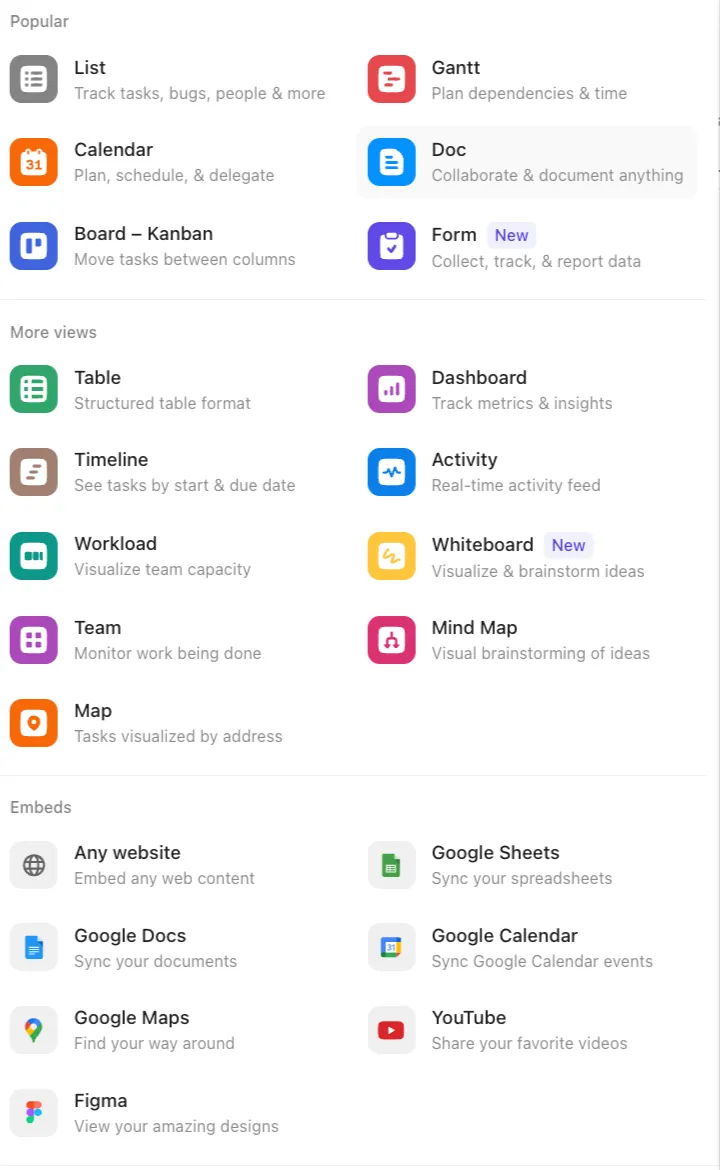
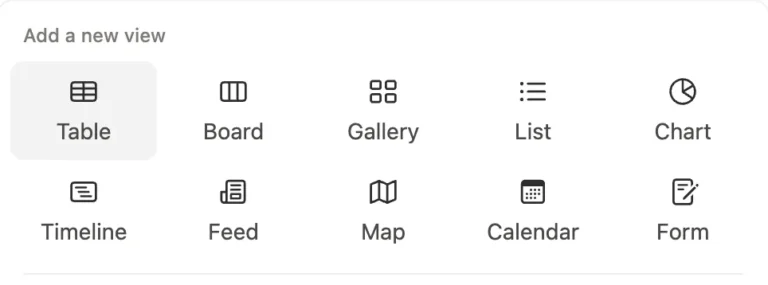
ClickUp Views vs Notion Database Views
| Views | ClickUp | Notion |
|---|---|---|
| List | Default task list; shows tasks vertically with statuses, custom fields, grouping & sorting. | Present as a List view; simpler, best for notes, docs, or lightweight task rows. |
| Calendar | Classic calendar for scheduling; drag tasks between dates; shows assignee & status. | Native Calendar view based on Date property; drag-and-drop supported. |
| Board (Kanban) | Status-based Kanban with deep automation, WIP limits, and workflow templates. | Kanban grouped by Select/Status; flexible but lacks automation depth. |
| Gantt | Advanced Gantt with dependencies, critical path, milestones, and timeline layering. | Not available – must simulate using Timeline + Relations; no true Gantt functionality. |
| Doc | ClickUp Docs stored inside tasks/spaces; supports blocks, relationships & task linking. | Every page is a document; far more flexible with full page hierarchy and linked DBs. |
| Form | Forms convert submissions into tasks; supports routing rules & automations. | Native Form tied directly to databases; supports conditional logic and branding. |
| Table | Structured grid of tasks; bulk edit, grouping, filters, saved views, custom fields. | Primary database view; strongest for relations, rollups, formulas, and complex modeling. |
| Dashboard | Full analytics hub: charts, sprints, workload, embeds, docs, time tracking, widgets. | Not available as a view – dashboards must be built manually using pages + embeds. |
| Timeline | Horizontal timeline for tasks; supports drag, grouping, filtering, and basic dependencies. | Native Timeline view; visually clean but lacks dependency management like ClickUp. |
| Activity | Real-time activity feed showing task updates, comments, status changes. | Not available as a database view – Notion Feed exists but is not an activity log. |
| Workload | Visual team capacity planning based on time estimates or task count. | Not available – needs formulas + rollups + manual setup; no capacity engine. |
| Team | People-focused view showing assigned work, capacity, and performance. | Not available – grouping by Person is possible but no dedicated Team workload view. |
| Whiteboard | Native whiteboard for brainstorming, diagrams, workflows, sticky notes, and shapes. | Not available – must embed Miro, Whimsical, FigJam, or use simple pages. |
| Mind Map | Native mind map view for freeform diagrams or task-based mind mapping. | Not available – only possible through third-party embeds. |
| Map | Map view using Location custom fields; ideal for addresses, delivery zones, and events. | Map view tied to Place property; both show pins interactively. |
| Embed | Dedicated Embed view for Sheets, Docs, Maps, YouTube, Figma, websites, & more. | Not available as a view – Notion Embed exists only as a block, not a database view. |
Clickup Views
Notion Views
Pricing Comparison
Clickup Pricing
- Free Plan: Unlimited tasks, unlimited members, 100MB storage, basic features
- Unlimited Plan: $10/user/month – unlimited storage, integrations, dashboards, Gantt charts
- Business Plan: $19/user/month – advanced features, timesheets, custom reporting
- ClickUp AI: Additional $14/user/month on any plan
Clickup Pricing
- Free Plan: Unlimited pages and blocks for individuals, 10 guest collaborators
- Plus Plan: $12/user/month – unlimited file uploads, automation, charts, custom sites
- Business Plan: $24/user/month (includes AI) – private teamspaces, advanced analytics, 250 guests
- Notion AI: Included in Business plan, otherwise additional cost
ClickUp offers more features in the free plan but charges separately for AI. Notion bundles AI with Business plan, potentially offering better value for teams needing AI capabilities.
How to choose ClickUp vs Notion; a checklist to follow
Choose ClickUp when:
- You need to track time for billing, productivity analysis, or project profitability
- Your team communicates and executes work in one place (chat + tasks)
- Team capacity planning and workload balancing matters
- You use due dates and assignees religiously – every task has an owner and deadline
- You want more control and visibility over projects
- You need structured setup that doesn’t break when scaling
- You manage a large team (10+ people) with complex projects
- You require nuanced automation to save repetitive work
- Multiple people touch the same project and handoffs matter
- Operations where missed deadlines have real business consequences
- Projects have dependencies where one delay cascades to others
- Accountability and status updates are critical to your operations
- Departments need to justify resource allocation to leadership
- Standardization helps more than customization for your operations
- Service businesses: agencies, consultancies, law firms billing by the hour
Choose Notion when:
- You want to build your own custom project management system
- Aesthetics and beautiful design matter for your workspace or client perception
- You’re a solopreneur or very small team (1-3 people)
- You’re a consultant, coach, or educator sharing resources with clients/mentees
- Your company doesn’t track time or need capacity planning
- Your projects don’t operate on strict due dates and assignments
- You mainly need to store resources, SOPs, docs, and knowledge base
- You have 2-4 weeks to invest building your Notion system properly
- You prefer flexibility over pre-built structure
- Basic automation is sufficient for your needs
- You’re creating client-facing documentation or course content
- You’re building a personal brand where your systems are showcased publicly
- Your workflow is genuinely unique and doesn’t fit standard PM patterns
- You don’t need to coordinate across multiple people constantly
- Everyone can see everything and structure matters less than flexibility
- Accountability tracking is unnecessary because you know what everyone’s doing
- Your primary needs: company wiki, knowledge repository, research organization, “second brain” for information retrieval, templates and brand asset management
Frequently Asked Questions (FAQ)
Yes, ClickUp is better for traditional project management. It comes with built-in project structures, time tracking, workload views, and capacity planning that Notion lacks. ClickUp's task management features are more robust out of the box. However, Notion works better if you need flexible knowledge management alongside light project tracking.
Notion can replace ClickUp for individuals and small teams with simple project needs. However, Notion lacks time tracking, capacity planning, workload views, mind maps, whiteboards, and built-in chat. Teams managing complex projects with multiple stakeholders will miss ClickUp's specialized PM features.
ClickUp is easier for people familiar with project management tools since it follows traditional PM patterns. Notion has a steeper learning curve because you start with a blank canvas and need to understand databases and views. However, once learned, Notion's flexibility becomes powerful.
No, Notion doesn't have native time tracking. ClickUp includes built-in time tracking, timesheets, and time estimates. Notion users need third-party integrations or external tools for time tracking.
Yes, many teams use both. A common approach is using ClickUp for project and task management while using Notion for documentation, knowledge base, and creative planning. You can integrate them through Zapier or Make to sync data between platforms.
Both have strong AI capabilities but serve different purposes. ClickUp AI focuses on project management tasks like generating reports, creating subtasks, and summarizing discussions. Notion AI excels at writing, research, and content generation. ClickUp charges $14/month extra for AI, while Notion includes AI in the Business plan ($24/month total).
Notion AI is better for writing content. It was designed specifically for content creation, offering better writing, editing, and rewriting capabilities. Notion AI can help draft documents, improve writing style, generate long-form content, and maintain consistent tone. ClickUp AI can write content too, but its strengths lie in project management tasks rather than pure content creation.
No, ClickUp AI is an add-on that costs an additional $14 per user per month regardless of your base plan (Free, Unlimited, Business, or Enterprise). You can add it to any plan level, but it's not included in any of the standard pricing tiers. This means even Enterprise customers pay extra for AI features.
No, Notion AI is not included in the free plan. It's available as an add-on for Business plan users or included in the Business plan at $18 per user per month. The Business plan provides the best value since it includes both platform features and AI capabilities in one price. Free and Plus users must pay separately for AI access.
Yes, users commonly report that ClickUp loads slower, especially with large lists or complex projects. Notion typically loads faster and maintains better performance even with substantial data. ClickUp's extensive features can create lag during daily use.
Notion has a vastly superior template ecosystem with thousands of templates available through its creator marketplace. Many designers build entire businesses creating Notion templates - from productivity systems to CRM dashboards. The variety, creativity, and aesthetic quality of Notion's community-created templates far exceeds ClickUp's collection.
Notion added automation features recently but they're more limited than ClickUp's mature automation system. ClickUp offers more triggers, actions, and integration options. Notion's automations work for basic workflows but can't match ClickUp's depth and flexibility.
Notion is often better for small teams (under 10 people) because of its flexibility, cleaner interface, and lower learning curve once you understand databases. ClickUp can be overwhelming with too many features small teams don't need. However, if you need time tracking and capacity planning from day one, start with ClickUp.
Yes, ClickUp has significantly better integrations with over 1,000 native connections versus Notion's limited native integrations. ClickUp's deep integrations work smoothly, while Notion often requires third-party tools like Zapier for connections that aren't truly "native."
ClickUp is better for remote teams managing complex work because of built-in chat, video calls, time tracking, and comprehensive project views. Remote teams can work entirely within ClickUp. Notion requires supplementing with other tools for communication and time management.
Yes, both ClickUp and Notion can be built to function as simple CRMs for storing and managing customer data. However, they have different strengths and limitations.
ClickUp as a CRM: ClickUp works better as a CRM due to its superior structure, automation, and communication features. You can create custom fields for lead information, contact details, deal stages, and pipeline management. ClickUp offers better automation to move leads through stages automatically, create follow-up tasks, and send notifications. The platform has multiple views (list, board, calendar, Gantt) to visualize your sales pipeline from different angles. Dashboard widgets help track deal values, conversion rates, and sales metrics in real-time.
A significant advantage is ClickUp's task archive feature, which lets you archive closed deals and lost leads cleanly. This prevents your CRM from getting cluttered with old data. You can also send emails directly from ClickUp to leads, keeping all communication history connected to the contact record.
Notion as a CRM: Notion can also work as a CRM, especially if you need flexibility. You can create databases for leads, deals, and contacts, then display all three on a single page using connected database views. This gives you a comprehensive overview of your entire sales process in one place. Notion's relational databases let you link contacts to deals and companies easily.
However, Notion lacks archive functionality, meaning closed deals and lost leads pile up in your database unless you manually delete them or create separate "lost/junk" databases. This makes long-term CRM management messier. Notion also doesn't allow sending emails directly from the platform, so you'll need to use external email tools.
Limitations of both: Neither ClickUp nor Notion is suitable for running mass email campaigns or advanced marketing automation. They're good for simple CRMs where you store contact data, track deals manually, and manage basic follow-ups. If you need email sequences, marketing automation, lead scoring, or mass campaigns, you should move to a dedicated CRM platform like HubSpot, Salesforce, Pipedrive, or Monday CRM.
Bottom line: Use ClickUp if you need better automation, email capability, and cleaner data management. Use Notion if you want maximum flexibility and a unified view of all CRM data on one page. For serious sales operations with marketing campaigns, invest in a dedicated CRM instead.
Yes, both can create wikis. Notion is superior for wiki creation with beautiful page design, flexible organization, and better knowledge management features. ClickUp can create docs and wikis but they're not as polished or flexible as Notion's system.
Both have mobile apps but neither matches their desktop experience. Users report Notion's mobile app is slightly more intuitive but both platforms work better on desktop for serious work. Mobile apps are good for quick updates and viewing but not ideal for extensive work.
ClickUp is better for software development teams. It has built-in sprint planning with sprint widgets, burndown charts, and velocity tracking. ClickUp offers native integrations with GitHub, GitLab, and Bitbucket for code repository management. The platform includes time tracking for developer productivity, workload views to balance team capacity, and agile board views with swimlanes. ClickUp also has better automation for development workflows like moving tasks through QA and deployment stages. Notion can work for small dev teams focused on documentation, but lacks the specialized features larger software teams need.
ClickUp is generally better for marketing agencies. It provides client management with guest access and permissions, time tracking for billable hours and client reporting, capacity planning to balance team workload across clients, campaign tracking with multiple views (calendar, board, timeline), built-in chat to reduce tool switching, and workload views to prevent team burnout. ClickUp's ability to track time, manage multiple client projects, and provide detailed reporting makes it ideal for agencies. However, Notion works well if your agency focuses heavily on content creation, brand guidelines, and creative documentation. Many agencies use both - ClickUp for project execution and client work, Notion for internal knowledge and creative planning.
Final Verdict: ClickUp vs Notion
Choose ClickUp if you’re managing projects, tracking time, planning capacity, and need robust automation. It’s the better project management platform with features purpose-built for team collaboration and complex workflows.
Choose Notion if you’re focused on knowledge management, documentation, and flexible organization. It’s superior for creating beautiful content, building custom databases, and adapting to creative workflows.
Many teams use both – ClickUp for project execution and Notion for knowledge management. Consider your team’s primary needs, budget, and technical expertise when deciding.
The best choice depends on whether you prioritize structure (ClickUp) or flexibility (Notion). Both are excellent tools that continue improving with regular updates and new features.
Imrul said,
“One of our clients, Crease Group, scaled from $3M to $10M annual revenue using ClickUp. The visibility, time tracking, and team capacity planning were critical to managing that growth without operational chaos. The right choice isn’t about which tool has more features – it’s about which tool matches how your business actually operates and where it’s going.”
About This Comparison
This comparison comes from Camel Tech, a business systemization consultancy that has successfully implemented ClickUp, Notion, and Monday for over 60 companies across various industries. Our team understands that every business has unique needs, workflows, and challenges.
Why trust this comparison?
We’re not affiliated with ClickUp, Notion, or any other project management platform. We don’t earn commissions or receive incentives for recommending one tool over another. Our only goal is helping businesses choose the right tool for their specific situation.
Our approach is simple: we analyze your business operations, understand your team’s workflow, and recommend the platform that genuinely fits your needs—whether that’s ClickUp, Notion, Monday, or something else entirely. This comparison reflects hands-on experience implementing these tools for real businesses, from startups to established companies scaling from $1M to $10M in revenue.
The insights in this guide come from actual implementations, user feedback, and solving real-world operational challenges – not marketing materials or sponsored content. This is an honest, unbiased, practical comparison based on what actually works.
Choosing between ClickUp and Notion for your team’s project management needs? You’re not alone. Both platforms have transformed how teams work, but they serve different purposes. This detailed comparison breaks down everything you need to know to make the right choice for your business.
Read related articles
Answer Engine Optimization (AEO) is the practice of getting AI tools like ChatGPT, Google Gemini, Perplexity, and Claude to mention, cite, and recommend your business when potential customers ask questions. It's not a distant trend — it's already reshaping how buyers discover and choose vendors. ChatGPT alone now has over 800 million weekly active users, and roughly 58-60% of Google searches end without a single click because AI answers the question before anyone scrolls.
This report distills real insights from 60+ scaling businesses across 15 industries. Based on client engagements, discovery calls, and hands-on implementations, it reveals the six operational problems that block growth, what they actually cost founders, and how companies that systemize early unlock 30–40% productivity gains within 90 days.

Learn how to hire the right Notion consultant for your business—what to look for, questions to ask, and how to ensure a scalable, customized Notion setup.
Build a business that thrives without you
Unlock your ultimate life goals: Focus on high-leverage tasks, personal growth, and family time while pursuing your next big initiative.
Let's book a call with our expert.
