
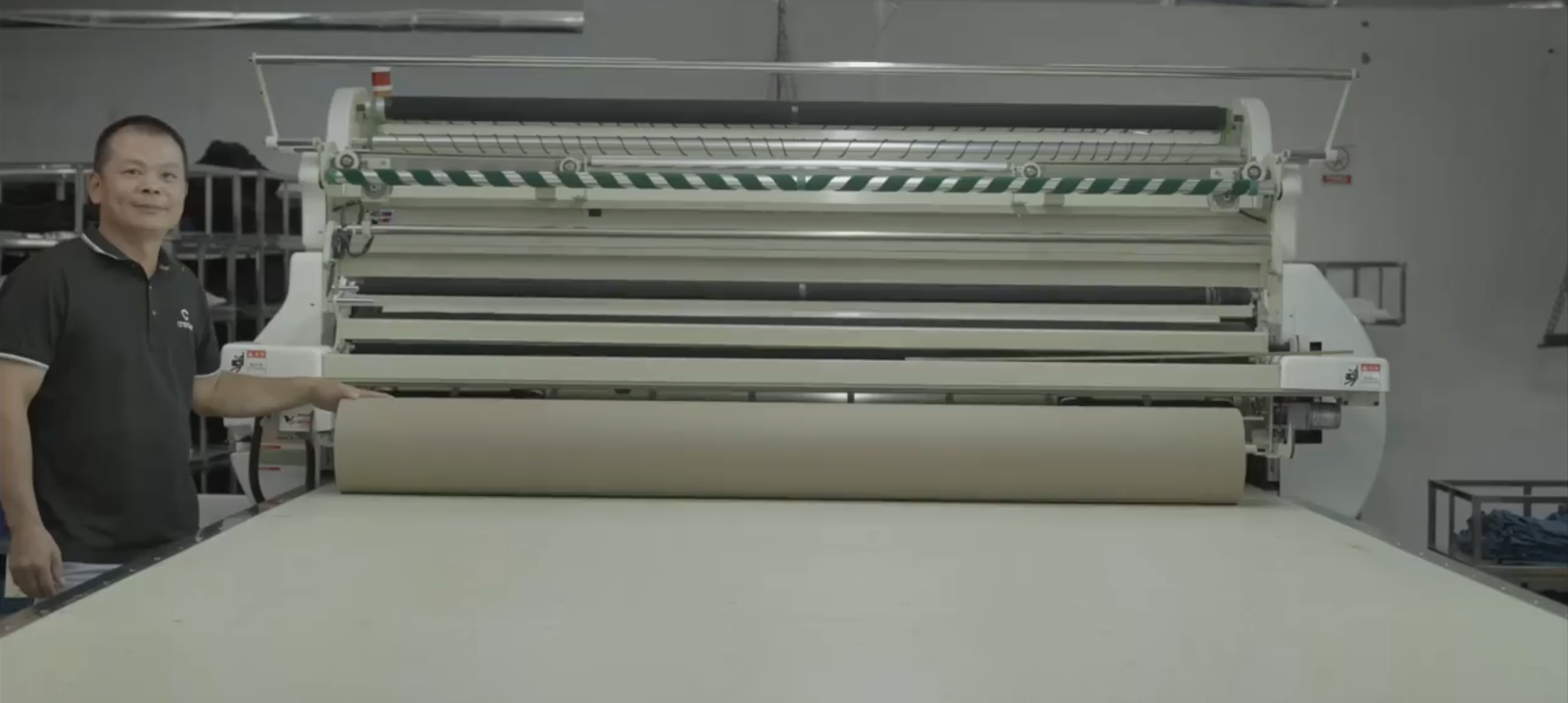

The Problems That Create Chaos in Clothing Manufacturing Companies
These are the exact bottlenecks that were holding Crease Group back. Camel Tech worked across two phases to address them – first building the foundation, then going deeper as the business scaled and new complexity emerged.
1. No Single Source of Truth for Production
Before the team relied on spreadsheets, email threads, and messaging apps to manage order workflows. There was no centralized place to track an order’s status. Design changes got buried in inboxes, shipment updates arrived overnight, and project managers spent more time chasing information than managing projects. For any clothing manufacturing company trying to grow, this kind of fragmentation is the first thing that has to go.
2. No CRM or Lead Management System
New inquiries came in through a website contact form and personal emails, with no dedicated system to track or follow up on them. Leads were manually copied into notes. If someone got busy, a promising prospect would go cold. There was also no way to qualify leads automatically – the team spent time vetting every inquiry by hand instead of focusing on the most viable opportunities.
3. No Documented SOPs or Reusable Templates
Operational knowledge lived in people’s heads. Every employee handled processes slightly differently. Training new hires meant weeks of shadowing, and if a key person was out, their work stalled. As Crease grew and added team members, this tribal knowledge problem became a direct threat to quality and consistency.
4. Global Team Misalignment
With client-facing teams in the US and production teams in Asia, keeping everyone aligned was a daily challenge. There was no real-time project hub connecting the two regions. The US team often waited overnight for factory updates before they could make decisions. Urgent client requests had to be manually relayed to the overseas office. This time-zone gap caused scheduling bottlenecks, duplicate work, and confusion over ownership.
5. Dashboard Gaps and No Pipeline Visibility
As Crease grew and opened their China showroom, the need for deeper reporting became urgent. There were no dashboards showing GMV, deal values, or revenue forecasts. Managers could not see when clients moved through each sales stage or how many leads reached each milestone in a given month. Calculating pipeline value or revenue forecast required manually pulling from multiple systems. Leadership was making growth decisions without the data to back them up.
6. Broken Client Intake and Duplicate Leads
The project brief form was static and unstructured. Clients submitted incomplete information – vague unit counts, missing fabric specs, or design files that turned out to be insufficient. Staff had to manually follow up to fill gaps before a quote could be prepared. When clients submitted the brief, it also created a duplicate entry in the system, meaning the same lead appeared in two places with no automatic way to keep them in sync.
7. No Item-Level Production Tracking
Projects were organized by invoice, not by client or item. A client with four shirts and two jackets across two invoices appeared as two separate records. There was no way to see that three items were in sampling and two were in production – because the system was not built to track at the item level. For a clothing manufacturer running hundreds of active projects, this is where operational control breaks down.
8. Cross-Team Updates Required Manual Effort
As the China office became more deeply integrated into the production workflow, the absence of automated cross-team updates became a serious problem. When the China team completed a stage, the US account manager found out through a Slack message. When sales needed a quote from the China office, it was a separate conversation outside ClickUp entirely. Nothing synced automatically. This manual back-and-forth consumed hours every week and increased the risk of missed updates across time zones.
How Camel Tech Rebuilt the Entire Operation – Phase 1 and Phase 2
Camel Tech did not just configure a tool. Each phase was built collaboratively – presenting plans to Crease’s leadership, gathering feedback, and refining before going live. Here is exactly how we implemented ClickUp for this clothing manufacturing company across both engagements.
Phase 1 – Building the Foundation
Solution 1: Process Mapping with Miro
Before touching ClickUp, we ran a comprehensive business process mapping session using Miro with Crease’s leadership. We mapped every core workflow – the full client project lifecycle from inquiry to shipment, coordination between US and China teams, and vendor handoffs. This gave Crease a visual blueprint o f their entire operation, identified where communication broke down, and determined where automation and SOPs would have the highest impact.
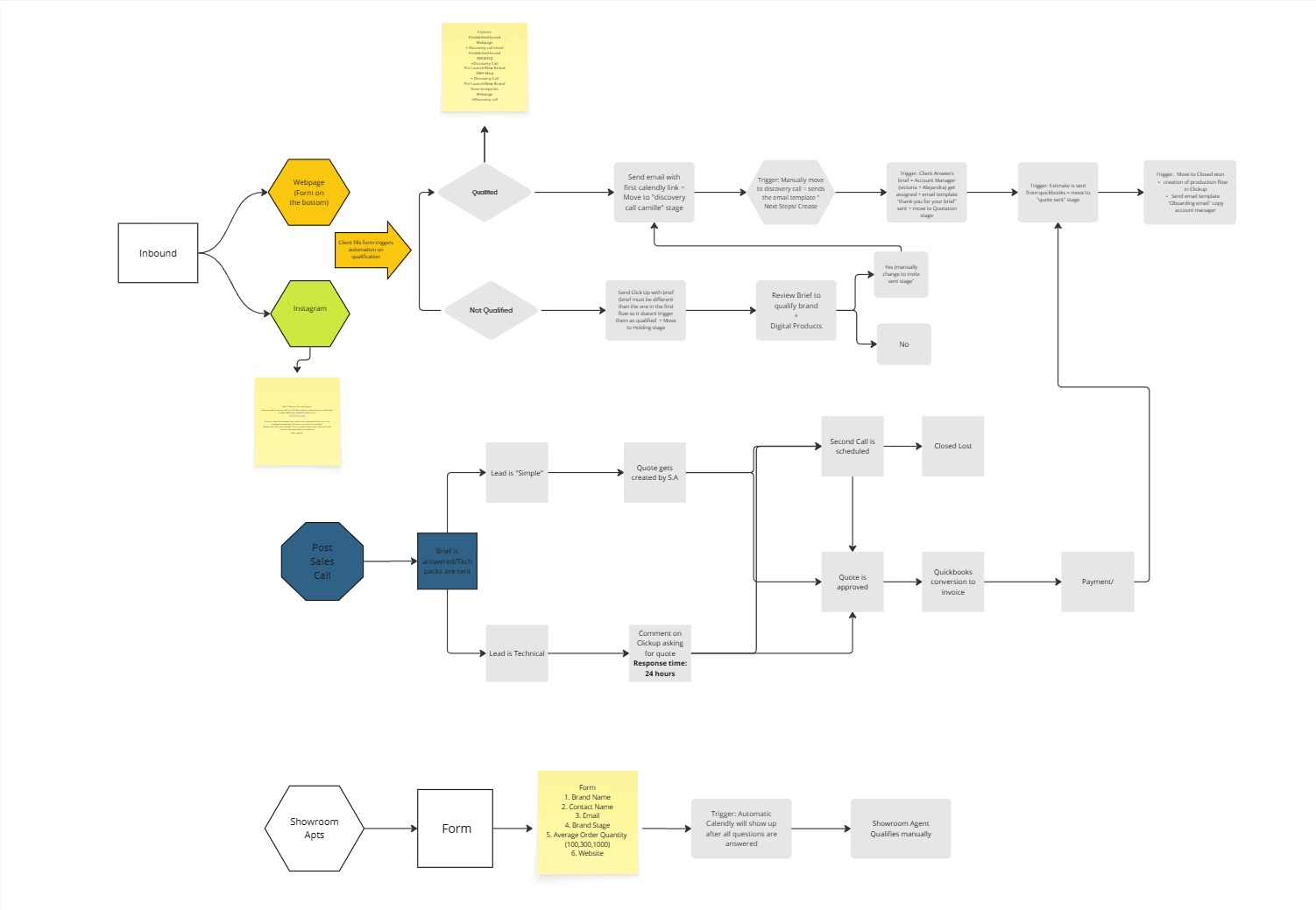
This is where implementing ClickUp for any clothing manufacturing company has to start – with clarity on the process, not the platform.
Solution 2: Centralized Fulfillment Space
We built a dedicated Fulfillment Space in ClickUp to manage the full order lifecycle from design to shipping. PO and shipment tracker lists captured order status and tracking information in real time. This replaced scattered spreadsheets and email threads with a single command center where every project had a clear home and every team member knew exactly where to look.
Solution 3: Basic CRM with Website Integration
We implemented a CRM inside ClickUp and integrated it directly with Crease’s website. New inquiries now auto-populate a live Leads list. Qualified leads move through a defined sales pipeline with automated follow-up triggers. Separate folders were set up for US and China showroom leads to support regional outreach. This eliminated manual lead copying and ensured every inquiry was captured, categorized, and acted on.
Solution 4: Make.com Lead Capture and Slack Automation
We built a Make.com automation that fires every time a website form is submitted. The lead data pushes automatically into ClickUp, creating a new task in the CRM pipeline. Simultaneously, a Slack notification goes to the internal team so they can respond immediately.
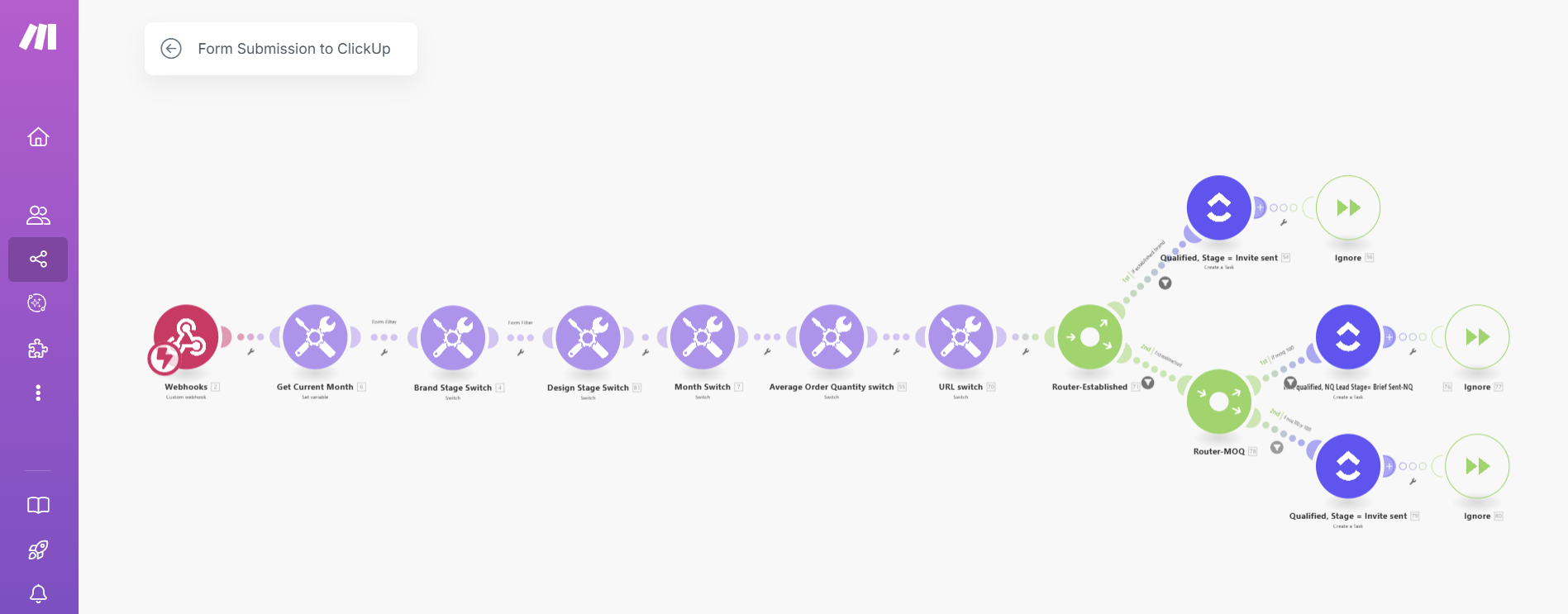
Account manager assignment was also automated based on form responses, routing each lead to the right person without manual sorting.
Solution 5: SOPs and Reusable Templates
We built a Processes and Templates space with documented SOPs and reusable task templates covering client onboarding, production, QC, and internal admin. Every repeating process was written down, standardized, and made accessible to the full team. This turned tribal knowledge into a scalable asset and reduced onboarding time for new hires by 65%.
Solution 6: Crease HQ Internal Hub
We created a Crease HQ space to organize internal operations – with dedicated folders for HR, leadership, recruitment, and admin. Teams could now manage hiring, meetings, equipment, and employee tasks from one place instead of across scattered tools.
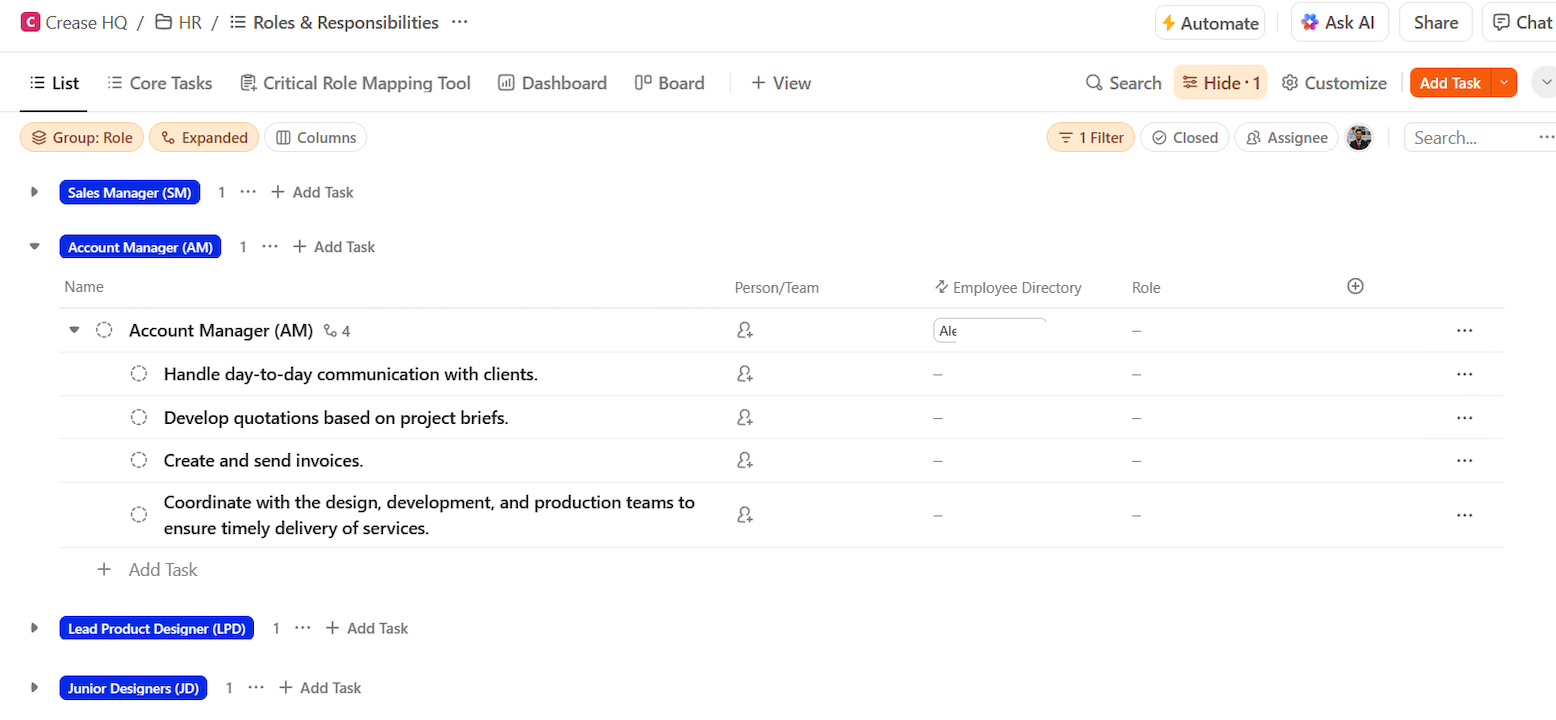
This brought structure and accountability to internal operations as the company grew.
Solution 7: Regional Spaces for US and China Teams
We set up dedicated regional spaces for the US and China teams, each with localized workflows, a sample tracker, and logistics task lists. Both teams operated within the same ClickUp workspace, so leadership could check the China space at any time to see whether a prototype had been shipped – without waiting for an email update. This real-time visibility across continents was a foundational shift in how the business operated.
Solution 8: Partner and Vendor Management Space
We built a dedicated Partner Space to track third-party suppliers and vendor tasks. Contact details, delivery statuses, and partner-specific timelines were centralized in one place. This replaced the scattered emails and notebooks that previously held supplier information and brought visibility and accountability to every external dependency.
Phase 2 – Advanced Automation and Full Operational Rebuild
As Crease scaled, opened their China showroom, and took on significantly more clients, the Phase 1 foundation needed to grow with them. The team returned to Camel Tech for a deeper rebuild – more automation, more visibility, and a fully connected ecosystem across all three teams.
Solution 9: Updated Process Map
Before rebuilding, we updated the full process map to reflect Crease’s expanded operation – including the China showroom, the new client intake flow, and the three-team ecosystem.
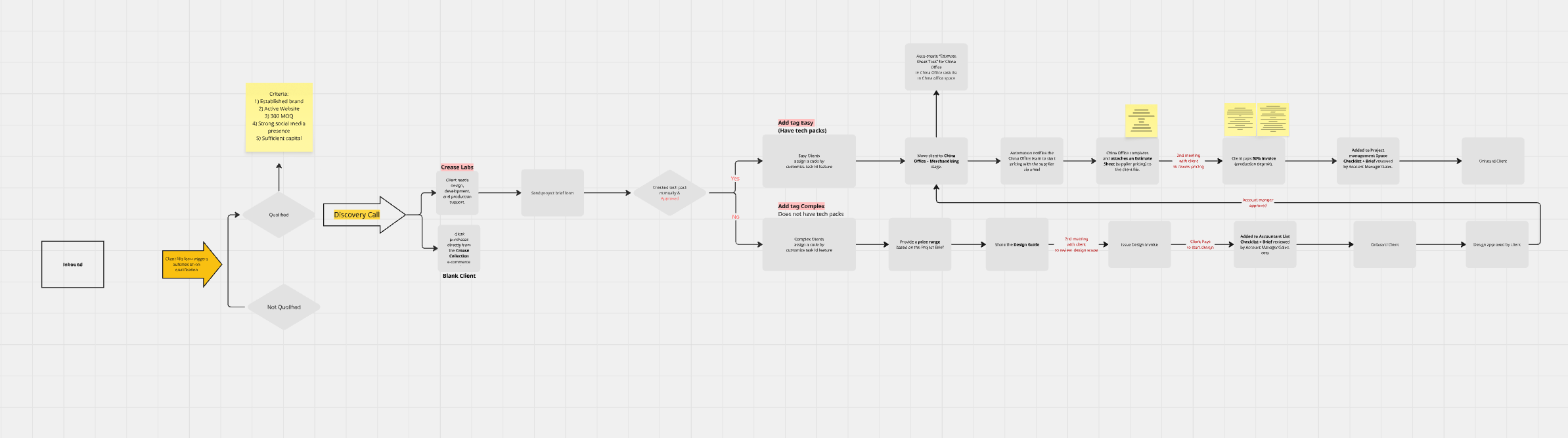
This ensured Phase 2 was built on an accurate picture of how the business actually operated, not how it looked a year earlier.
Solution 10: Advanced Sales Dashboard with Full Pipeline Tracking
We rebuilt the sales reporting from the ground up. The new dashboard tracks pipeline value, revenue forecast by month, total design estimation, total production estimation, deal value by stage, and actual closed revenue – all in real time. Managers can see how many discovery calls happened this month, how many project briefs were submitted, how many quotes were sent, and how many clients closed. Lead source data shows whether leads came from referrals, the website, or other channels. Average deal close time is also tracked.
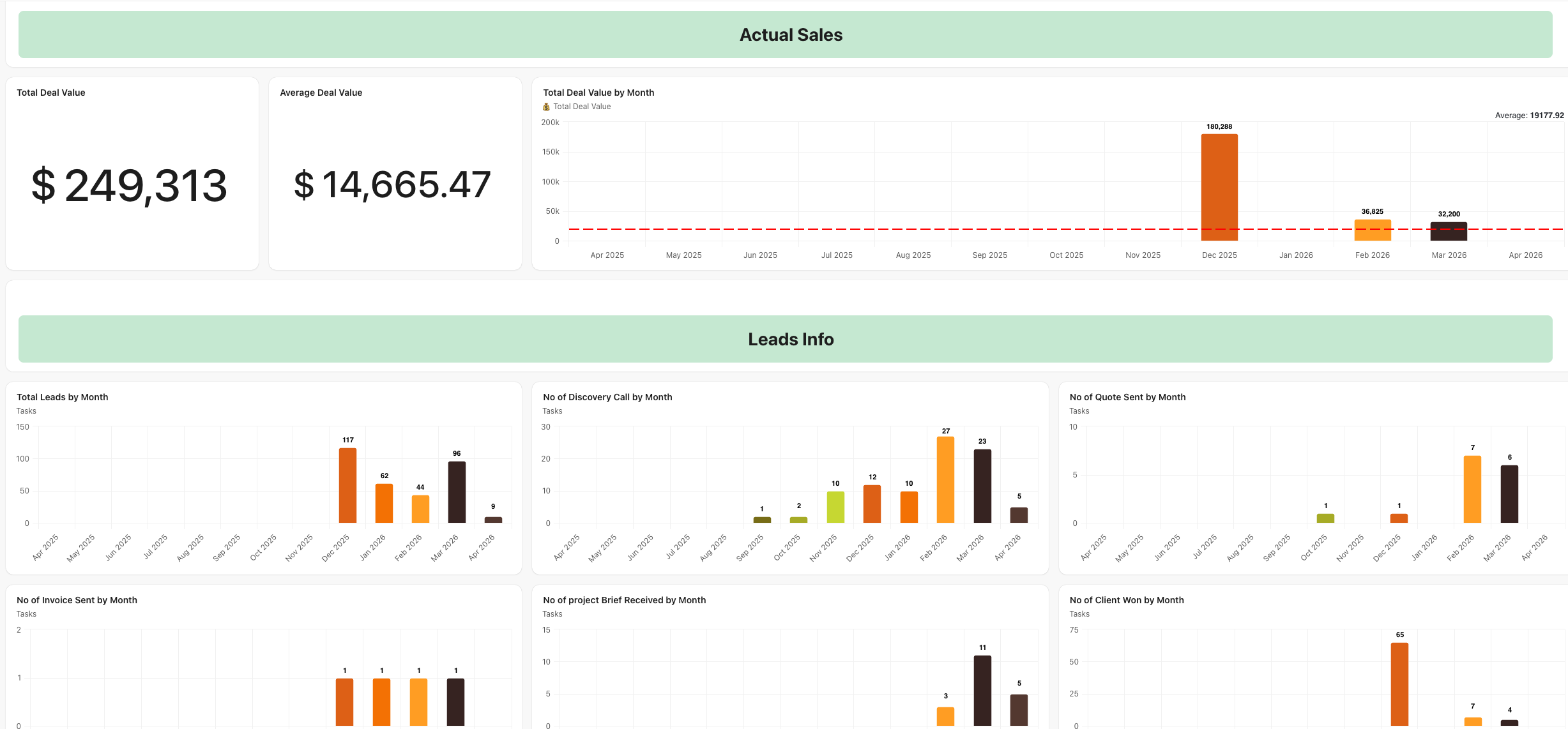 SOPs are embedded directly in the dashboard so the team has everything in one place.
Solution 11: Conditional Project Brief via Tally and Make.com
The static ClickUp form was replaced with a Tally-based project brief featuring full conditional logic. Clients see only the questions relevant to their situation – if they have a tech pack, they attach it and move on; if they do not, the form walks them through item-by-item detail covering style name, fabric composition, target price, quantity, and custom artwork.
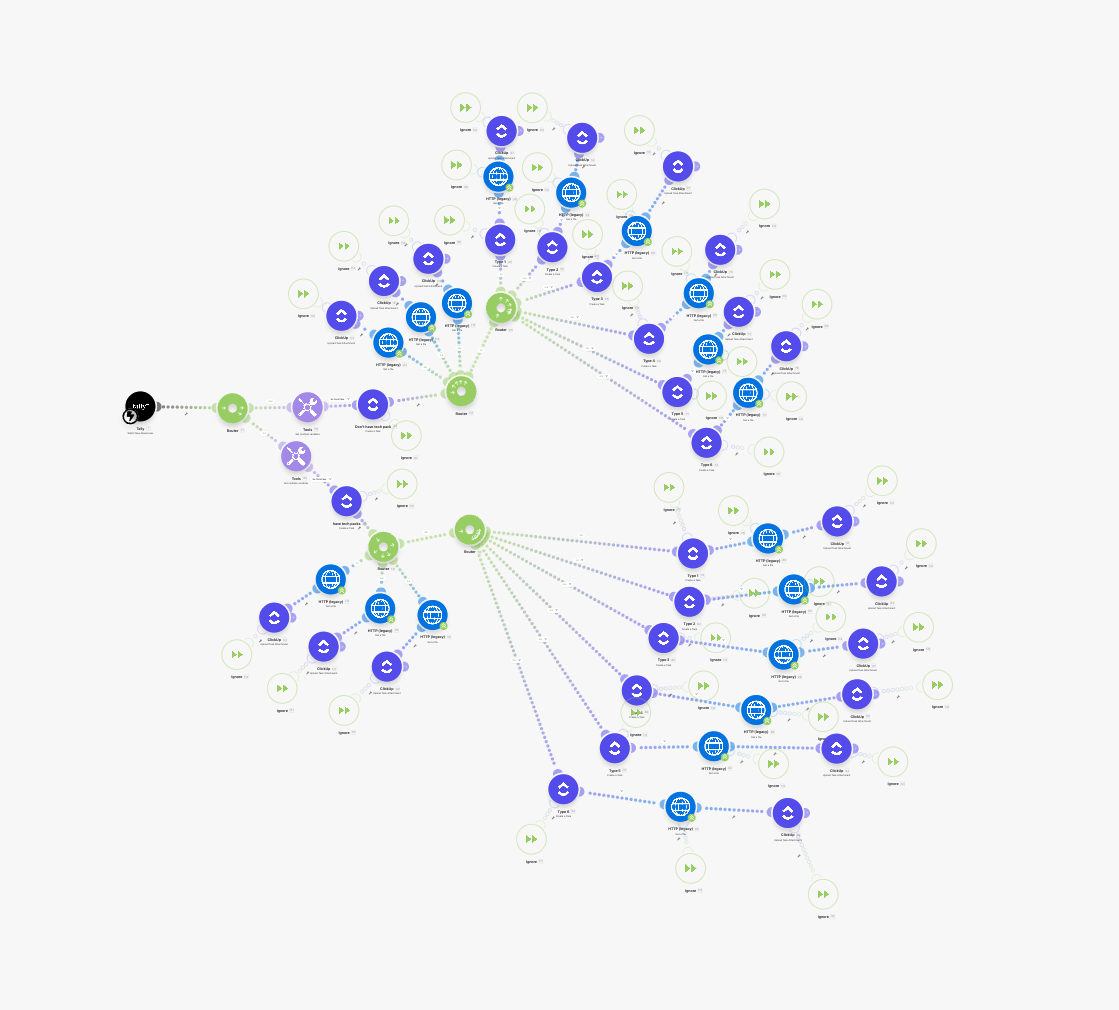 We integrated Tally with ClickUp via Make.com so every submission maps directly into the Project Brief list with all fields populated correctly.
Solution 12: Dynamic Two-Way Stage Sync via Make.com
We built a dynamic automation so that when a stage changes in the Project Brief list, it automatically updates in the Leads Qualified list – and vice versa. Both lists stay in sync at all times without anyone manually updating two places. This eliminated the duplicate lead problem from Phase 1 and ensured the sales team always had an accurate, current view of where every prospect stood.
Solution 13: Automated Project Routing
When a project brief is reviewed, it routes automatically to the correct list based on whether design is needed. Complete tech packs go to the Production Ready Projects list. Projects requiring design work go to the Design Projects list. This routing is fully automated based on brief responses – no manual sorting, no judgment calls, no projects landing in the wrong place.
Solution 14: Automated SLA Timelines for Every Production Stage
We built full SLA automation into the operations space. When a project enters any stage – design, tech pack, sampling, client approval, PPS, production, QC, or shipping – the system sets the due date automatically based on the defined timeline for that stage. No manual date entry. If a stage goes overdue, it is flagged. The dashboard tracks average duration per stage so leadership can see exactly where delays happen – whether internally or at the factory level.
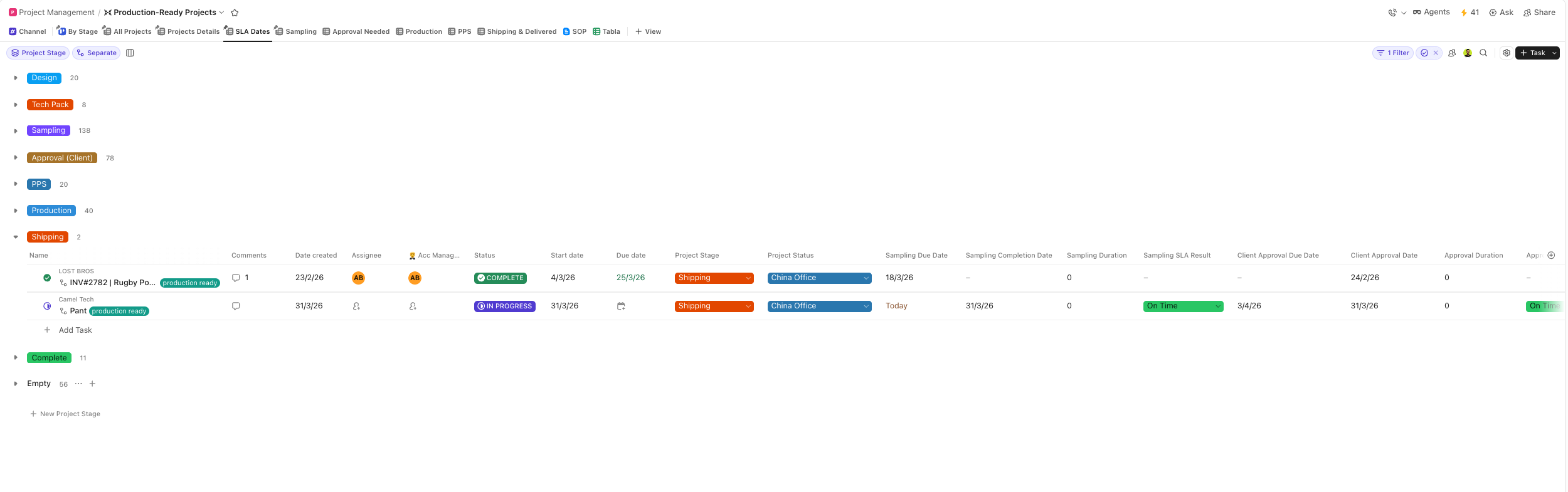 This is what it looks like when you automate your clothing manufacturing workflow rather than just tracking it.
Solution 15: Item-Level Project Tracking by Brand and Client
We restructured the entire project management space so each client or brand is the parent record, with every individual item tracked independently underneath it. A client with four shirts and two jackets now appears as one record with six items, each moving through its own stages. Account managers can open any client record and immediately see which items are in design, sampling, production, or shipping – without opening a single spreadsheet or making a single call.
Solution 16: Project Management Dashboard with Full KPI Tracking
We built a dedicated project management dashboard showing every active project by stage, broken down by account manager, designer, factory, and project type. The dashboard shows which projects are exceeding their SLA, which are due within the next few days, QC status across all active work, and project volume by factory.
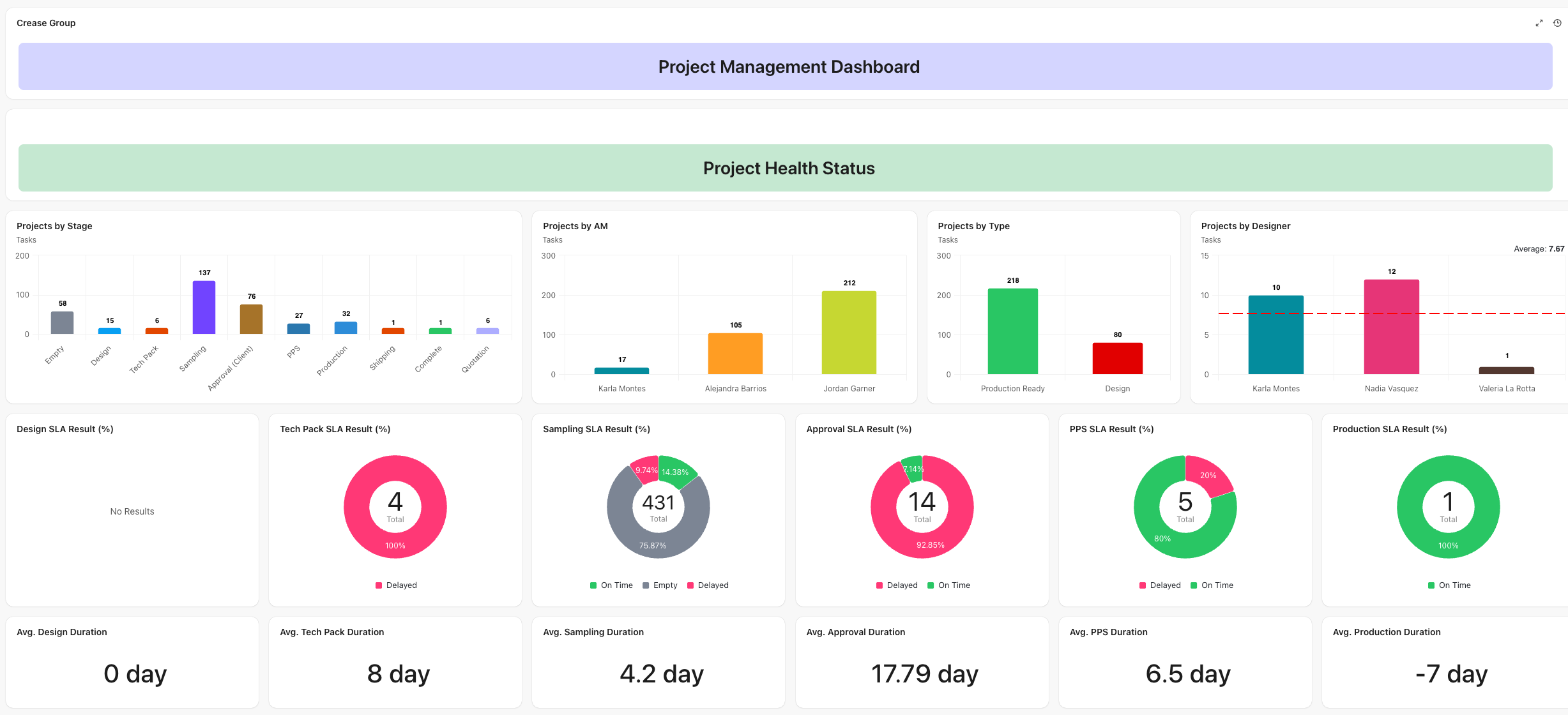 This factory performance data did not exist before – it is now captured automatically as every stage completes.
Solution 17: China Office Space with Connected Quotation and Production Lists
We created a dedicated China Office space with two core lists – Sales Quotation and Production Management. Quote requests route automatically to the China team’s queue. When they complete a quote and change the stage to approved, it routes back to the sales team automatically – no messages, no emails between teams. The Production Management list mirrors updates back into the project management space, so when the China team marks a stage complete, the account manager sees it instantly in their client record.
Solution 18: Account Manager Templates and Updated SOPs
We created individual folders for each account manager with pre-built project templates. When a new project starts, the account manager launches from a template and the full task structure is ready – stages, due dates, assignees, and checklists all pre-configured. SOPs were also fully updated in Phase 2 with video walkthroughs and detailed documentation covering every new workflow, ensuring the team could operate the new system confidently from day one.

Learn how a landscaping business automation system replaced email chaos, centralized operations, and helped a

Residential child care organisations often face operational chaos as they scale, with information scattered across

How one Brooklyn firm removed the chaos, systemized operations, and built a scalable foundation -

Selected resource
Enter your email and we’ll send the resource directly to your inbox.
Check your inbox
We’ve received your request and will send the resource to your email.
Please check your spam or promotions folder if you don’t see it shortly.