

Groff Landscape Designer has spent over a decade becoming the most trusted residential landscape planning and construction firm in Northern Virginia. Their clients are busy professionals who expect a low-stress, fully managed experience – from initial design consultation through final installation. As the business grew and pushed toward a $30M revenue target, the gap between that promise and the operational reality behind the scenes widened. Projects were managed through a combination of email threads, to-dos entered by hand for every new job in LMN, and a system built in Excel. There was no single place where leadership could see what was happening across all active projects without calling someone.
The 7 Problems That Create Chaos in Landscape Construction Firms
1. Project Handoffs Depended on a Single Email
When a project was sold and handed off from sales to operations, the trigger was one email with seven people CC’d on it. That email could get buried. Construction managers, the controller, and the COO were all expected to catch it and act. If it slipped through, the project sat in limbo – with no automatic alert, no task created, and no one formally assigned. A handoff system built around a single email was never going to hold up as the business scaled.
2. Construction Managers Re-Entered the Same Tasks for Every Project
Neither LMN nor HubSpot supported task templates. Every time a new project was handed off to operations, a construction manager had to manually type the same preparation checklist into LMN – ordering materials, scheduling subcontractors, booking the pre-construction meeting, sending client communications. These were identical tasks for every single project, and they had to be entered from scratch every time. It was a significant waste of time and a consistent source of missed steps when the list got long or someone was stretched thin.
3. Leadership Had No Real-Time Visibility Into Active Projects
If the owner, Robert Groff, wanted to know the status of a project mid-installation, he had to ask someone. LMN’s schedule showed which crews were on which sites, but nothing about project progress, material orders, subcontractor status, or client communications. The COO had the same problem. Visibility into what was actually happening on any given job required a phone call, a text, or digging through email threads. There was no dashboard, no status view, and no single place to look.
4. Email Threads Were Long, Disorganized, and Unreliable
Client communications during installation ran entirely through email. Construction managers would reply to the same thread for the entire project – meaning a weather delay update might get buried inside a thread titled “Welcome to Construction.” Stakeholders were CC’d on everything because there was no other way to keep people informed. The operations team was always pinging each other through email when a single shared board could have eliminated most of that noise. Things got lost. Clients got confused. And the team spent time managing inboxes instead of managing jobs.
5. Change Orders Had No Formal Tracking System
When a change order was identified on a job site, the process ran through text messages, emails, and phone calls. A construction manager would notify the controller, who would estimate the change, send it to the client for signature, and then confirm back to the team. There was no board, no status, and no record of where any change order sat in the process. Operations leadership had no way to see open change orders across all active jobs without asking around – and with multiple projects running at once, that created real risk of things slipping.
6. Sales and Operations Ran in Completely Separate Systems
Everything that happened before a project was sold lived in HubSpot. Everything after lived in LMN, email, and Dropbox. The two sides of the business had no real-time connection. Operations had no visibility into the sales pipeline – no way to see what was coming, how close deals were to closing, or which projects were about to land in their queue. When a deal did close, operations found out through an email. If that email was missed or delayed, the project sat without an owner. For a firm managing multiple concurrent projects with crews that need to be scheduled weeks in advance, having sales and operations running blind to each other is a direct operational risk.
7. Warranty Claims Were Managed on a Spreadsheet
Post-installation warranty requests – plant replacements, patio issues, callbacks – were tracked in an Excel spreadsheet. There were no statuses, no assigned owners, no task templates, and no visibility across the team. The controller owned the warranty process until it was ready to be executed in the field, but the handoff between those two phases was informal and inconsistent. COO Brenda Flores described it directly: she hated the spreadsheet, and it was confusing. As the business grows, a warranty program managed on a spreadsheet will not hold.
8. HR and Onboarding Had No Scalable System
With a carpentry division being added in early 2026 and a $30M revenue target on the horizon, Groff had no structured onboarding process. New hires were managed informally – no checklist, no task assignment, no visibility for HR. The company’s one HR director was managing everything manually. Job applications had no centralized intake. As hiring ramps up, the absence of a repeatable onboarding system becomes a direct obstacle to growth.
How to Remove the Chaos and Systemized the Entire Landscaping Business Operation
Camel Tech partnered with Groff Landscape Design over several months to completely overhaul their operations using ClickUp. Here’s exactly how we implemented ClickUp for this landscape construction firm.
1. Built a Five-Space ClickUp Workspace Tailored to Groff’s Operations
We structured the entire ClickUp workspace across five spaces: Client Projects, Operations, Sales, HR, and Resources. Each space was designed around how Groff actually works – not a generic setup. The Client Projects space handles every active job from handoff through quality assurance. Operations covers shop tasks and internal work outside of client projects. Sales mirrors HubSpot’s pipeline. HR manages recruitment, onboarding, and the employee directory. Resources holds SOPs, video training, and task templates. Every department now has a dedicated home inside one system.
2. Automated Project Folder Creation From HubSpot via Zapier
We built a Zapier automation that monitors HubSpot deal stage changes. When a deal moves to “Handed Off to Operations,” Zapier automatically creates a full project folder in the Client Projects space – named after the deal, with all relevant task templates applied. No manual work required. At the same time, the head of operations receives an automatic notification so they can take action immediately.  The email that used to trigger everything is now a backup, not the system.
 The email that used to trigger everything is now a backup, not the system.
3. Created a Master Project List and Dashboards for Full Operational Visibility
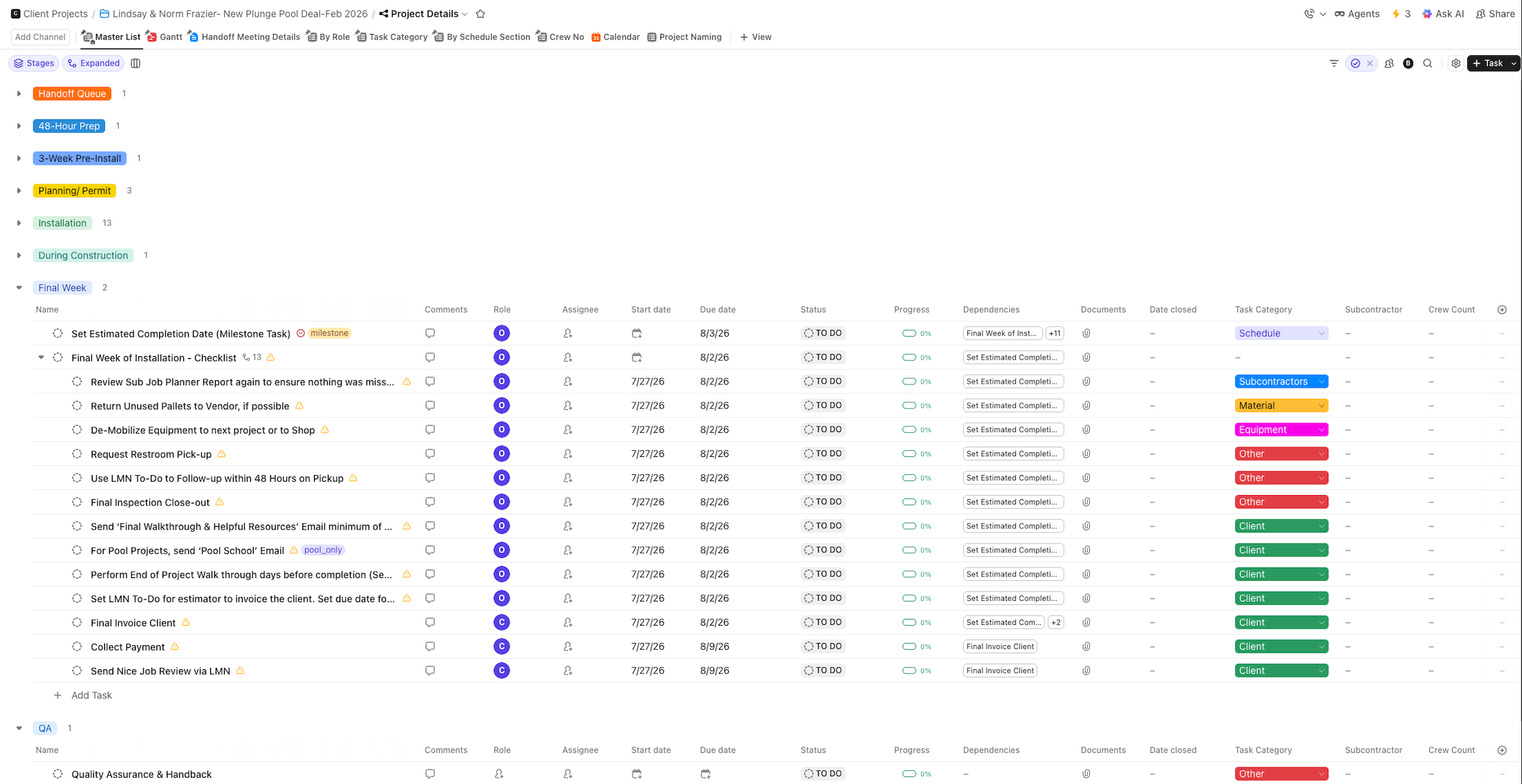
Inside the Client Projects space, we built a Master Project List that pulls data from every individual project folder into one view. Leadership can now see the status of every active job – materials, change orders, client communications, subcontractor status – without opening each folder individually. Statuses reflect the full project lifecycle: End of Queue, 48 Hours Prior, 3 Weeks Pre-Install, Planning and Permit, Installation, During Construction, Final Week, and Quality Assurance. We also built a dedicated dashboard inside every project folder, automatically applied when the folder is created from the template. Each dashboard gives the construction manager and operations lead an instant view of that project’s task statuses without digging through individual lists. At the master level, there is a fixed dashboard that pulls data across all active projects, giving Robert and Brenda a single view of the entire operation at a glance – without asking anyone.
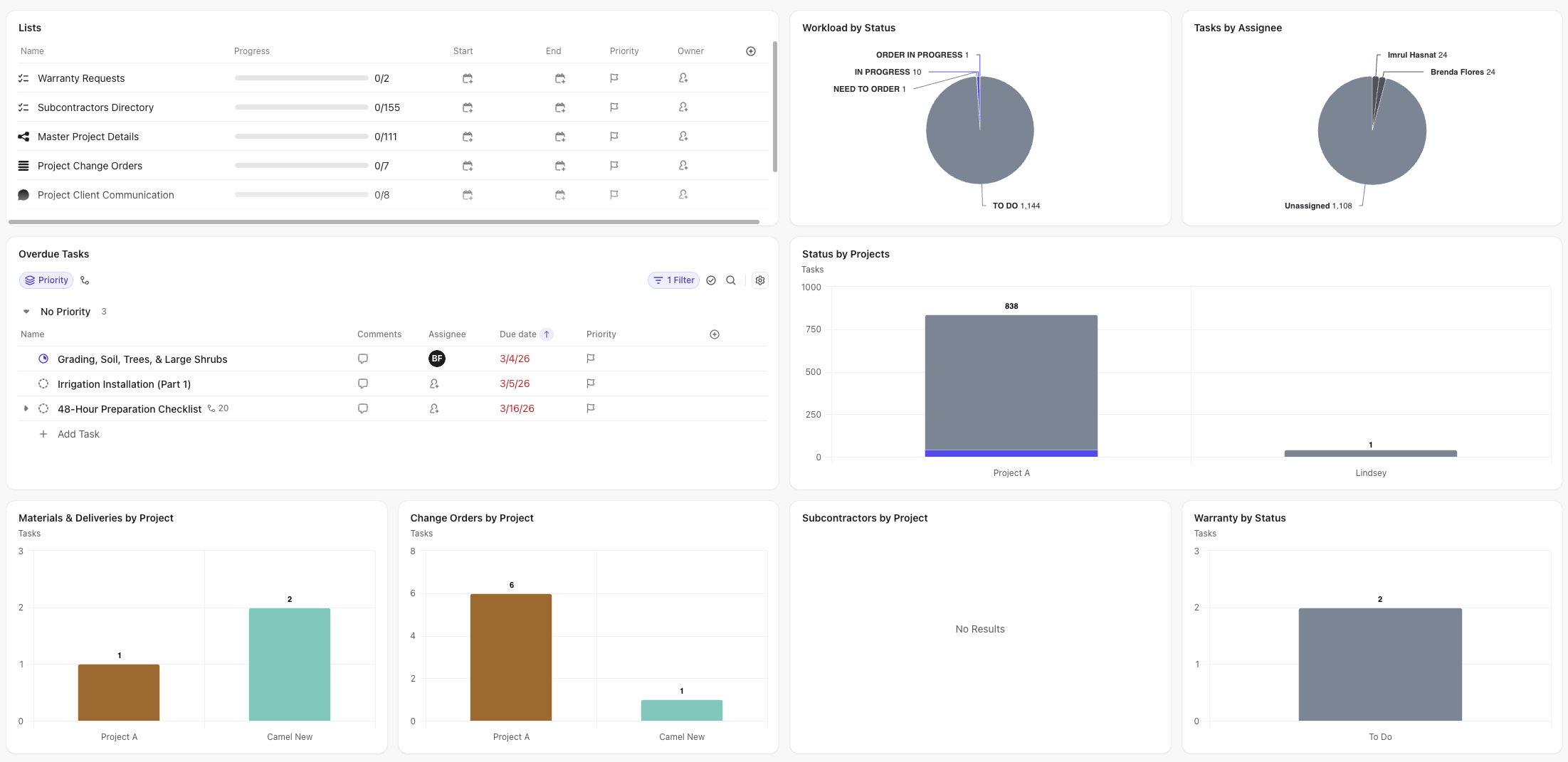 At the master level, there is a fixed dashboard that pulls data across all active projects, giving Robert and Brenda a single view of the entire operation at a glance – without asking anyone.
4. Standardized Every Phase of Construction Management With Task Templates
We built task templates for every phase of a construction project – the 48-hour post-handoff checklist, the 3-week pre-installation tasks, recurring during-construction routines, and final week closeout steps. Templates are applied automatically when a project folder is created. We also added dependencies so that when one due date changes, all connected task dates update automatically. Construction managers no longer type the same checklist into LMN for every new job. The template does it, and every task has a due date and an assigned owner.
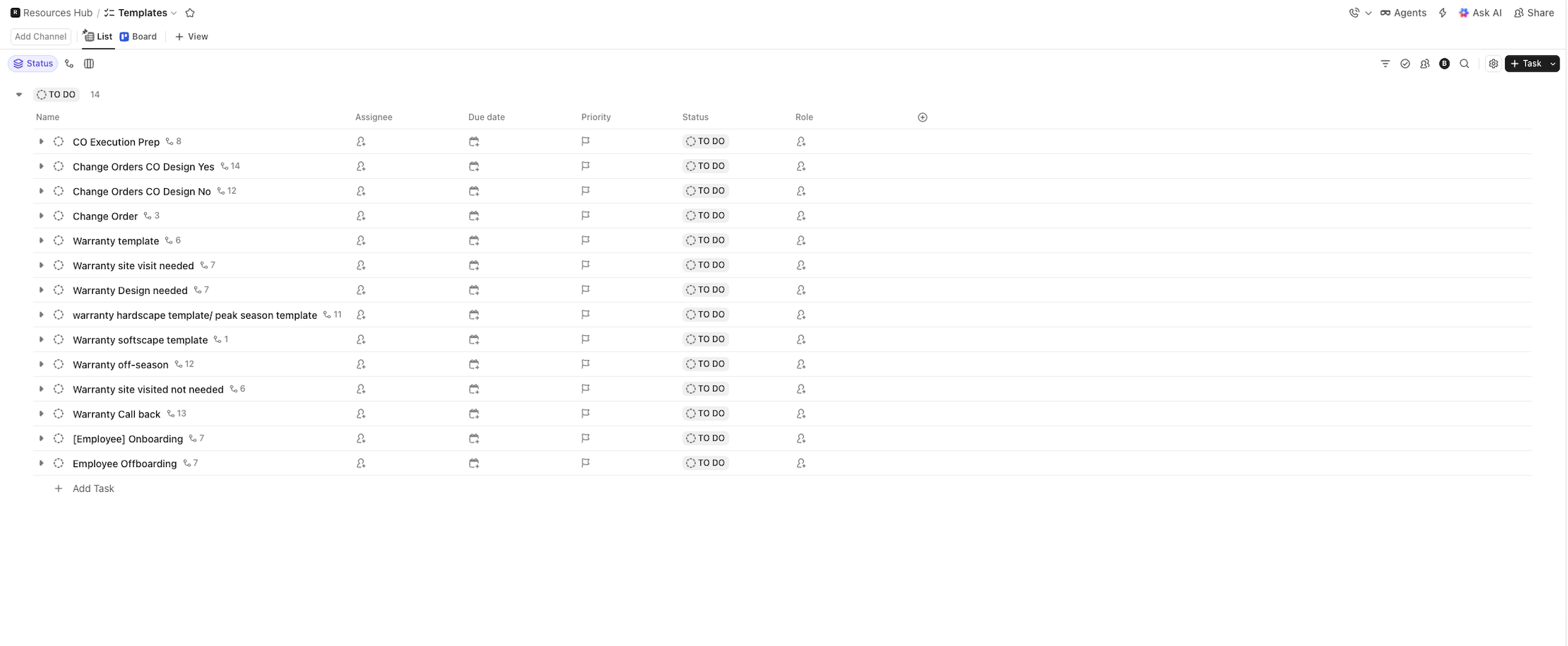 Construction managers no longer type the same checklist into LMN for every new job. The template does it, and every task has a due date and an assigned owner.
5. Built a CM Routine Tasks List With Recurring Automation
Daily and weekly construction manager tasks – daily crew huddle reviews, Friday material delivery checks, client progress updates, timesheet approvals – now live in a dedicated CM Routine Tasks list, separate from project milestone tasks. These tasks are auto-created from the Project Details list using ClickUp automation. When a task is completed, it regenerates automatically for the next cycle. This keeps recurring responsibilities visible, prevents them from getting buried inside project folders, and gives leadership a clear view of whether routine work is being done.
6. Created Structured Change Order and Warranty Boards
We built dedicated Change Orders lists inside each project folder and at the master level, with task templates based on change order type – typical or fast-track. Conditions within the template add or remove tasks depending on whether design work is involved. For warranty, we created a dedicated Warranty Requests list with a client-facing intake form that submits directly into ClickUp. Task templates are applied based on the warranty workflow type – whether a site visit is required, whether design is needed, whether client approval is pending. Both boards give leadership a real-time view of every open change order and warranty claim across all projects.
7. Built a Full HR System Including Automated Onboarding
We built the HR space from the ground up. The Positions list manages open job postings. The Recruitment list has an application form embedded directly on Groff’s website – when someone applies, the information populates automatically in ClickUp with no manual entry. When a candidate is moved to hired, an automation triggers and creates their full onboarding checklist without anyone having to set it up. We also added an Employee Directory populated by a form sent to new hires, a Training folder for internal materials, an HR Tasks list, and a Software and Password Manager with a dashboard showing monthly subscription spend by category.
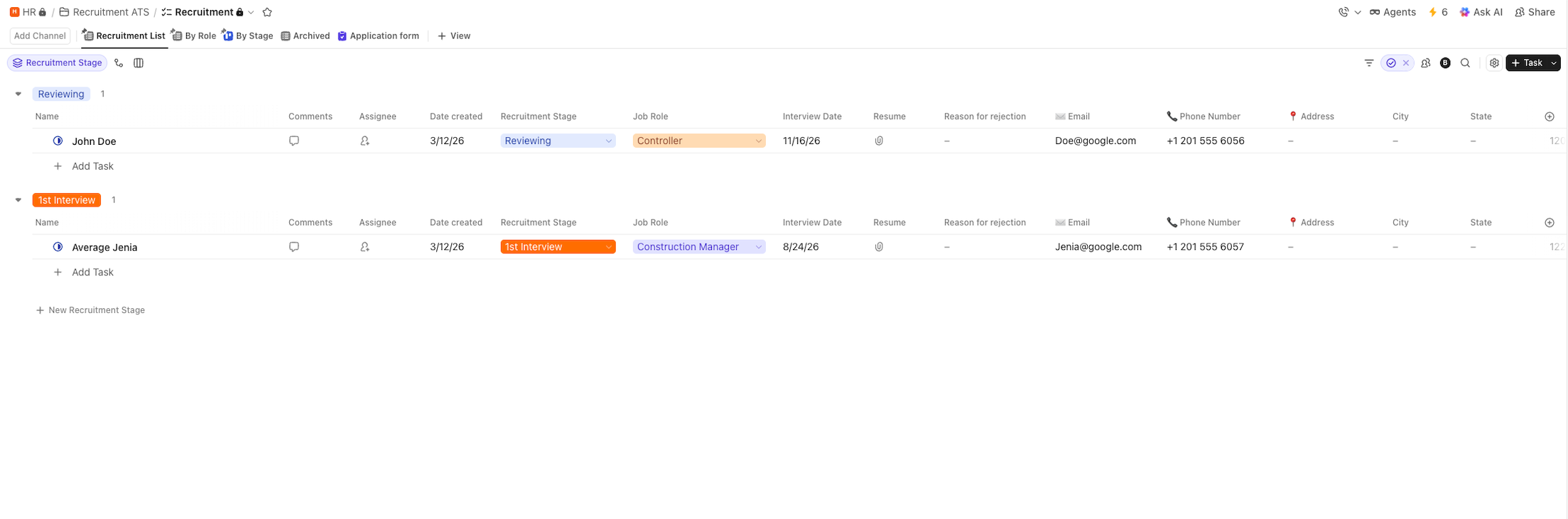 We also added an Employee Directory populated by a form sent to new hires, a Training folder for internal materials, an HR Tasks list, and a Software and Password Manager with a dashboard showing monthly subscription spend by category.
8. Centralized All Client Communication Inside ClickUp
We built a dedicated Client Communication list inside every project folder. All client-facing team members – construction managers, the controller, the COO – are added to the list for their respective project. Instead of sending emails from their inbox and CC’ing multiple people, the team communicates directly through the ClickUp comment section, which is connected to email. Comments sent from ClickUp arrive in the client’s inbox as normal emails, and replies come back into ClickUp automatically. If a project requires communication on more than one subject, the team creates a separate comment thread for each subject, keeping conversations organized by topic instead of buried in a single growing thread. At the master level, we also built a Master Client Communication list that pulls all project communications into one view – so leadership can see every active client conversation across all projects without opening each folder individually.
9. Synced HubSpot Deal Stages to ClickUp in Real Time
We built a Zapier workflow that dynamically syncs HubSpot deal stages to the Sales space in ClickUp. When a deal changes stage in HubSpot, ClickUp updates automatically. If the deal does not yet exist in ClickUp, it gets created. The Sales space mirrors HubSpot’s pipeline boards, giving operations visibility into what is coming before it arrives in their queue – without requiring the sales team to change how they work in HubSpot.
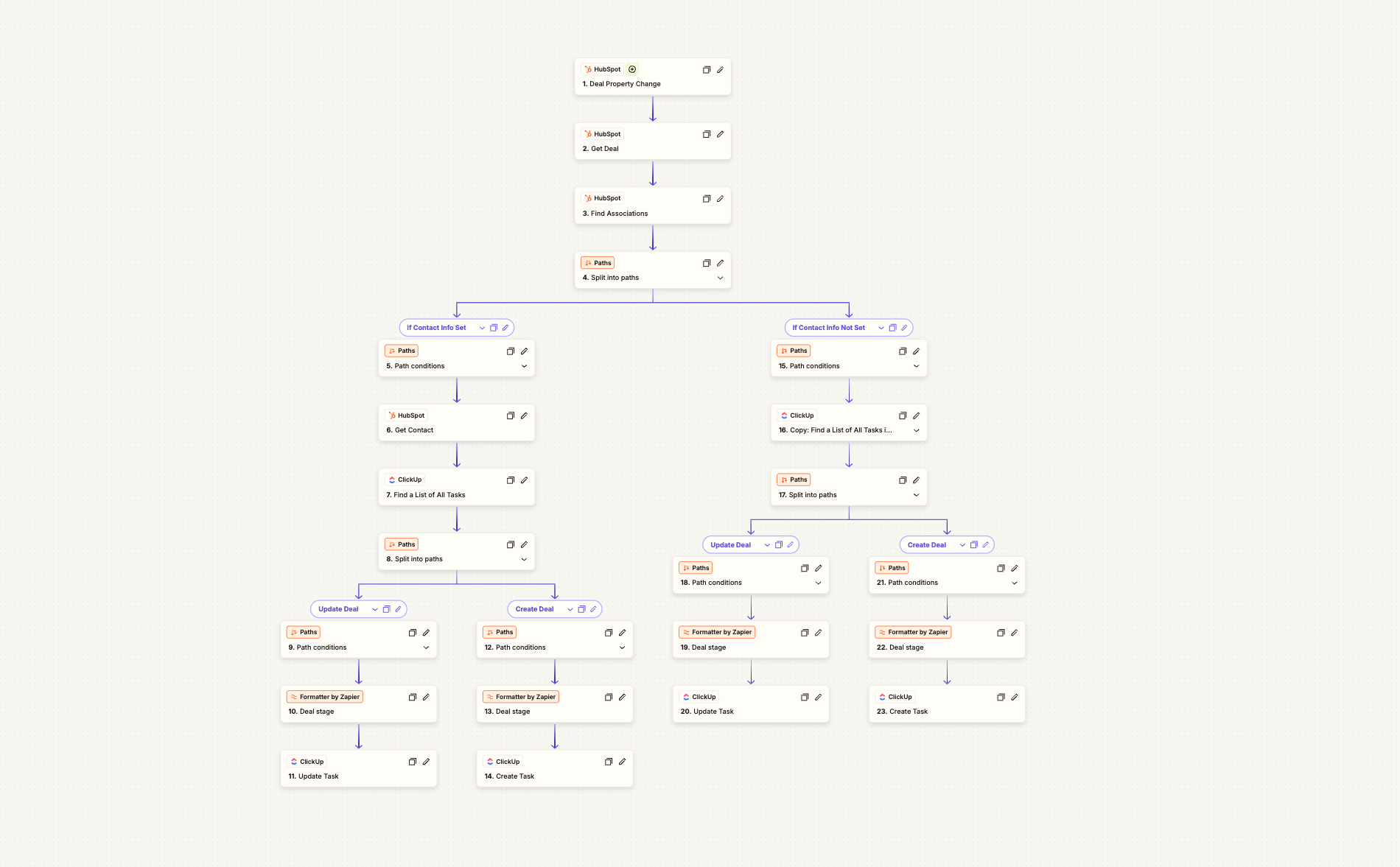 The Sales space mirrors HubSpot’s pipeline boards, giving operations visibility into what is coming before it arrives in their queue – without requiring the sales team to change how they work in HubSpot.
Full Implementation Summary
- ClickUp Workspace Setup – Five-space structure covering Client Projects, Operations, Sales, HR, and Resources
- Master Project List – Cross-project visibility board pulling status, materials, change orders, and communications from all active project folders
- Automated Project Folder Creation – Zapier creates the full project folder and applies templates when HubSpot deal is handed off to operations
- Project Task Templates – Phase-based templates for the 48-hour handoff, 3-week pre-install, during construction routines, and final week closeout
- Dependency-Linked Due Dates – One date change cascades automatically across all connected tasks
- CM Routine Tasks List – Recurring daily and weekly construction manager tasks that auto-regenerate on completion
- Change Orders Board – Template-driven tracking with typical and fast-track workflows, visible at both project and master level
- Warranty Requests Board – Client-facing form submission with conditional task templates based on warranty type
- Client Communication List – Per-project communication list connected to email so the team sends and receives client emails directly through ClickUp comment threads, with separate comment threads per subject for organization
- Master Client Communication List – Cross-project view of all active client conversations visible to leadership from one place
- Subcontractor Directory – Centralized database of subcontractors linked to relevant project folders
- Materials and Deliveries List – Dedicated per-project list for material tracking, importable from LMN
- HubSpot Deal Stage Sync – Real-time Zapier automation keeping ClickUp and HubSpot aligned at all times
- HR Recruitment System – Website-embedded application form that populates the Recruitment list automatically
- Automated Employee Onboarding – Hire trigger applies the full onboarding checklist without manual setup
- Employee Directory – Form-based intake that populates a structured staff database in ClickUp
- Software and Password Manager – Subscription tracking with a monthly spend dashboard
- SOP library – Video SOPs organized by process inside the Resources space
- ClickUp Training Materials – Internal training folder to onboard the Groff team to the new system
Results in Detail
Replaced Email Chaos With Organized, Project-Linked Client Communication
Every project folder now has a dedicated Client Communication list where team members send and receive client emails directly through ClickUp’s comment section. Each conversation thread is tied to a subject, so a weather delay update no longer gets buried inside a welcome email thread. Leadership can see all active client conversations across every project from the Master Client Communication list without opening a single inbox. The CC chains that used to connect seven people on every email are gone.
Eliminated Manual Project Creation
Every new project folder used to require someone to sit down and manually set it up in LMN, assign to-dos, and notify the team by email. Now, when HubSpot marks a deal as handed off to operations, Zapier creates the full project folder in ClickUp with all templates applied and sends an automatic notification to the operations lead. The process that used to take manual effort and still got missed now takes zero.
Gave Leadership Real-Time Visibility Across All Active Jobs
The Master Project List gives Brenda and Robert a single view of every project’s phase, materials status, change orders, and client communications. They no longer need to ask construction managers for updates or monitor individual email threads to understand what is happening across the company. [VERIFY: confirm with Brenda and Robert whether this visibility has changed day-to-day management behavior]
Standardized Construction Manager Workflows Across Every Project
Construction managers now work from the same task templates on every job – with due dates that cascade automatically when the project schedule shifts. The inconsistency that was causing missed tasks, delayed client communications, and operational frustration has been replaced with a repeatable system where every step has an owner and a deadline.
Replaced Scattered Email and Spreadsheet Tracking With Structured Boards
Change orders and warranty claims each have their own dedicated boards with statuses, assigned owners, task templates, and client-facing intake forms. What used to live across text messages, emails, and an Excel spreadsheet is now in one place with a clear process from identification through resolution.
Built HR Infrastructure to Support Planned Growth
With a carpentry division being added and a $30M revenue target in sight, Groff now has a scalable recruitment and onboarding system. New hires trigger their own onboarding checklist automatically. Applications arrive directly in ClickUp from the website form. The HR director can manage growth without managing chaos.
Founder Freedom
Robert Groff can now check the status of any project, any open change order, or any warranty claim from a single dashboard – without calling anyone. For a founder scaling toward $30M, that visibility is not a convenience. It is a prerequisite.

What began as a Salesforce migration became a complete business transformation. See how Camel Tech

Learn how Camel Tech implemented ClickUp for a medical case management company, automating workflows, centralizing

Learn how a landscaping business automation system replaced email chaos, centralized operations, and helped a
What began as a Salesforce migration became a complete business transformation. See how Camel Tech
Learn how Camel Tech implemented ClickUp for a medical case management company, automating workflows, centralizing

Selected resource
Enter your email and we’ll send the resource directly to your inbox.
Check your inbox
We’ve received your request and will send the resource to your email.
Please check your spam or promotions folder if you don’t see it shortly.