
How Accounting Firm Automation Reduces Errors and Saves Time

Imrul Hasnat
Founder, Camel Tech
- Last Updated:October 29, 2026
20 mins read
Table of Contents
Quick Answer
An invoice entered twice. A missing client receipt. A payroll change overlooked before processing. Individually, these may seem like small mistakes. But when an accounting firm manages dozens of clients and hundreds of recurring tasks, those mistakes can lead to unnecessary rework, delayed reports, and additional pressure around filing deadlines.
Accounting software has simplified financial record-keeping, yet many firms still rely on emails, spreadsheets, and manual reminders to manage the work surrounding it.
Accounting firm automation helps reduce these problems by handling repetitive tasks, standardising workflows, and identifying missing information before it creates further delays. It allows accountants to spend less time coordinating routine activities and more time on financial analysis, accuracy checks, and client advice.
The potential is measurable. Xero’s 2026 UK Modern Practice Playbook research found that surveyed accounting and bookkeeping practices reported average estimated AI-related time savings of 7.1 hours per week.
This guide explains where manual accounting errors occur, which processes can be automated, how much time firms could recover, and how to implement automation without compromising financial accuracy or compliance.
Key Takeaways
- Accounting firm automation reduces repetitive administration by simplifying data entry, document collection, task assignments, and client follow-ups.
- Consistent workflows can help prevent avoidable errors caused by duplicate information, missing documents, and overlooked tasks.
- UK accounting practices report meaningful AI-related time savings. Xero’s 2026 research found estimated average savings of 7.1 hours per week, based on self-reported survey responses.
- Successful automation starts with organised processes. Disconnected software and undocumented procedures can limit the benefits of introducing new tools.
- Human oversight remains essential. Tax interpretation, financial decisions, unusual transactions, and final approvals still require professional judgement.
What Is Accounting Firm Automation?
Accounting firm automation is the use of software, predefined rules, and connected systems to complete repetitive accounting and administrative tasks with less manual effort.
It can automatically create monthly bookkeeping tasks, assign responsibilities, collect documents, track deadlines, and send reminders when information is missing.
For example, instead of manually creating a bookkeeping checklist for every client at the beginning of each month, an accounting firm can configure a workflow that generates tasks, assigns them to the appropriate employees, and alerts managers when reviews are due.
Automation for accounting firms typically involves three complementary technologies:
Technology | Main function | Accounting example |
Accounting software | Records and processes financial information | Recording invoices, bank transactions, and reconciliations |
Workflow automation | Coordinates repetitive tasks and approvals | Creating monthly tasks and sending client reminders |
AI-assisted automation | Extracts, organises, or analyses information | Reading invoices and flagging unusual transactions |
These technologies perform different functions.
Accounting software maintains financial records. Workflow automation organises how work gets completed. AI can help process less structured information, such as scanned invoices, receipts, and emails.
Effective accounting firm automation connects these functions while keeping appropriate checks in place. Automation carries out defined steps. Accountants still make the judgements, such as tax treatment, classifications, and final approvals.
4 Common Sources of Manual Accounting Errors in Accounting Firms
Accounting errors do not always begin with incorrect financial calculations. They can also arise from the administrative processes used to collect documents, enter information, manage deadlines, and review completed work. Four common sources of these errors are repetitive data entry, missing financial documents, missed deadlines, and inconsistent procedures.
1. Repetitive Data Entry
Entering the same financial information into multiple systems increases opportunities for mistakes.
An employee might copy invoice details from an email into a spreadsheet and then enter them again into accounting software. Each additional step introduces the possibility of incorrect values, duplicated records, or missing information.
Automated data extraction and integrations can reduce repeated entry by transferring information between systems.
However, extracted values should still be validated before they become part of the accounting records.
2. Missing Financial Documents
Accountants frequently depend on clients to submit invoices, receipts, bank statements, and payroll information.
When documents are scattered across inboxes, shared folders, and messaging platforms, identifying what is missing becomes unnecessarily difficult.
Automated document requests and tracking systems can give accountants a clearer picture of outstanding information and trigger follow-ups when required.
This helps reduce delays without eliminating the need to review submitted documents.
3. Missed Deadlines and Follow-Ups
Accounting practices handle overlapping deadlines for VAT, payroll, annual accounts, and tax preparation.
Problems arise when tasks lack clear ownership or depend on employees remembering to send reminders.
Recurring workflows, assigned responsibilities, and deadline alerts make it easier to identify unfinished work before a deadline arrives.
4. Inconsistent Processes Between Employees
Two accountants may complete the same monthly reconciliation using different procedures.
One might follow a documented checklist, while another relies on memory. This inconsistency can make quality control difficult and increase the risk of overlooked steps.
Standardised workflows help teams follow the same procedures, with clear preparation, review, and approval stages.
6 Accounting Firm Workflows That Can Be Automated
The four problems discussed above can affect multiple accounting activities, from invoice processing to month-end reporting. Automation can help address them by reducing repetitive work, improving document collection, standardising procedures, and keeping deadlines visible.
The best opportunities are recurring tasks with predictable steps that require substantial manual coordination.
Here are six accounting workflows worth considering.
1. Invoice Processing and Data Capture
Processing invoices typically involves receiving documents, extracting information, entering details, and obtaining approvals.
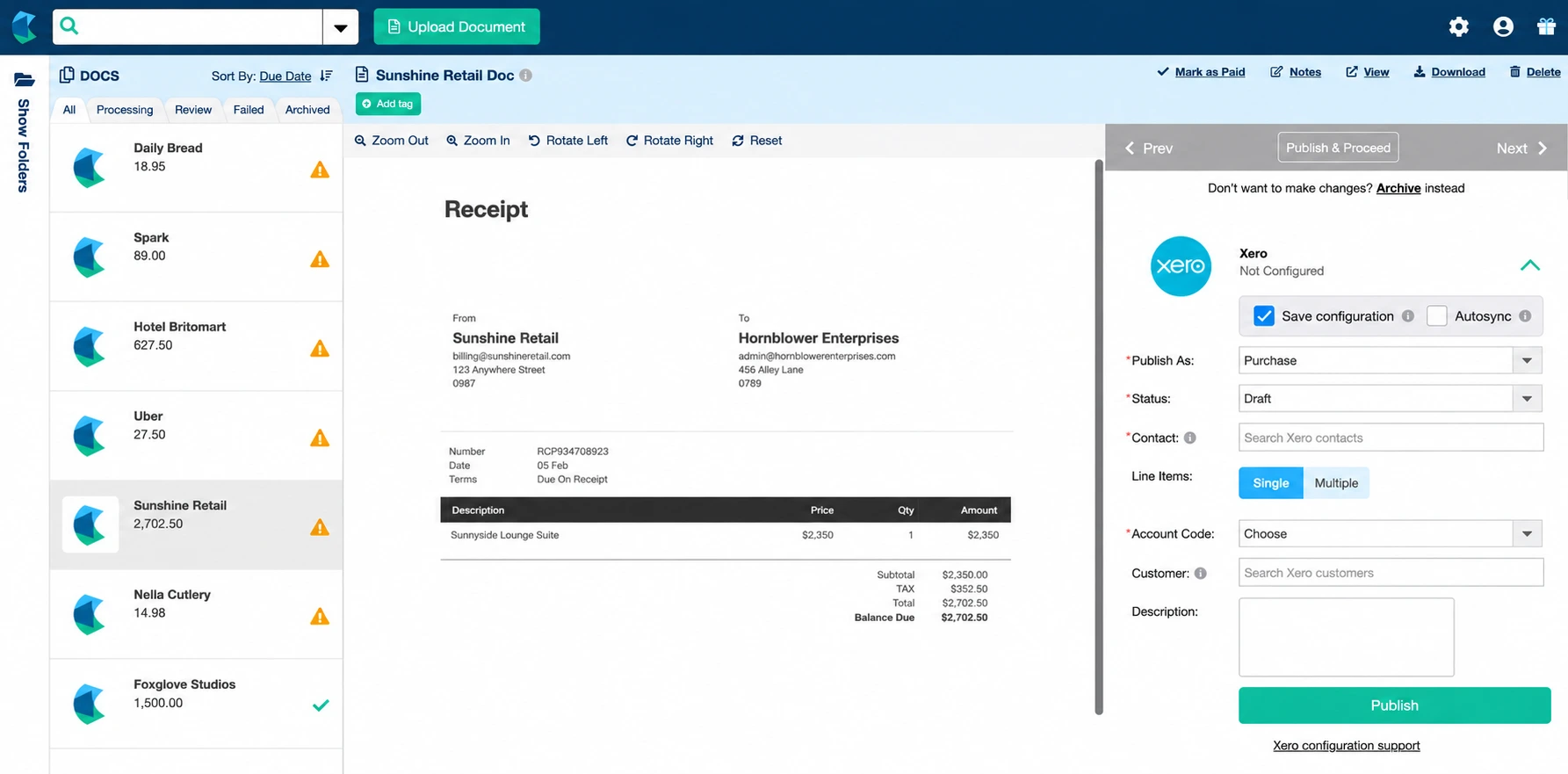
Automation can collect invoices from designated inboxes, extract relevant fields, identify possible duplicates, and route documents to the correct person.
For example, supplier invoices could be automatically collected and organised by the client before entering an accounting review queue.
AI-assisted document processing can help extract supplier names, invoice numbers, dates, and amounts from different invoice formats.
Potential benefit: Less repetitive data entry and more consistent invoice processing.
Human review: Incorrectly extracted values, duplicate flags, unusual expenses, and VAT treatment.
2. Bookkeeping and Bank Reconciliation
Bookkeeping involves collecting transaction records, categorising expenses, matching bank entries, and resolving discrepancies.
Bank feeds and transaction rules can import financial information automatically and suggest matches between recorded transactions and supporting documents.
AI-assisted categorisation can also help identify transactions requiring further investigation.
For instance, recurring subscription payments may be matched using established rules, while an unfamiliar transaction is flagged for review.
Potential benefit: Faster routine transaction processing and less manual matching.
Human review: Unmatched transactions, incorrect classifications, reconciliation differences, and unusual activity.
3. VAT Preparation and Deadline Tracking
VAT preparation requires complete financial records, reconciliations, appropriate classifications, and timely submissions.
Automation can support the administrative process by:
- Creating recurring VAT preparation tasks.
- Requesting outstanding financial documents.
- Sending reminders before deadlines.
- Assigning review responsibilities.
- Tracking the status of each client’s return.
UK firms must still comply with HMRC’s Making Tax Digital requirements and use compatible software where required.
Potential benefit: More organised VAT preparation and reduced risk of overlooked administrative steps.
Human review: VAT classifications, adjustments, reconciliations, and return accuracy.
For UK businesses, professional accounting support remains important alongside automated workflows. Cartwheel International is a London-based accounting firm supporting small businesses with bookkeeping, VAT, payroll, limited company accounts, construction accounting, and Making Tax Digital for Income Tax. Its ACCA- and AAT-qualified team brings over 10 years of experience filing UK VAT and CIS returns, helping businesses maintain accurate records, meet HMRC requirements, and make informed financial decisions.
For more detailed guidance, Cartwheel International also explains filing obligations and potential penalties in its article on UK VAT return deadlines and penalties.
4. Payroll Preparation and Approvals
Payroll involves gathering employee information, checking salary changes, calculating deductions, and completing submissions.
Accounting firms can automate recurring preparation checklists, requests for employee changes, and notifications when approvals are required.
For example, an employer could receive a scheduled reminder to confirm payroll changes before the processing date. Once the information is received, the system can notify the assigned payroll administrator.
Potential benefit: Fewer repeated follow-ups and a clearer payroll preparation process.
Human review: Payroll calculations, employee changes, statutory deductions, and final submission checks.
5. Client Document Requests and Follow-Ups
Repeatedly chasing client documents can consume considerable administrative time.
A structured workflow can send scheduled requests, monitor whether documents have been received, and remind clients when information remains outstanding.
Consider a firm handling monthly bookkeeping for 40 clients.
Instead of manually emailing each client and maintaining a separate tracking spreadsheet, the firm could use a system that schedules requests, records responses, and creates follow-up tasks only when information is missing.
Accountants can then concentrate on the clients who need additional assistance.
Potential benefit: Less manual chasing and improved visibility over outstanding information.
Human review: Document completeness, quality, and suitability for accounting purposes.
6. Month-End Reporting and Task Management
Month-end reporting involves a predictable sequence of activities: collecting financial records, reconciling accounts, reviewing adjustments, preparing reports, and obtaining approval. Automation can turn these activities into recurring tasks with assigned owners, due dates, and review checkpoints.
For example, in its SDA CPA Group implementation, Camel Tech built a ClickUp system with client-specific task lists, automated monthly checklists, deadline reminders, and management dashboards. Previously, the firm relied on scattered spreadsheets, emails, and inconsistent procedures to coordinate recurring accounting work. The new system gave staff and managers a shared view of upcoming deadlines, overdue tasks, and client progress.
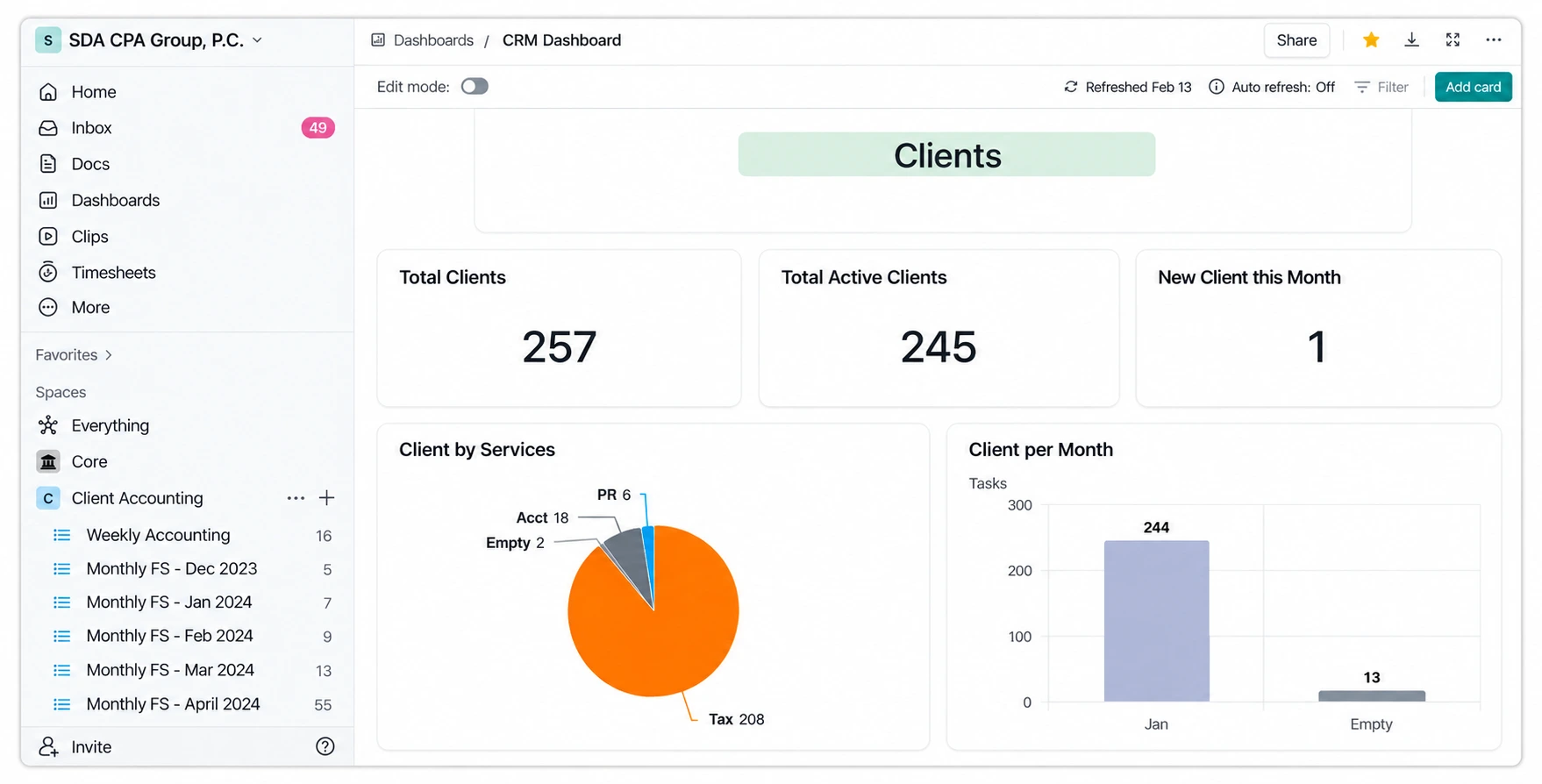
The practical benefit is not simply faster task creation. Managers can identify outstanding work without requesting separate status updates, while standardised checklists help employees follow the same process.
Potential benefit: More consistent monthly processes, clearer accountability, and reduced coordination time.
Human review: Reconciliation accuracy, financial adjustments, and final reporting.
Manual vs Automated Accounting Workflows
The following comparison shows how automation can change routine accounting activities.
Accounting process | Manual approach | Automated approach |
Invoice processing | Re-entering invoice information | Automated capture and exception routing |
Bookkeeping | Importing and matching transactions individually | Bank feeds and matching rules |
VAT preparation | Tracking tasks and deadlines manually | Recurring checklists and deadline reminders |
Payroll | Repeated requests for employee changes | Scheduled information collection and approval workflows |
Client follow-ups | Sending individual reminder emails | Automated reminders for outstanding documents |
Month-end reporting | Recreating task lists and requesting updates | Recurring workflows and centralised dashboards |
Automation does not remove the need for qualified accountants. It reduces the repetitive activities surrounding their work and helps ensure important steps are completed consistently.
How Accounting Firm Automation Reduces Errors and Saves Time
Accounting firm automation reduces errors by cutting repeated data entry, standardising checklists, and flagging missing information early. It saves time by removing manual chasing, status updates, and task setup.
A well-designed system can improve the accuracy of routine work, reduce administrative effort, and make it easier for accountants to identify exceptions.
Reducing Manual Data Entry and Rework
Repeatedly entering the same information increases both workload and the opportunity for mistakes.
Automation can reduce unnecessary data transfers, while validation rules help identify incomplete or inconsistent entries.
This means employees can spend more time investigating exceptions and less time repeating straightforward processing tasks.
Standardising Recurring Accounting Processes
Standardised workflows create consistent expectations for how work should be completed.
For example, a month-end process can require reconciliations, outstanding-item reviews, and manager approval before a report is marked complete.
Automated task assignments and reminders support those requirements without depending entirely on employee memory.
Reducing Administrative Follow-Ups
Accountants often spend time checking whether clients have responded, locating information, and confirming the progress of assigned tasks.
Centralised workflows and scheduled reminders reduce some of this coordination.
Instead of asking whether a task is complete, managers can review its recorded status and identify outstanding work.
Giving Accountants More Time for Advisory Work
When accountants spend less time preparing and coordinating routine work, they may have more capacity for financial reviews, business analysis, and client advice. Xero’s research found that three in five practices (61%) plan to redirect AI-related time savings towards advisory and other higher-value work.
What UK Accounting Research Shows About Time Savings
Xero’s Modern Practice Playbook research, published on 4 August 2026, is a Xero-commissioned survey of 520 independent senior accountants and bookkeepers across the UK, conducted between 7 and 26 May 2026.
The survey reported:
- 7.1 hours per week: Estimated average AI-related time savings across surveyed practices.
- 10.6 hours per week: Estimated average savings among top performers actively using AI in daily workflows. Xero defines top performers as employing firms (two or more full-time employees) with a net profit margin of 41% or higher.
- 87%: Share of practices using AI daily that rate their core processes as well-documented, compared with 18% among practices with no plans to adopt AI.
- Three in five practices (61%): Share planning to redirect AI-related time savings towards advisory and other higher-value work.
The time-saving figures are based on accountants’ self-reported estimates rather than independently measured results. Actual savings will depend on each firm’s processes, software, and level of adoption.
The findings also suggest an important relationship between organised business processes and AI adoption, although they do not establish that documentation alone causes higher savings.
What Camel Tech's Business Research Reveals About Automation
Accounting firms are not the only businesses affected by disconnected software, repetitive administration, and undocumented processes.
Camel Tech, a business systemisation and AI automation consultancy, examined these challenges in its 2025 SMB Operations Intelligence Report. The research draws on more than 60 client engagements, over 100 companies using Camel Tech’s digital products, and more than 70 discovery calls, supported by implementation reviews and client conversations during 2024–2025.
Two recurring problems stood out:
- Fragmented workspaces (90%): Information and responsibilities were spread across disconnected tools, making it harder to coordinate work and monitor progress.
- Missing process documentation (95%): Essential procedures were not consistently documented, increasing reliance on individual employees and informal instructions.
These are Camel Tech’s reported observations across multiple industries, rather than statistics for UK accounting firms. The report’s methodology identifies two accounting and bookkeeping engagements within its industry breakdown.
For accounting practices, the findings reinforce the importance of documented procedures, connected client information, and consistent review processes before introducing additional automation.
Why These Findings Matter for Accounting Firms
Accounting practices face similar operational challenges when financial information is scattered across emails, spreadsheets, accounting software, and task management platforms. Employees can spend valuable time collecting records, transferring data, and following up on missing information before they can begin financial analysis.
These challenges are reflected in Camel Tech’s 2025 SMB Operations Intelligence Report. Efraim Green, an e-commerce business owner, described the confusion surrounding his accounting records:
“Right now I only use like an Excel sheet and we go back and forth and communication gets very messy. Like, oh, what this transaction was, this was that?”
For accounting firms managing multiple clients, similar communication gaps can mean repeated follow-ups, incomplete records, and unnecessary administrative work.
A more direct accounting example comes from Leibish Fried & Associates, a Brooklyn-based bookkeeping firm managing 137 entities across more than 40 clients. The firm struggled to track time accurately across clients, and its existing Timely time-tracking application did not integrate properly with its ClickUp workspace.
Camel Tech reorganised the workspace, connected time tracking to client-specific tasks, and introduced a central task dashboard, documented procedures, and client profitability reporting.
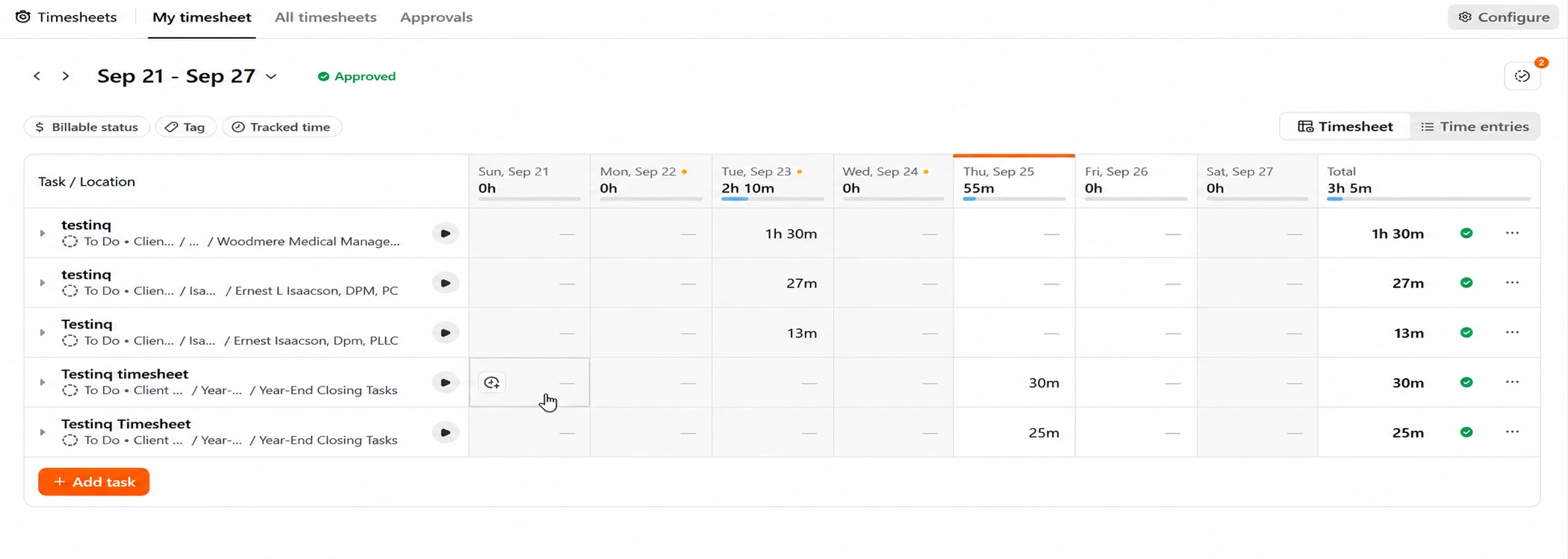
Employees could review their recorded time each day, while managers gained visibility into overdue work, workloads, and the actual time spent serving each client.
According to Camel Tech’s case study, automated time tracking eliminated more than 10 hours of manual timer management weekly, while the central task view saved approximately another 10 hours previously spent in status meetings. Together with other workflow improvements, the firm reported recovering more than 26 hours per week.
These are company-reported results, but the implementation shows where the time savings came from: fewer manual tracking activities, less status chasing, and more accessible client information. Beyond time savings, automation can change where accountants deliver the most value. During a Camel Tech interview, Stanley Dean, CEO of SDA CPA Group, discussed the growing importance of human relationships as AI takes on more transactional work. The published episode notes capture that perspective:
“The more AI handles transactional work, the more valuable the human relationship becomes.”
Together, these experiences highlight an important lesson: accounting automation is not simply about processing information faster. It is about reducing repetitive work, improving access to reliable information, and giving accountants more time for analysis, professional judgement, and meaningful client relationships.
How Accounting Automation Supports UK Tax Compliance
For UK accounting firms, automation must operate alongside established tax and record-keeping requirements.
Digital processes can make compliance easier to manage, but using automated reminders or task management software does not automatically satisfy HMRC rules.
Making Tax Digital for VAT
Under HMRC’s Making Tax Digital for VAT requirements, businesses within the rules must maintain the required digital records and submit returns using compatible software.
Accounting firms can automate document requests, preparation checklists, deadline tracking, and internal review notifications.
However, financial records, VAT treatment, and submissions still require appropriate checks.
Making Tax Digital for Income Tax
As of October 2026, Making Tax Digital for Income Tax is being phased in for qualifying sole traders and landlords.
According to HMRC’s guidance, the rollout is:
Start date | Qualifying income |
6 April 2026 | More than £50,000 |
6 April 2027 | More than £30,000 |
6 April 2028 | More than £20,000 |
Qualifying income generally refers to total gross income from self-employment and property before expenses, based on the relevant previous tax return. Eligibility and exemptions must be considered individually.
Those within the requirements must use compatible software to maintain relevant digital records and send quarterly updates.
For accounting practices, these obligations create recurring information collection, bookkeeping, and reporting responsibilities.
Automated workflows can make those responsibilities easier to coordinate.
For businesses and contractors navigating these requirements, Cartwheel International’s guide to MTD ITSA for Contractors in 2026 provides a more detailed explanation of eligibility, reporting deadlines, and compliance responsibilities.
Construction Industry Scheme Workflows
Construction accounting introduces further administrative responsibilities involving subcontractor details, deductions, and monthly returns.
Automation can help organise documents, track recurring tasks, and remind staff when verification or submission activities are required.
However, accountants must still ensure the correct tax treatment and follow the applicable Construction Industry Scheme rules.
Where AI Fits Into Accounting Automation
Traditional automation is designed around predictable instructions.
For example, it might create a task when a client submits a document or notify a manager when an approval is overdue.
AI in accounting extends automation to less structured information.
What AI Can Help Accounting Firms Do
Potential applications include:
- Extracting information from invoices and receipts.
- Organising financial documents by type.
- Suggesting transaction categories for review.
- Identifying incomplete or unusual entries.
- Summarising client communications.
- Assisting with operational and financial information analysis.
These activities can reduce preparation time, particularly when accountants regularly handle large amounts of unstructured information.
What Still Requires Human Oversight
AI-generated information can be incomplete or incorrect.
An AI system might extract an incorrect invoice value, misunderstand a financial transaction, or provide an inaccurate explanation of a tax rule.
Accounting firms should therefore retain appropriate review for:
- Complex tax interpretation.
- Unusual financial transactions.
- Final reporting and submissions.
- Material accounting adjustments.
- Client-specific financial advice.
Stanley Dean, CEO of SDA CPA Group, reflected on the profession’s history of technological change in a Camel Tech interview about AI adoption in accounting. As quoted in the episode’s published notes:
“TurboTax was supposed to put us out of business. So was QuickBooks. AI is just the next tool.”
His perspective reinforces the distinction between automating routine accounting work and replacing professional expertise. AI can assist with processing and analysis, but accountants remain responsible for interpreting financial information and advising clients.
Data protection also matters.
The Information Commissioner’s Office guidance on AI and data protection addresses privacy, accountability, fairness, and other considerations when AI systems process personal data.
Accounting firms introducing AI should consider how client information is collected, processed, stored, and protected, including their responsibilities under UK data protection law.
For accounting practices, AI should support professional expertise rather than operate as an unchecked replacement for it.
How to Start Automating Your Accounting Firm
An accounting practice does not need to replace its entire technology setup to introduce automation.
The most practical approach is to start with a manageable process, test the results, and expand gradually.
Step 1: Identify Repetitive and Error-Prone Tasks
List activities that employees perform daily, weekly, or monthly.
Prioritise tasks involving repeated data entry, manual reminders, document collection, or unnecessary handoffs.
Step 2: Document the Current Workflow
Record how the process works, who is responsible, what information is required, and where approvals occur.
Include common exceptions, such as missing documents or incorrect information.
If the process is inconsistent, standardise it before introducing automation.
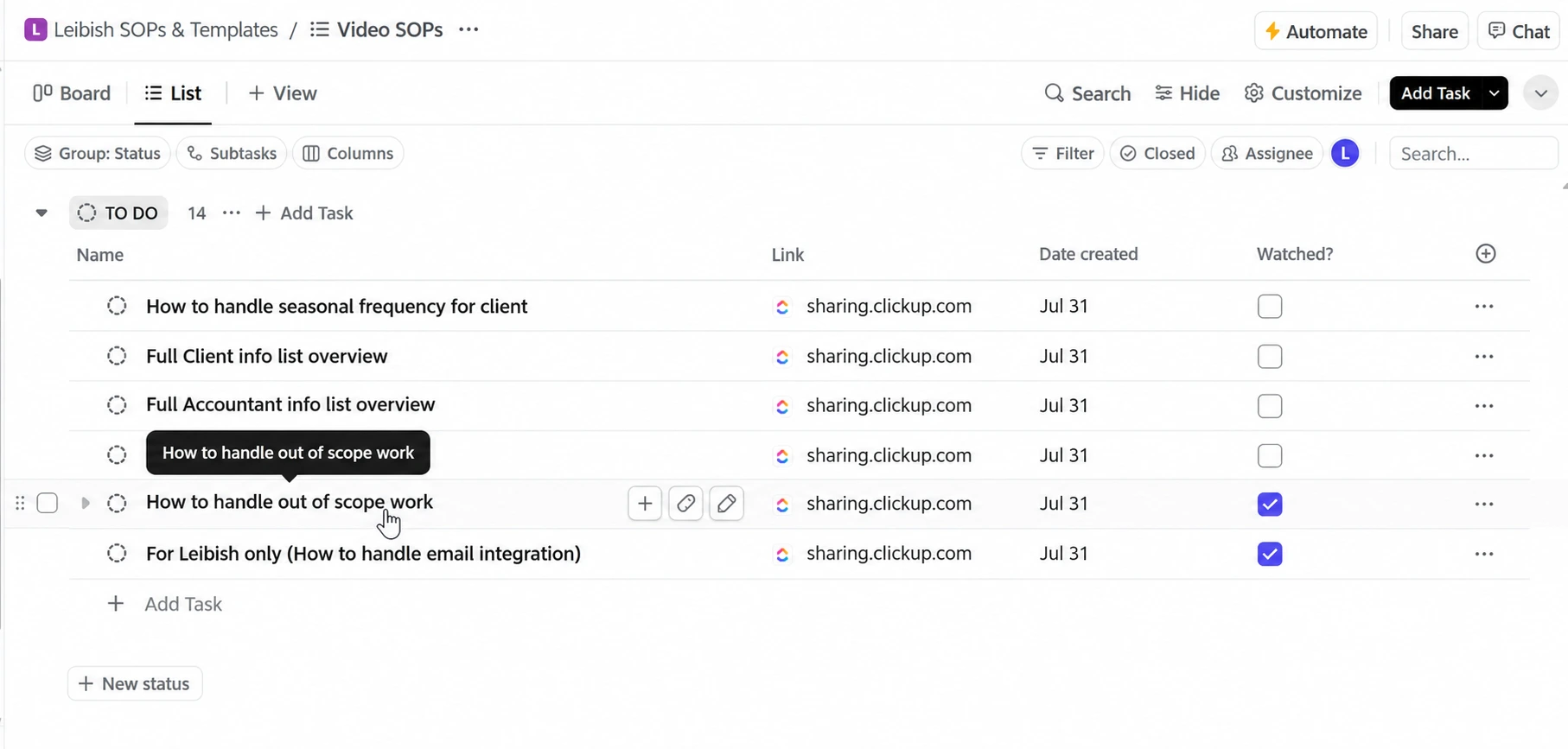
Step 3: Review Existing Accounting Software
Check whether the firm’s current software already supports the necessary functions.
Bank feeds, recurring tasks, document requests, and basic automation rules may be available without purchasing additional products.
Step 4: Automate One Low-Risk Process
Begin with an administrative workflow such as client document reminders or recurring task creation.
Avoid immediately automating sensitive financial approvals or complex accounting decisions.
Example: Automating Monthly Client Document Collection
Before: a bookkeeper emails each of 40 clients at month-end, tracks replies in a spreadsheet, and chases late documents by hand.
After: a recurring task sends each request on a set date, records what arrives, and creates a follow-up task only for clients with missing items. A manager checks one status view, and a person still reviews each document before posting.
Step 5: Test Accuracy and Handle Exceptions
Test the workflow with a small group of clients before rolling it out across the firm. For a document collection process, record how many requests previously required manual follow-ups, how long those follow-ups took, and how often documents arrived incomplete.
During the pilot, check whether reminders reach the correct clients, submitted files are recorded accurately, and missing documents are flagged without creating duplicate requests.
Keep a manual review step and record exceptions, such as incorrect attachments, failed notifications, or documents assigned to the wrong client. Resolve these problems before expanding the workflow.
Once the process is stable, compare the results against the original baseline to establish whether it is genuinely saving time and reducing errors.
Step 6: Measure Results Before Expanding
Compare the automated process against the previous approach.
Useful measurements include:
- Administrative time spent per client.
- Number of overdue tasks.
- Missing document follow-ups.
- Corrections and rework.
- Time required for manager reviews.
Once the workflow delivers reliable improvements, consider extending automation to other recurring activities.
Common Accounting Automation Mistakes to Avoid
Automation can create additional problems when the underlying process or controls are inadequate.
Automating an inefficient process: A poorly designed workflow remains inefficient even when software performs its steps faster.
Introducing too many disconnected tools: Additional software may create more integration and maintenance work than it saves.
Relying on AI without verification: AI-generated entries, classifications, and explanations should be checked before they affect financial records.
Removing necessary approvals: Important financial decisions, unusual transactions, and final submissions still require appropriate human review.
Assuming automation makes you HMRC-compliant: Automated reminders, document collection, and task management do not satisfy HMRC requirements on their own. Businesses subject to Making Tax Digital must use compatible software, maintain the required digital records, and preserve digital links where applicable. VAT returns, CIS deductions, and payroll calculations must also be checked against their respective rules before submission.
Ignoring client data security: Client financial records often contain personal data protected under UK GDPR. Firms should assess access permissions, software providers, data handling, and confidentiality. The ICO’s guidance on AI and data protection covers these obligations in more detail.
Neglecting training and maintenance: Staff need clear procedures for handling exceptions, and rules need reviewing as software and working practices change.
A reliable accounting automation system should make work easier to complete, monitor, and review.
Final Thoughts: Better Processes Create More Time for Better Accounting
Successful accounting firm automation starts with improving how work is organised, not simply adding more software. Documented procedures, connected systems, and clear review responsibilities help firms automate repetitive work while maintaining financial accuracy.
For UK accounting practices, operational efficiency must also go hand in hand with tax compliance and professional oversight.
Ultimately, the goal is not to replace accountants or their professional judgement. It is to give them reliable systems that reduce administrative work and create more time for financial analysis, client advice, and stronger client relationships.
Frequently Asked Questions (FAQ)
Accounting firms can automate repetitive tasks such as invoice data capture, bank transaction matching, bookkeeping checklists, payroll preparation, and client document reminders. Workflow tools can also assign responsibilities and flag overdue work. Complex classifications, exceptions, and final approvals should still be reviewed by qualified staff, especially where tax treatment or financial accuracy is involved.
Accounting automation can reduce errors by limiting repeated data entry, standardising checklists, and identifying missing or inconsistent information before it reaches financial reports. Automated reminders also help prevent overlooked tasks. However, incorrect source data or poorly designed rules can spread mistakes quickly, so firms still need validation checks, exception handling, and human review.
Time savings depend on a firm's workload, existing systems, and the processes being automated. In one Camel Tech accounting case study, Leibish Fried & Associates reportedly recovered more than 26 hours of manual work each week through automated time tracking and streamlined workflows. This is a company-reported outcome, not a guaranteed result.
Accounting automation follows predefined rules to complete repetitive steps, such as sending reminders, creating tasks, or importing transactions. AI can process less structured information, including scanned invoices and emails, and suggest classifications or summaries. Both require oversight: AI can generate incorrect outputs, while rule-based workflows can fail when instructions or source data are wrong.
Yes. Small accounting firms can often begin with affordable features already available in their software, such as recurring tasks, bank feeds, and document reminders. Costs increase with custom integrations, AI processing, training, and maintenance. Start with one workflow, like client document reminders, and measure the hours saved before buying more tools.
Client document collection is often a good starting point because it is repetitive, relatively low-risk, and easy to measure. Firms can schedule requests, track missing records, and send reminders automatically while retaining human review of submissions. Compare the time spent chasing documents and the number of overdue items before expanding to more sensitive financial processes.
Yes. Accounting firms can automate VAT document requests, deadline reminders, reconciliation checklists, and review assignments. However, automation does not replace accurate VAT treatment or HMRC-compatible record-keeping and submission software. Accountants must still verify VAT classifications, supporting records, adjustments, and final return accuracy before filing, while ensuring submissions meet the applicable deadlines.
Making Tax Digital for Income Tax requires eligible sole traders and landlords to maintain digital records and submit quarterly updates using compatible software. It started in April 2026 for qualifying income above £50,000, extends to above £30,000 in April 2027, and above £20,000 in April 2028. Eligibility and exemptions apply; automated reminders alone do not satisfy HMRC requirements.
Accounting firms must comply with UK GDPR when automation processes personal data. They should restrict access, use appropriate security measures, assess what information each system receives, and review agreements with software and AI providers. Data retention and international transfers may also require attention. The ICO's AI and data protection guidance provides further information.
AI can automate parts of accounting work, but it cannot reliably replace professional judgement, complex tax interpretation, or client-specific advice. It can assist with document extraction, transaction suggestions, and routine analysis, while accountants remain responsible for reviewing outputs, explaining financial results, and advising clients. The goal is to support expertise, not remove professional accountability.
Ready to Reduce the Manual Work in Your Accounting Firm?
Knowing what to automate is one thing. Building workflows that fit your accounting firm’s existing processes, software, and team is another.
At Camel Tech, we help accounting and bookkeeping firms organise client workflows, connect disconnected tools, automate recurring tasks, and build reporting dashboards. Our work with SDA CPA Group and Leibish Fried & Associates shows how better systems can reduce manual coordination and give teams clearer visibility into their daily operations.
Whether you’re struggling with client follow-ups, recurring bookkeeping tasks, or disconnected accounting workflows, the starting point is understanding where your team loses time and which improvements will make the greatest difference.
Explore Camel Tech’s accounting automation solutions to see how we help accounting firms build more organised and scalable operations.
Ready to build a more efficient accounting firm? Book a free consultation with Camel Tech through our accounting solutions page to review your workflows, identify practical automation opportunities, and explore how to streamline operations without unnecessary tools or complexity.
Read Related Articles

Camel Tech joins Anthropic's Claude Partner Network, gaining access to technical resources and certification opportunities

Honest Review After 80+ Implementations (2026). Most comparison articles are written by someone who tested
Leaving Airtable? Compare 7 alternatives, from Notion to Baserow, by use case, real pricing and
Build a business that thrives without you
Unlock your ultimate life goals: Focus on high-leverage tasks, personal growth, and family time while pursuing your next big initiative.
Let's book a call with our expert.

Selected resource
Enter your email and we’ll send the resource directly to your inbox.
✓
Check your inbox
We’ve received your request and will send the resource to your email.
Please check your spam or promotions folder if you don’t see it shortly.