
How to Migrate from HubSpot to Monday CRM (2026): The Complete Guide

Imrul Hasnat
Founder, Camel Tech
- Last Updated:September 22, 2026
16 mins read

Table of Contents
Quick Answer
Migrating from HubSpot to monday CRM usually means moving your contacts, companies, deals, and sales activities into monday, rebuilding your pipeline stages and custom fields, reconnecting forms and integrations, and recreating the automations your team actually needs.
The safest approach is to migrate in phases: first audit what is actively used in HubSpot, clean and export the data, build the matching CRM structure in monday, import and map the records, then recreate workflows and integrations before switching the sales team over. Run both systems in parallel briefly so you can verify records, ownership, pipeline stages, and automations before fully retiring HubSpot.
The biggest migration risk is assuming every HubSpot feature should be recreated in monday. It usually should not. HubSpot’s marketing automation, lead scoring, attribution, and service features do not translate one-to-one into monday CRM. Decide early whether those capabilities will be replaced with monday automations, external tools such as n8n, or kept outside the CRM.
If your team mainly uses HubSpot for contact management, deals, pipeline tracking, follow-ups, and reporting, the migration can be relatively straightforward. If HubSpot Marketing Hub, Service Hub, complex lead scoring, or attribution are central to your workflow, the migration requires more planning and may not be a complete one-platform replacement.
Why Trust This Content
This guide was researched and written by Imrul, founder of Camel Tech and a monday.com Certified Partner with hands-on experience designing CRM, sales, operations, and automation systems for growing businesses.
Unlike a generic HubSpot vs monday CRM comparison, this guide focuses specifically on the migration itself: what to move, what not to recreate, how to structure your monday CRM, how to map contacts and deals correctly, and how to rebuild the workflows and integrations your team actually depends on.
The recommendations are based on practical implementation experience across CRM migrations, monday.com system design, workflow automation, and integrations using tools such as n8n, Make, Zapier, and other business systems.
Key Takeaways
What’s the main difference between HubSpot and Monday CRM?
HubSpot organizes data into fixed CRM objects, contacts, companies, deals, and tickets, all connected in one record. Monday CRM organizes the same information into customizable boards built on monday.com‘s Work OS, which trades some structure for flexibility.
Which is cheaper? Monday CRM, in almost every scenario. Its Basic plan starts at $12/seat/month, with Standard at $17 and Pro at $28. HubSpot’s Sales Hub Starter runs $15 to $20/seat, but the real jump comes at Professional ($100/seat plus a $1,500 onboarding fee) and Enterprise ($150/seat plus $3,500 onboarding).
Can you migrate your full HubSpot history to Monday CRM? Contacts, companies, and deals migrate cleanly. Email history, call logs, and meeting notes don’t export through a simple click; that’s the part of the migration teams consistently underestimate.
What’s the best migration method? A CSV export and import for the bulk historical data, paired with monday CRM’s native HubSpot integration to keep both systems in sync during the transition period.
Do HubSpot workflows carry over to Monday CRM? No. monday’s automation model is board-native and works differently. You’ll rebuild the underlying logic, not copy the exact steps.
What do you lose by switching? Native marketing automation and email sequencing at HubSpot’s depth, a native customer service module, and a chunk of pre-built integrations, HubSpot offers roughly 2,000+ against monday’s 850.
What Is HubSpot CRM?
HubSpot CRM began as the free core of an inbound marketing platform and has grown into a full revenue suite spanning Marketing Hub, Sales Hub, Service Hub, and, as of June 2026, Revenue Hub (the renamed and expanded Commerce Hub, now covering quoting, invoicing, subscription billing, and automated tax calculation). Every contact, company, deal, and ticket lives as a structured object, connected to the same record regardless of which Hub touches it.
The CRM itself is permanently free for unlimited users. You start paying when you need marketing automation, custom reporting, or more than the free contact limit. HubSpot’s AI layer, Breeze, now spans a free Assistant available on every tier, autonomous Agents (Prospecting, Customer, and Data Agents) that require paid subscriptions and credits, and an Intelligence data-enrichment layer whose standard fields are now free on paid seats.
What Is Monday CRM?
Monday CRM is monday.com‘s dedicated sales product, built on the same Work OS that powers monday.com‘s broader work management platform. Rather than fixed objects, your pipeline lives on boards: highly flexible tables where each column can hold a status, a date, a linked contact, or a file. Launched in 2022, it extends monday.com‘s visual, no-code approach to cover lead capture, deal tracking, email engagement, forecasting, and post-sale collaboration in one place.
Because Monday CRM runs on the same Work OS as monday.com‘s project, marketing, service, and dev products, teams that close a deal and immediately move into delivery or onboarding can keep that handoff inside one platform instead of exporting it to a second tool. On G2, monday CRM holds a Leader badge in the CRM Software category and G2’s “Highest User Adoption for Enterprises” award.
What Products Does Each Platform Actually Include?
Neither “HubSpot” nor “monday” is a single product, and that matters once you’re deciding what you’re actually migrating away from.
HubSpot organizes itself into six Hubs, all connected through one shared Smart CRM: Marketing Hub (campaigns, landing pages, forms, ads), Sales Hub (pipeline, sequences, forecasting, the one this guide focuses on), Service Hub (ticketing, help desk, knowledge base), Content Hub (formerly CMS Hub, for websites and blogs), Data Hub (formerly Operations Hub, for data sync and quality automation), and Revenue Hub (formerly Commerce Hub, for quoting, invoicing, and subscription billing). You can buy the free CRM alone or any combination of Hubs, and pricing scales per Hub.
monday.com is structurally similar in that it’s also a bundle of separately priced products, not one flat plan: monday Work Management (the general-purpose Work OS product for tasks and projects), monday CRM (the sales-specific product this guide is about), monday Dev (sprint planning and roadmaps for engineering teams), and monday Service (ticketing and cross-functional service operations). Each product is licensed and billed on its own, though you can bundle several together under one account.
The practical takeaway: if you’re only replacing HubSpot’s Sales Hub, monday CRM is the direct equivalent. If your HubSpot usage also spans Marketing Hub or Service Hub, you’re really evaluating whether monday’s other products (or a third-party tool) cover that ground too, not just comparing CRM to CRM.
How to Migrate from HubSpot to Monday CRM: Step-by-Step
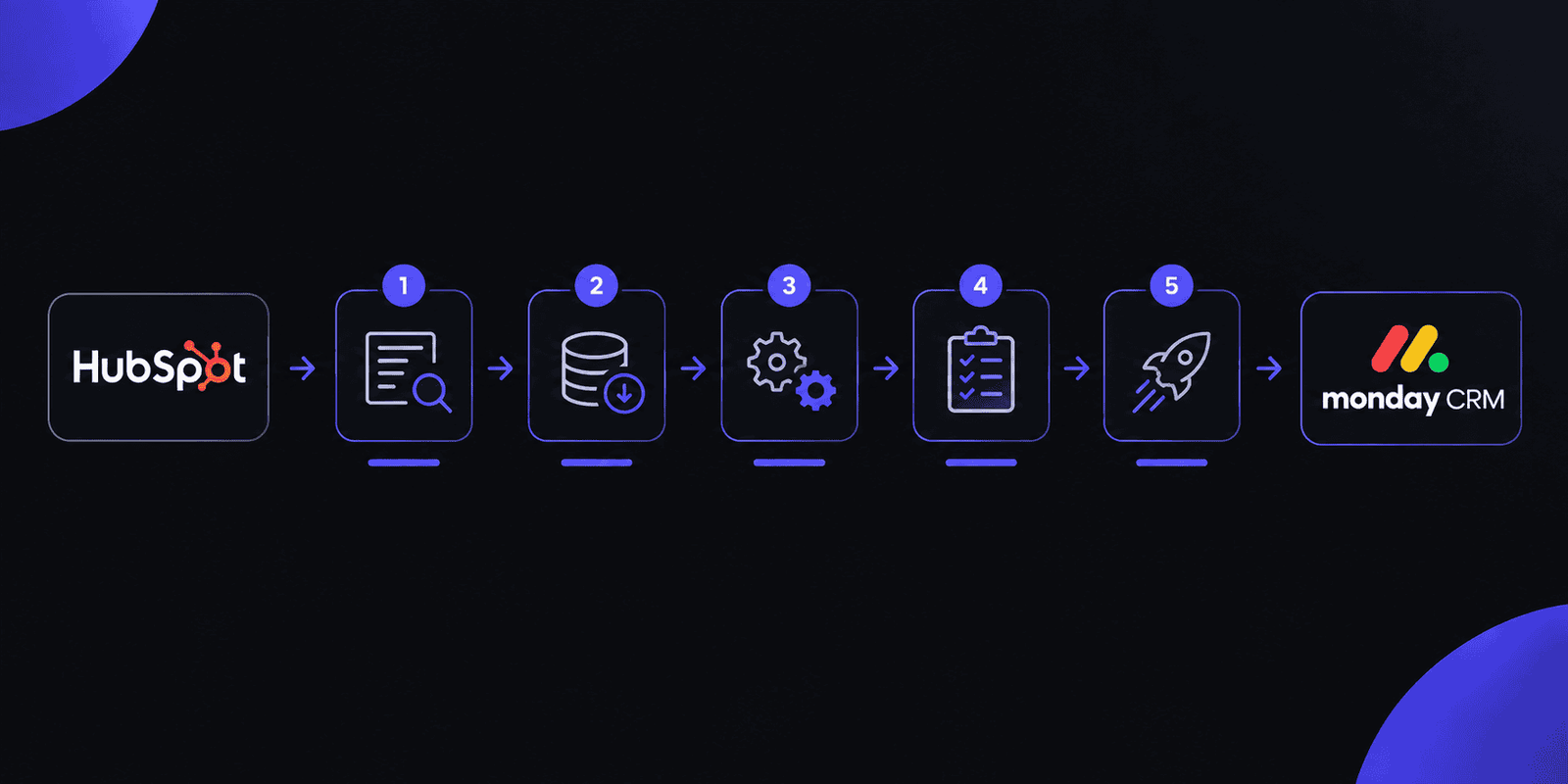
Step 1: Audit your HubSpot instance before you touch anything
List every object type you actually use: contacts, companies, deals, tickets, custom properties, workflows, and any integrations pulling data in or out. Note which fields are actually populated versus legacy clutter. This audit is what prevents you from re-creating a mess in your new system.
Step 2: Choose your migration method
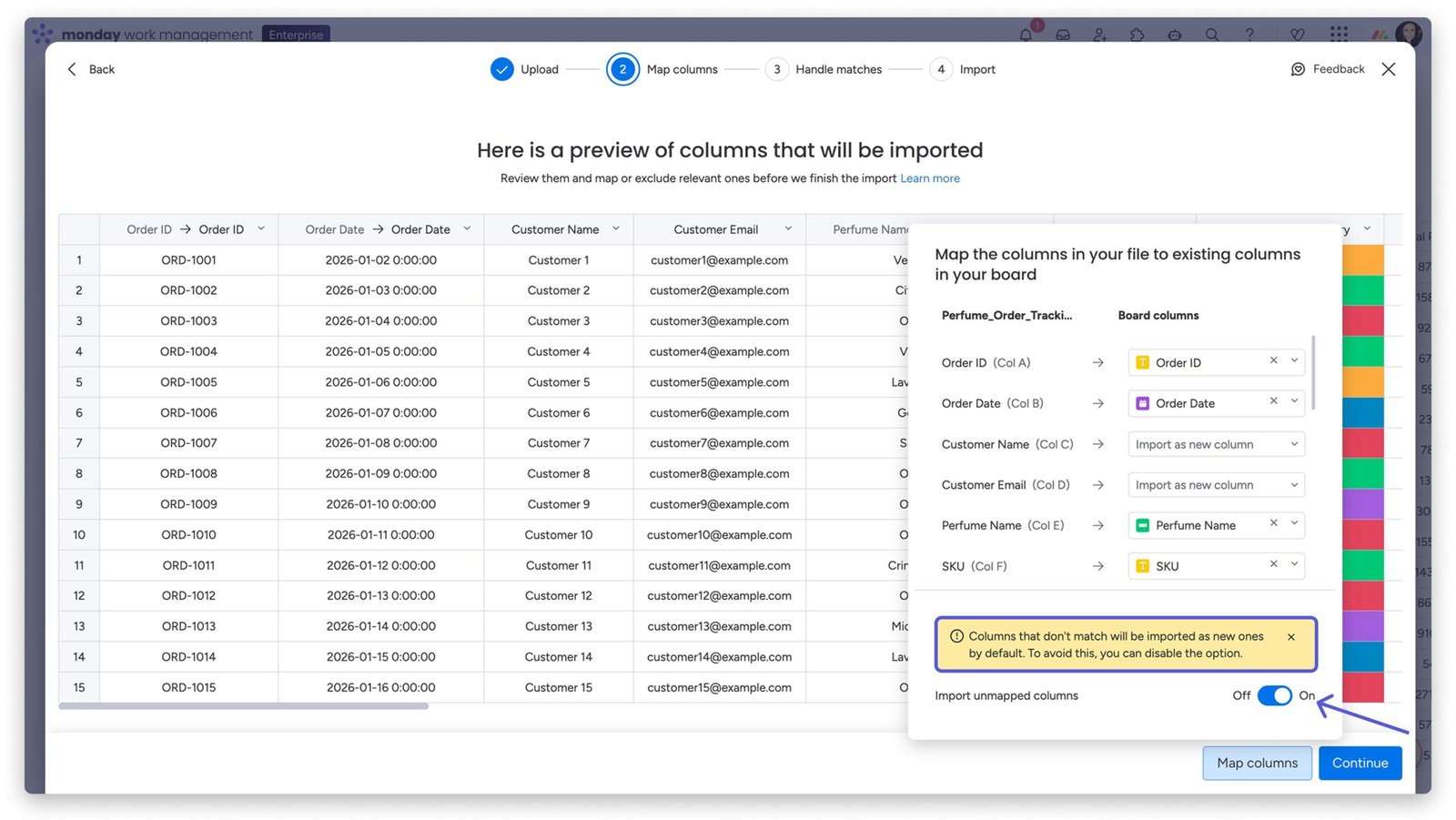
- Native integration sync: monday CRM’s built-in HubSpot integration can sync contacts, companies, and deals on an ongoing basis. Best for keeping both systems aligned during a transition rather than a full historical move.
- CSV export/import: HubSpot exports contacts, companies, and deals cleanly as CSV files, and monday CRM’s import tool handles them well. This is the most reliable method for a one-time, complete migration.
- Automation platform (Make.com or Zapier): Useful for field-level mapping logic or migrating in batches while keeping both systems briefly in sync.
For most teams, CSV export and import for the bulk historical data, paired with the native integration for anything still live during the transition, is the least error-prone combination.
Step 3: Map HubSpot objects to monday CRM boards
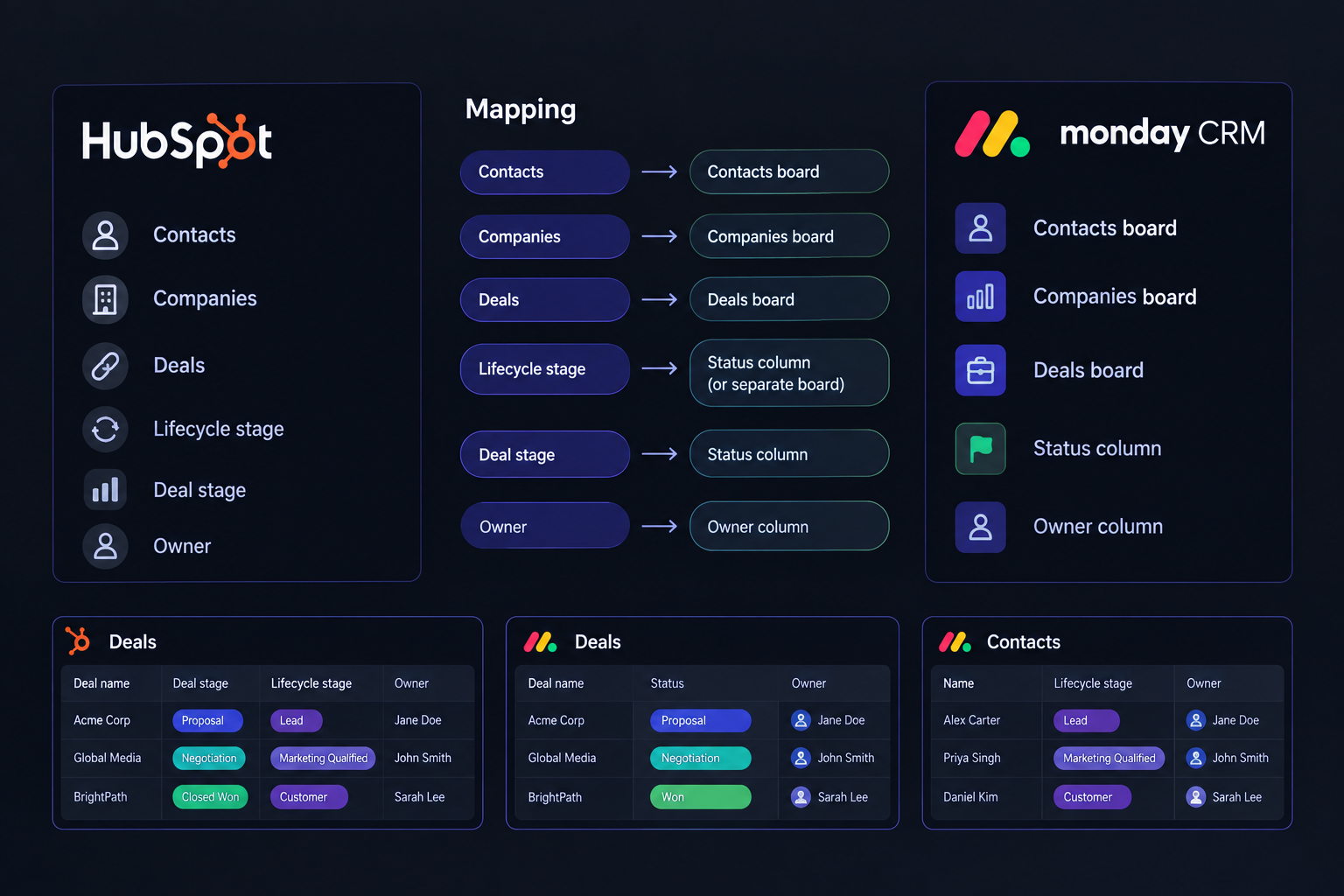
Decide upfront: does “deal stage” become a status column? Does “lifecycle stage” become its own board or a column on the contacts board? Do this mapping on paper before importing a single record. Skipping it is the single biggest cause of duplicate or malformed records after migration.
Step 4: Clean your data before it moves, not after
Both platforms’ exports carry system-generated columns you don’t need, record IDs, internal timestamps, workflow flags. Strip those out, standardize inconsistent values (“Closed Won” vs “closed-won” creates two stages instead of one), and de-duplicate contacts. Cleaning after import means cleaning inside a live system your team is already using.
Step 5: Run a pilot migration on one board first
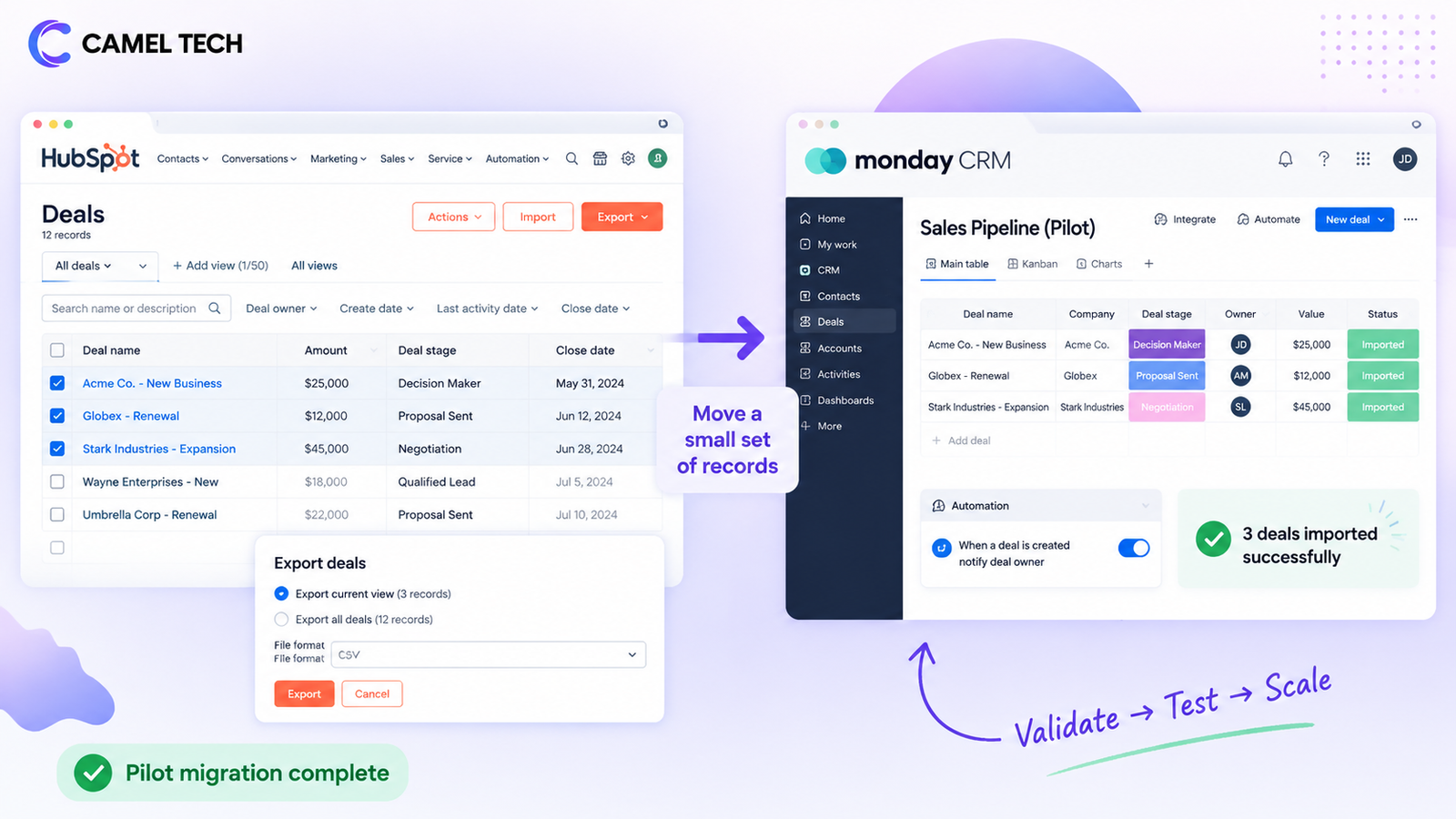
Import a single pipeline or one team’s contacts before moving everything. Monday CRM’s import summary flags rejected records, most commonly malformed email addresses or type mismatches. Fix the pattern causing the failures, then scale up.
Step 6: Import in batches, not all at once
Break large imports into batches of 5,000 to 10,000 records, letting each finish before starting the next. Isolating problems in a 5,000-row batch is far easier than debugging a single 50,000-row import that partially failed.
Step 7: Handle historical activity, notes & attachments separately
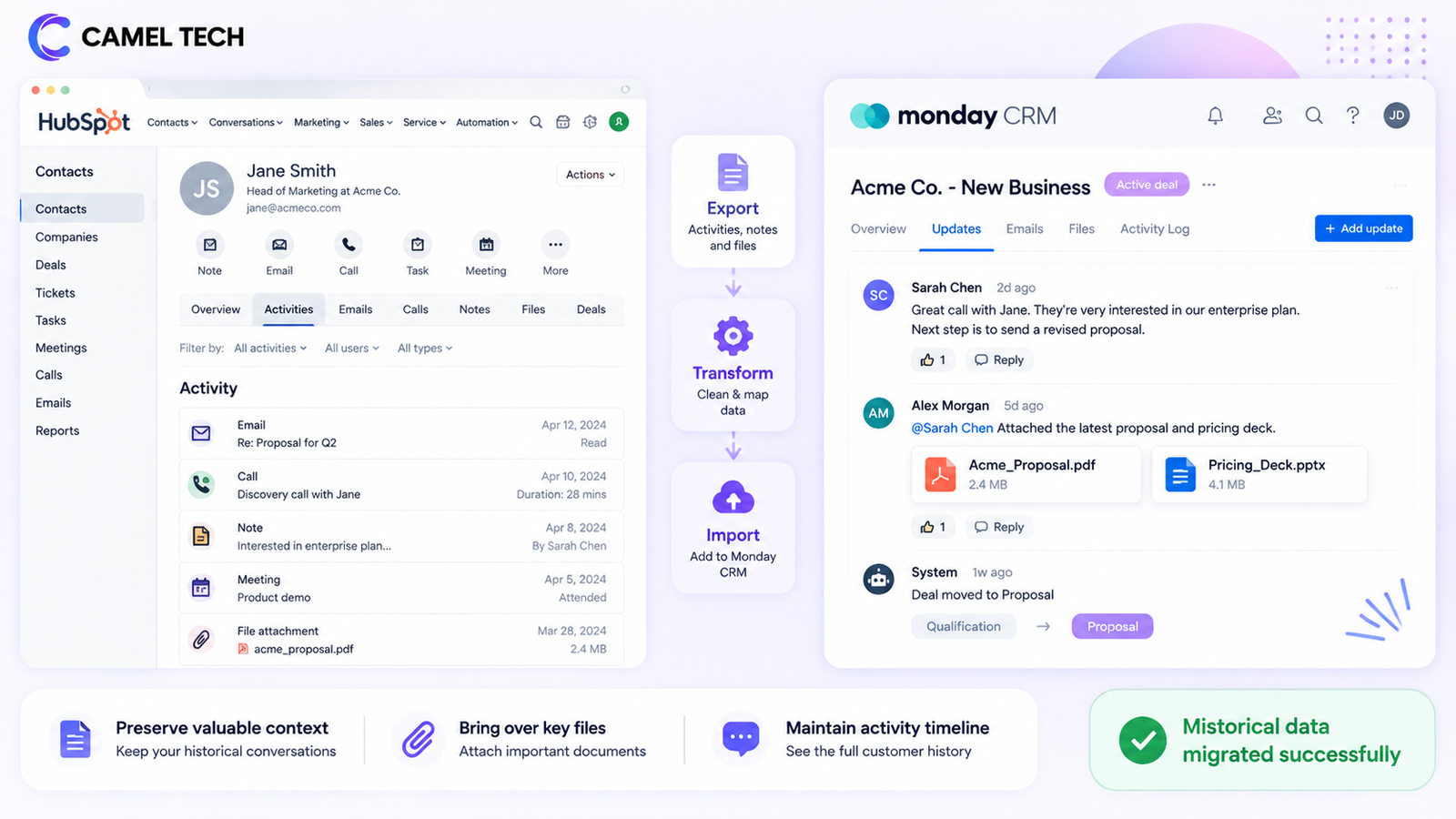
This is the part vendors gloss over. HubSpot doesn’t offer a clean, one-click export for email history, call logs, or meeting notes. Teams migrating 5,000+ contacts with years of interaction history consistently report this as the hardest part of the move. Realistic options: export via HubSpot’s API if you have technical resources, use a third-party CRM-to-CRM migration tool, or accept that only your highest-value accounts get full history carried over manually.
Step 8: Rebuild automations & pipeline logic natively in monday
Don’t replicate HubSpot workflows one-to-one, monday’s automation model is board-native and works differently. Screenshot your existing HubSpot workflows before migrating so you have a reference, then rebuild the underlying logic using monday’s automation recipes.
Step 9: Run both systems in parallel before full cutover
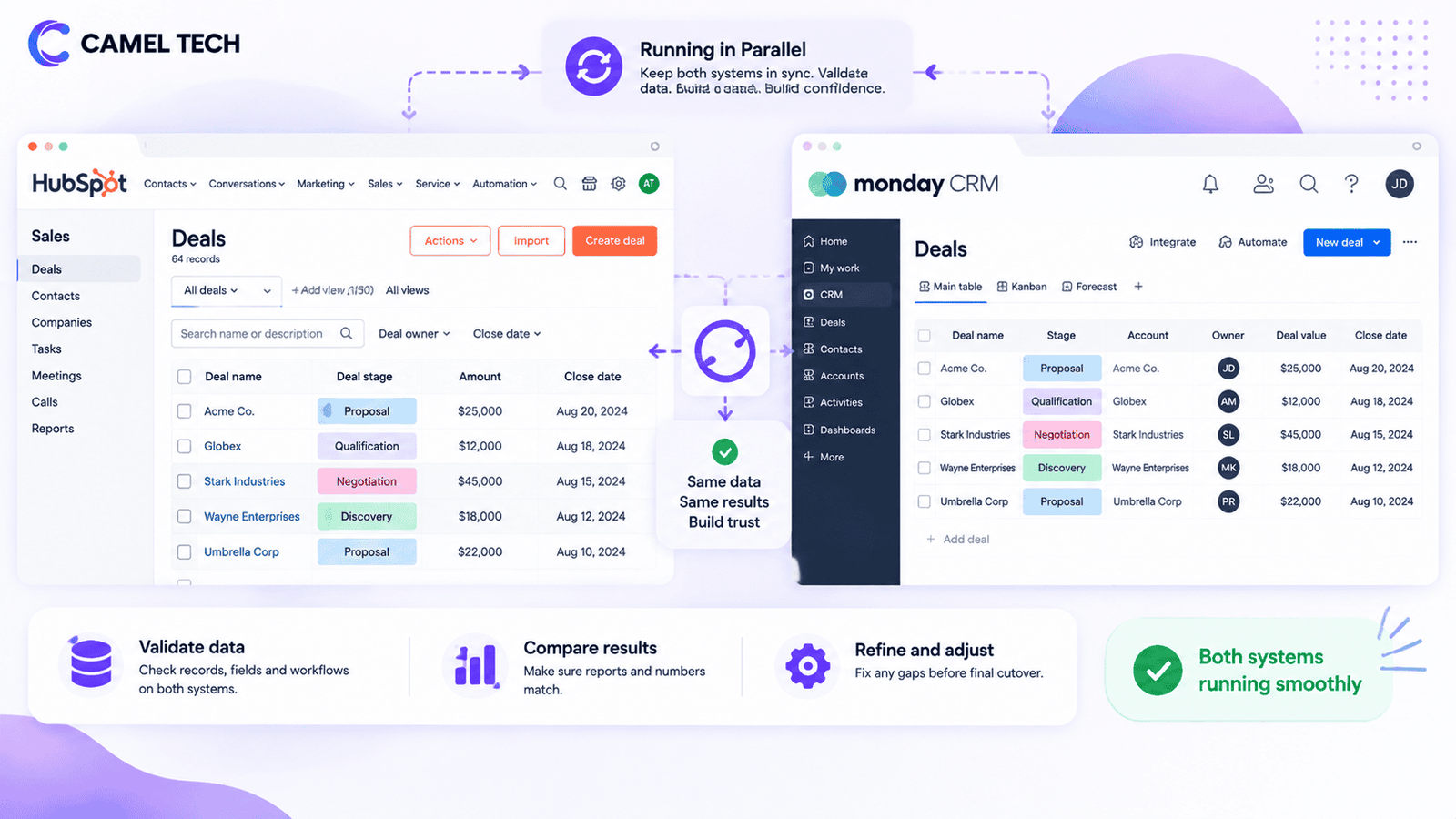
Keep HubSpot live and in read-only or sync mode for two to four weeks after go-live. This gives your team a safety net and gives you time to catch anything the migration missed before canceling your HubSpot subscription.
Step 10: Train the team & set a hard cutover date
Adoption, not data, is usually what determines whether a CRM migration actually succeeds. Block time for hands-on training on monday’s board views, and set a firm date after which HubSpot becomes read-only.
What's Actually New in 2026
HubSpot: Breeze AI Expands Fast
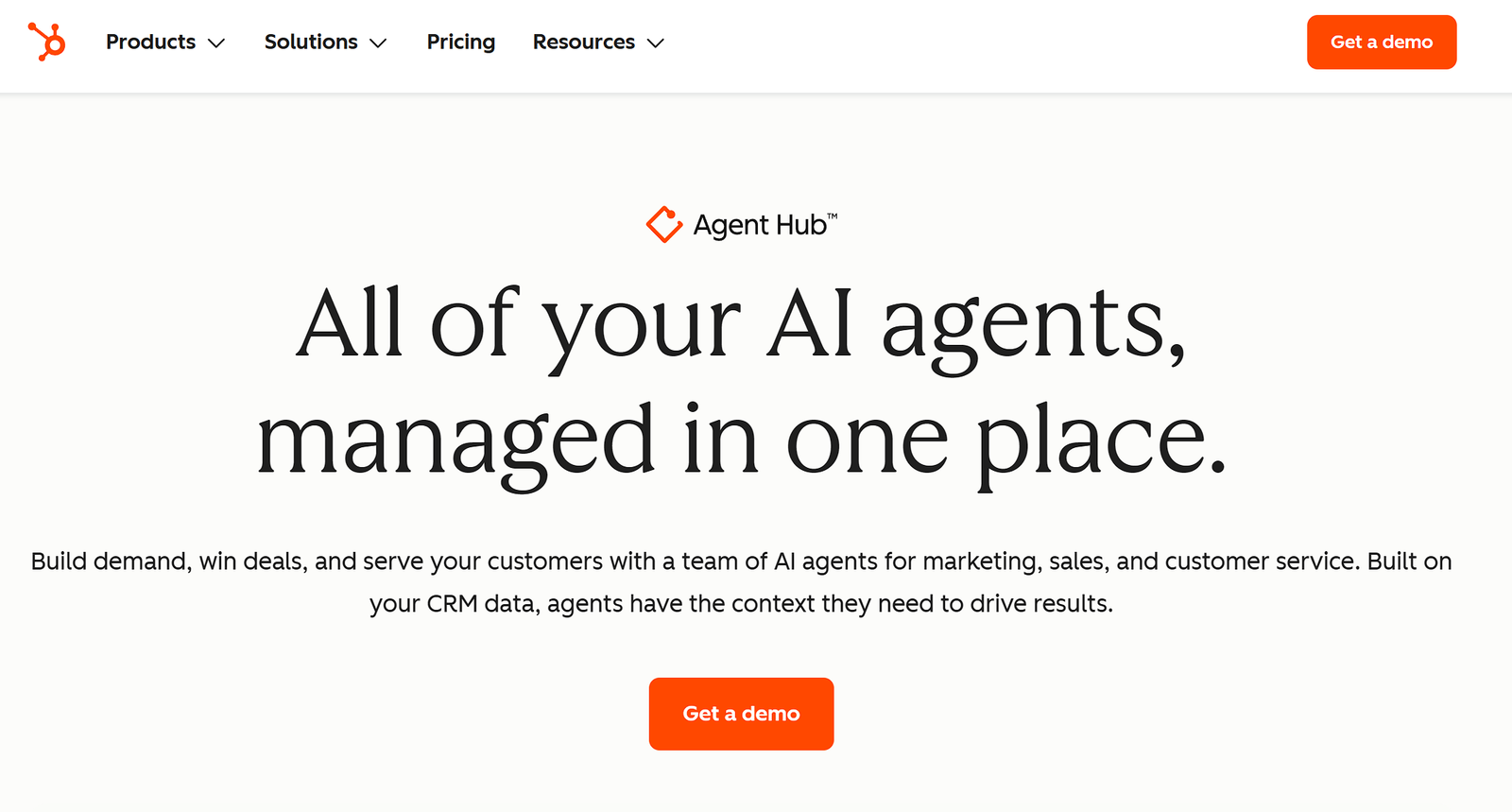
HubSpot has shipped an unusually large wave of AI updates through 2026. At the Spring Spotlight (April 14, 2026), HubSpot announced 99 product updates in a single release, including a rebuilt Prospecting Agent, official AI Connectors for Claude, ChatGPT, Gemini, and Microsoft Copilot, and general availability of its own MCP server, all usable on every HubSpot tier, including the free CRM, at no separate charge.
Commerce Hub was renamed Revenue Hub in June 2026, carrying forward quoting and invoicing while adding automated tax calculation. As of the July 2026 release, Prospecting Agent is available on any paid portal, no longer gated to a smaller account subset.
Monday CRM: AI Agents & Vibe Tooling
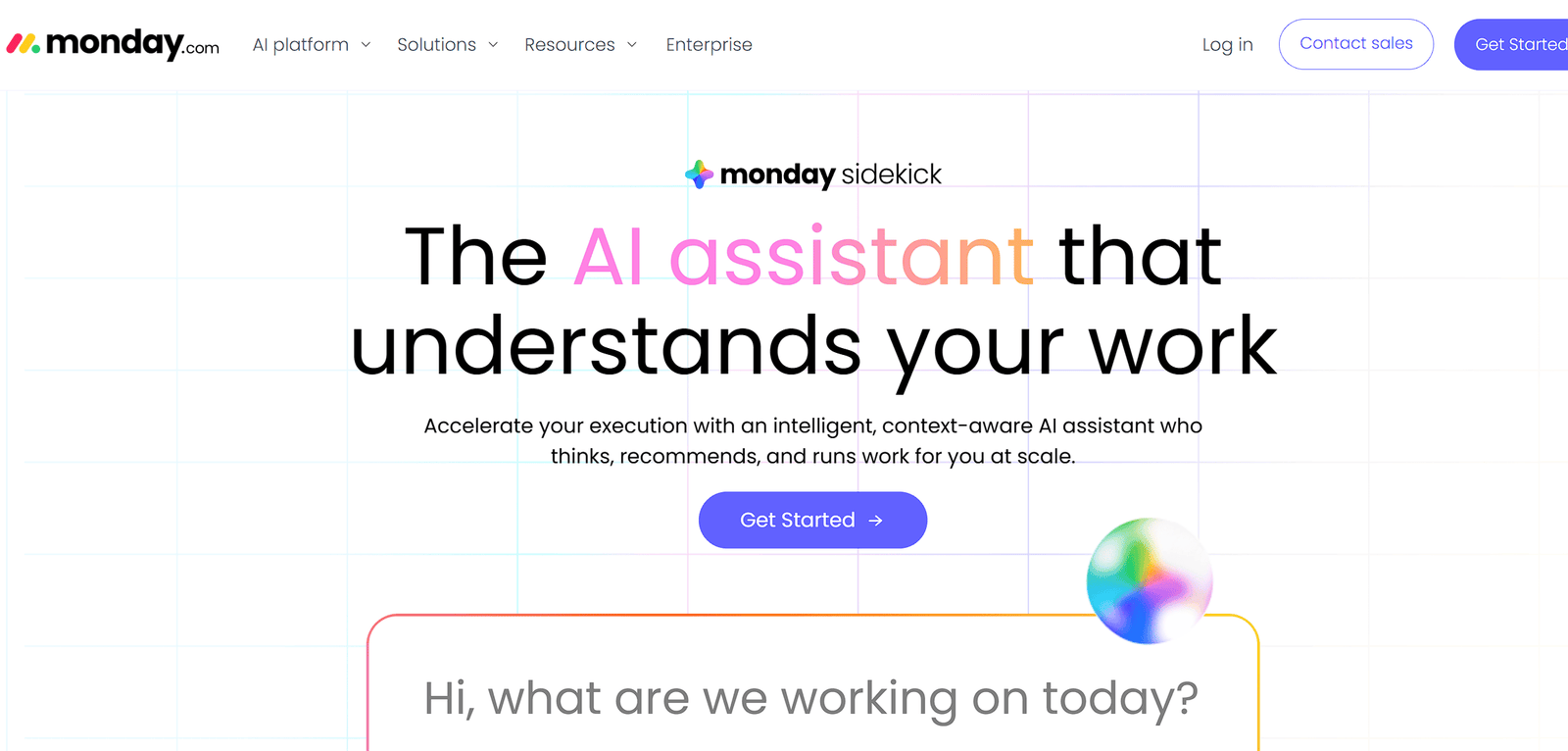
Monday.com has pushed hard on AI throughout 2026, with monday CRM’s calling agent, meeting prep agent, and pipeline agent each automating a specific, previously manual task inside the CRM itself. The company’s AI Sales Agents (branded Lexi in some releases) can autonomously source and qualify leads and book meetings. Monday also introduced “AI Blocks,” no-code automations like sentiment analysis or automatic task generation that build directly into sales boards. On the pricing side, monday.com changed how it sells AI credits on May 6, 2026: credits are now purchased separately from seats rather than bundled with the plan, so a migration budget needs to account for both lines.
Monday CRM vs HubSpot: What You're Actually Choosing Between
| HubSpot Sales Hub | Monday CRM | |
|---|---|---|
| Free tier | Yes, free CRM for unlimited users | No free CRM tier |
| Entry paid tier | $15 to $20/seat (Starter) | $12/seat (Basic, annual) |
| Mid-tier pricing | $100/seat (Professional) + $1,500 onboarding | $17/seat (Standard) to $28/seat (Pro) |
| Top tier | $150/seat (Enterprise) + $3,500 onboarding | Ultimate, custom pricing |
| Native marketing automation | Yes, Marketing Hub | No, needs the campaigns add-on or a separate tool |
| Native customer service module | Yes, Service Hub | No, needs a separate help desk tool |
| Pre-built integrations | 2,000+ | ~850 |
| Data structure | Fixed CRM objects (contacts, deals, tickets) | Customizable boards, groups, and columns |
| G2 rating | 4.4/5 (13,295 reviews) | 4.6/5 (1,056 reviews) |
| Best fit | Revenue teams that need marketing, sales, and support on one platform | Teams whose sales process is tightly linked to project delivery or ops |
The pricing gap looks bigger than it sometimes is in practice. If you’re only using HubSpot’s CRM and Sales Hub today, without Marketing or Service Hub, the seat-cost comparison above is close to your real total cost difference. If you’re also running email marketing or support tickets through HubSpot, you’ll need to replace those separately after migrating, which changes the math.
How Are HubSpot & Monday CRM Similar?
Underneath the different philosophies, the two products overlap more than the marketing pages suggest. Both are cloud-based, no-code platforms that let non-technical sales reps set up a pipeline without a developer.
Both organize deals into stages you can view as a Kanban-style board, both sync natively with Gmail and Outlook to log email activity against a contact, and both offer dashboards and reporting on pipeline value and rep activity.
Both platforms now gate their more advanced AI behind paid tiers and a consumption-based credit system rather than a flat feature toggle. And functionally, they’re not even strangers: monday CRM ships with a native two-way integration to HubSpot, built specifically so the two can run side by side and stay in sync, which tells you the vendors themselves see plenty of overlap in what teams use each tool for.
How Are HubSpot & Monday CRM Different?
The differences start with the data model and cascade from there. HubSpot’s contacts, companies, deals, and tickets are fixed objects with pre-populated properties and a unified interaction timeline, so two different HubSpot portals still look structurally similar.
Monday CRM has no default structuring data model, a “pipeline” is really just a filtered board view, which means two teams inside the same monday account can end up modeling the same deal in completely different ways without central governance.
That flexibility is also monday’s biggest advantage and its biggest risk: it adapts to any process, but without discipline it’s easy to end up with dozens of inconsistent boards and no single source of truth. HubSpot, by contrast, takes longer to learn (the interface has more tabs and options, and HubSpot Academy exists precisely because the learning curve is real) but the structure is guided from day one.
The other clear difference is scope: HubSpot was built outward from marketing, so campaigns, forms, and attribution are native; monday was built outward from general work management, so project and delivery tracking are native in a way HubSpot’s CRM alone doesn’t attempt to match.
Feature-by-Feature: What Actually Matters
Ease of Use and Setup
Which One Is Cheaper: HubSpot or Monday CRM?
On paper, monday CRM is cheaper at every tier: $12/seat on Basic, $17 on Standard, and $28 on Pro, against HubSpot Sales Hub’s $15 to $20/seat Starter, $100/seat Professional, and $150/seat Enterprise. But real user reviews suggest the sticker price doesn’t tell the whole story on either side.
On Capterra, a CRM consultant who has implemented HubSpot for multiple companies still flagged the cost pattern directly: “certain features like workflows require an upgrade and can be expensive for some SMBs.”
Another HubSpot reviewer who switched from Mailchimp put it more bluntly, noting the platform “gets really costly, really fast,” while still affirming the ROI was worth it once the business had grown enough to justify the upgrade.
On G2, one verified HubSpot Sales Hub user summed up the feeling in three words: the pricing is “slightly high” relative to what they got for it. A monday.com user reviewed on the same platform took the opposite view, saying their plan gave them “as many functionalities in one program” as they needed for a price that felt fair.
Layer in HubSpot’s mandatory onboarding fee ($1,500 on Professional, $3,500 on Enterprise) and the AI-credit systems both platforms introduced in 2026, monday now requires a minimum monthly credit purchase on Standard and Pro plans, and the real total cost gap is usually wider than the headline per-seat numbers suggest in either direction.
HubSpot: Feature-rich but denser. G2’s category scores put HubSpot at 8.7 for ease of use and 8.3 for ease of setup.
Monday CRM: Consistently rated the more approachable platform. G2 scores it 8.9 for ease of use and reviewers frequently cite the visual, board-based interface as the reason adoption happens faster with less training.
Verdict: Monday CRM wins for teams without a dedicated RevOps function to manage a more complex setup.
Monday CRM vs HubSpot Marketing Automation
This is where the gap is widest. HubSpot’s Marketing Hub provides native email campaigns, landing pages, forms, ad management, and multi-touch attribution, all reading from and writing to the same record as the deal. G2 scores HubSpot at 8.7 for email marketing against monday CRM’s 7.5. Monday CRM’s campaigns add-on covers AI-assisted email creation, segmentation, and basic automation, but there’s no native landing page builder, no ad management, and no attribution layer tying marketing touchpoints back to closed revenue.
Verdict: If marketing automation drives your pipeline, this single gap should decide the migration question before you look at anything else.
AI Features
HubSpot: Breeze AI is now the deepest layer on the market for a CRM at this price point, a free Assistant across every tier, paid Agents for prospecting, customer service, and data enrichment, and native MCP connectors to Claude, ChatGPT, and Gemini.
Monday CRM: AI is built directly into board workflows: a calling agent, a meeting-prep agent, a pipeline agent, and no-code AI Blocks for tasks like sentiment analysis. Since May 2026, AI usage is metered separately from seats via a credit system.
Verdict: Close. HubSpot’s AI is more mature for marketing-adjacent use cases; monday’s is more tightly woven into day-to-day pipeline work.
Customer Contract Management & Forecasting
HubSpot: Scores higher here, 8.2 on G2 for contract management against monday’s 7.9, and reviewers consistently point to deeper forecasting and reporting sophistication.
Monday CRM: Handles standard pipeline forecasting well but doesn’t match HubSpot’s depth on multi-stage contract workflows.
Verdict: HubSpot wins for revenue teams with complex contract or forecasting needs.
Customization
HubSpot: Structured and reliable but less flexible; G2 scores it 8.1.
Monday CRM: Scores 8.7 on G2 for customization, and it’s the platform’s defining strength: boards, columns, and automations reshape to your process rather than the reverse.
Verdict: Monday CRM wins for teams that want the system to bend to an unusual sales process rather than the other way around.
Integrations
HubSpot: 2,000+ pre-built integrations, plus native AI Connectors and an MCP server available on every tier.
Monday CRM: Roughly 850 integrations, smaller but covers the common stack (Gmail, Outlook, Slack, Zapier, Make).
Verdict:HubSpot has the deeper ecosystem; monday covers what most small-to-mid-size teams actually use.
What Real Users Say
Review data is one of the few places you get an honest, unfiltered read on both platforms, especially from people who’ve actually switched.
On G2, HubSpot Sales Hub sits at 4.4 out of 5 across 13,295 reviews, while monday CRM runs slightly higher at 4.6 out of 5 across a smaller base of 1,056 reviews. G2’s aggregated review data shows monday CRM consistently ahead on ease of use and customization, while HubSpot holds the edge on email marketing depth and contract management, a pattern that lines up closely with the feature comparison above.
Finance Manager, moved from monday.com to HubSpot CRM wrote that “HubSpot CRM has improved the relationships from the company and clients, and no challenges experienced.” citing a lack of integrations as the deciding factor. It’s a useful reminder that the right platform depends on your team’s shape, not a universal winner.
On the HubSpot side, reviewers on Capterra named Micah L. frequently flag cost as the recurring complaint. He said, “It is so expensive if you have to pay for features.. and sometimes there’s ONE feature you need but then have to pay for the pro tier which is too expensive to justify for some businesses.”
One review put it plainly: advanced features are “only available with higher-priced plans, so the cost can increase quickly as your business grows.” That’s consistent with the onboarding-fee and per-seat jump documented in the pricing table above, and it’s the single most common reason teams start evaluating monday CRM as an alternative in the first place.
The migration pain point this guide flags in the step-by-step section below shows up in real reviews too. Heather B. COO, Management Consulting (Used the software for: 2+ years) who switched from HubSpot CRM to monday CRM, reviewing on Capterra, praised monday saying, “Our team loves monday.com“ alongside some friction syncing with Outlook. That’s a direct, first-hand confirmation of the activity-history gap this guide covers in Step 7.
What the Experts Say
Imrul Hasnat, Camel Tech:“The biggest mistake we see teams make is migrating because a pricing page looked cheaper. The real question is whether your sales process depends on marketing automation or on tight delivery handoff. Get that answer right first, and the migration itself is just execution.”
HubSpot Sales Hub pricing documentation, 2026:HubSpot reports that 84% of customers using Sales Hub said they saw increased revenue, a figure worth weighing against the Professional-tier cost jump this guide covers above.
When Should You Integrate Monday with HubSpot Instead of Migrating?
Migration isn’t the only option. Sometimes the better move is connecting monday.com to HubSpot and running both, rather than replacing one with the other. This fits when:
- Marketing and sales alignment genuinely depends on HubSpot’s Marketing Hub, but your delivery or operations team works better on monday’s boards, so each team keeps the tool suited to its job.
- You have too much built up in HubSpot workflows and reporting to responsibly migrate right now, but a specific team, like project delivery, still needs visual board tracking today.
- You want to pilot monday CRM in one department before committing the whole organization to a switch.
- You’re mid-year on a HubSpot contract or have compliance and data-retention requirements that make a full data migration risky to rush.
There are a few real technical ways to connect the two without moving your system of record:
- monday’s native HubSpot integration. Available from the Integrations Center on Standard, Pro, and Enterprise monday plans, it handles two-way sync of contacts, companies, and deals with no code required. This is the fastest option and the right starting point for most teams.
- Zapier or Make.com. Useful once you need logic the native integration doesn’t cover, for example, “when a HubSpot deal closes, create a monday board item in the onboarding board with specific fields pre-filled.” Both platforms have pre-built HubSpot and monday.com connectors.
- HubSpot’s App Marketplace connector. Worth checking directly, since HubSpot’s own Data Hub sync layer supports two-way sync with a growing list of tools, and marketplace connectors are added independently of this guide’s publish date.
- A custom API integration. For teams with development resources, HubSpot’s API and monday.com‘s GraphQL API can be connected directly for logic too specific for either native integration or Zapier-style tools to handle.
If you want to see the native integration actually being set up rather than just described, there are several walkthrough videos on YouTube covering monday-HubSpot integration setup step by step, worth watching before you configure it live.
Is Migrating from HubSpot to Monday CRM Right for You?

Before you commit to a migration, it’s worth being honest about which of these describes your team:
- Stay on HubSpot:
- Marketing and sales alignment is core to how you generate pipeline. Content, email nurture, forms, and attribution reporting all need to live on the same record as the deal.
- Stay on HubSpot:
- You depend on native customer service ticketing, advanced forecasting, or a large stack of pre-built integrations you’d have to rebuild elsewhere.
- Good fit for monday CRM:
- Your sales process is inseparable from delivery. Deals close, then a project, onboarding flow, or client engagement starts immediately, and you want that handoff to happen in the same system.
- Good fit for monday CRM:
- You’re a small-to-mid-size team that wants a visual, board-based pipeline and doesn’t rely heavily on marketing automation, lead scoring, or multi-touch attribution.
If you’re still unsure, a smaller pilot, moving one team or one pipeline first, is a better test than migrating everything at once. You can also check out this G2 comparison as well.
Is Migrating to Monday CRM Just a Data Move, or a Full Implementation Project?
A CSV import moves your contacts, deals, and companies from one system to another. It does not move your workflow. HubSpot’s pipeline stages, lifecycle automations, and reporting logic have no direct copy-paste equivalent on monday’s boards, they have to be deliberately rebuilt using boards, columns, statuses, and automation recipes.
In practice, this makes a HubSpot-to-Monday migration much closer to a monday implementation project than a simple data transfer, and it’s worth budgeting and staffing it that way rather than as a weekend data export.
That’s not necessarily bad news. Since you’re rebuilding the structure anyway, this is a natural point to audit how your team actually works today, rather than just replicating however HubSpot happened to be configured a few years ago. Teams that treat migration as a pure lift-and-shift tend to recreate the same inefficiencies, duplicate fields, stale automations, an approval step nobody remembers the reason for, inside the new platform.
Teams that treat it as a chance to remap the workflow, deciding which stages actually reflect how deals move today, which sales-to-delivery handoffs are real versus assumed, and what reporting leadership actually looks at, tend to get more value out of the switch than the CRM swap alone would justify.
Common Pitfalls to Avoid
- Skipping the field-mapping exercise and importing directly. This is the top cause of duplicate and malformed records.
- Assuming activity history exports cleanly. It doesn’t, by default. Plan for this early rather than discovering it during cutover week.
- Migrating everything at once instead of piloting on one board or team first.
- Underestimating automation rebuild time. Recipes in monday work differently from HubSpot workflows, and a one-to-one translation rarely works cleanly.
- Not budgeting time for adoption. A technically perfect migration still fails if the sales team quietly keeps using HubSpot out of habit.
Still deciding whether monday CRM is the right platform in the first place, separate from the migration itself? Our upcoming comparison of monday CRM vs HubSpot marketing automation digs specifically into whether the automation gap matters for your team.
Frequently Asked Questions (FAQ)
Most core CRM data, including contacts, companies, deals, owners, pipelines, and many custom fields, can be moved. However, email history, attachments, marketing assets, some reporting configurations, and complex workflow logic may need a separate migration process, manual rebuilding, or a third-party tool.
Yes, but you need to preserve the relationships among records. Map HubSpot contacts to people, companies to account or company records, and deals to the appropriate monday CRM pipeline so every opportunity stays connected to the correct customer and organization.
Usually, yes. First, create matching monday CRM columns or fields. Then map each HubSpot property to the right data type, such as text, date, status, number, dropdown, or owner. Incorrect field types are a common source of import errors.
HubSpot workflows do not automatically convert into monday CRM automations. Rebuild important processes using monday automations, integrations, and notifications, then test them with sample records before your team begins using the new CRM.
Yes. monday.com’s HubSpot integration can sync selected contact, company, and deal data, including mapped custom fields in supported setups. This can help with a phased transition, but it does not replace a complete migration and validation process.
Yes. Remove duplicate records, archive outdated contacts and companies, standardize phone numbers and lifecycle values, and decide which inactive data does not need to move. Clean data improves reporting, automation, and user adoption after launch.
Not during the entire project. Your team can continue working in HubSpot while data is prepared and tested. Near the final cutover, use a short data freeze so newly created or edited records are included in the final transfer.
CSV imports suit clean, straightforward data. An integration can help when both platforms need to run temporarily. Consider a migration specialist for historical activity records, complex associations, custom objects, high data volume, or a low-disruption transition.
Compare record totals, inspect high-value accounts, check deal stages and owner assignments, review required custom fields, confirm associations, test permissions and automations, and validate key reports. Keep HubSpot available until stakeholders confirm that important data and daily workflows work properly.
Do not treat migration as only a data-export project. It is also an opportunity to improve your CRM process by defining pipelines, record ownership, required fields, automation triggers, and reporting needs before importing data.
Not Sure If Migrating Is the Right Move?
At Camel Tech, we’ve helped 100+ companies build CRM, automation, and operational systems that actually get used. You can explore our case studies and client reviews to see how we’ve helped businesses improve the way they manage sales, operations, delivery, and automation.
We work across platforms like monday.com, HubSpot, ClickUp, Notion, GoHighLevel, n8n, Make, Zapier, and other business tools. That means: selecting the right platform for your business, configuring it around your actual workflows, migrating data, building automations, connecting your tools, creating dashboards, and training your team to actually use the system.
We don’t just recommend the platform. We build the system.
Book a free discovery call. We’ll tell you whether monday CRM, HubSpot, or another platform makes sense for your team, and what a proper implementation or migration actually looks like.
Read Related Articles
ServiceTitan is purpose-built for plumbing dispatch, GPS, and pricing. Monday.com is cheaper and flexible but

Should you migrate from Airtable after the Bending Spoons deal? Review the risks, compare alternatives,

Compare the best ClickUp consultants and agencies in 2026 by pricing, specialty, and red flags
Build a business that thrives without you
Unlock your ultimate life goals: Focus on high-leverage tasks, personal growth, and family time while pursuing your next big initiative.
Let's book a call with our expert.

Selected resource
Enter your email and we’ll send the resource directly to your inbox.
✓
Check your inbox
We’ve received your request and will send the resource to your email.
Please check your spam or promotions folder if you don’t see it shortly.