
Zapier vs Make vs n8n: Honest Review After 80+ Automation Builds (2026)

Imrul Hasnat
Founder, Camel Tech
- Last Updated:August 4, 2026
18 mins read
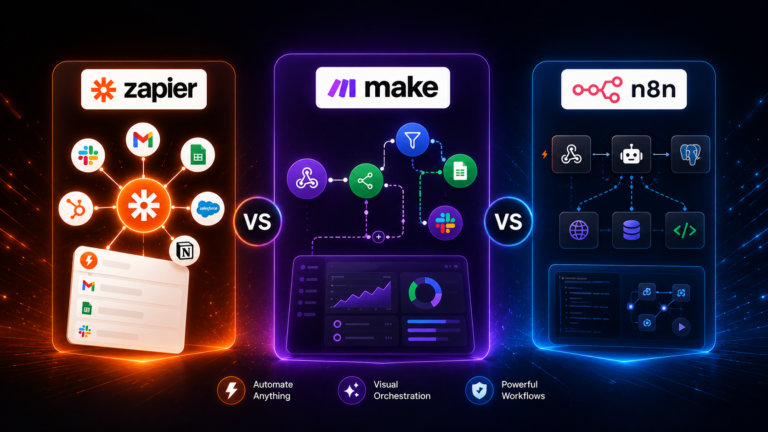
Table of Contents
Quick Answer
Choosing between Zapier, Make, and n8n isn’t about which tool has the most integrations. It’s about how your team works, how complex your workflows are, and how much technical capacity you have in-house.
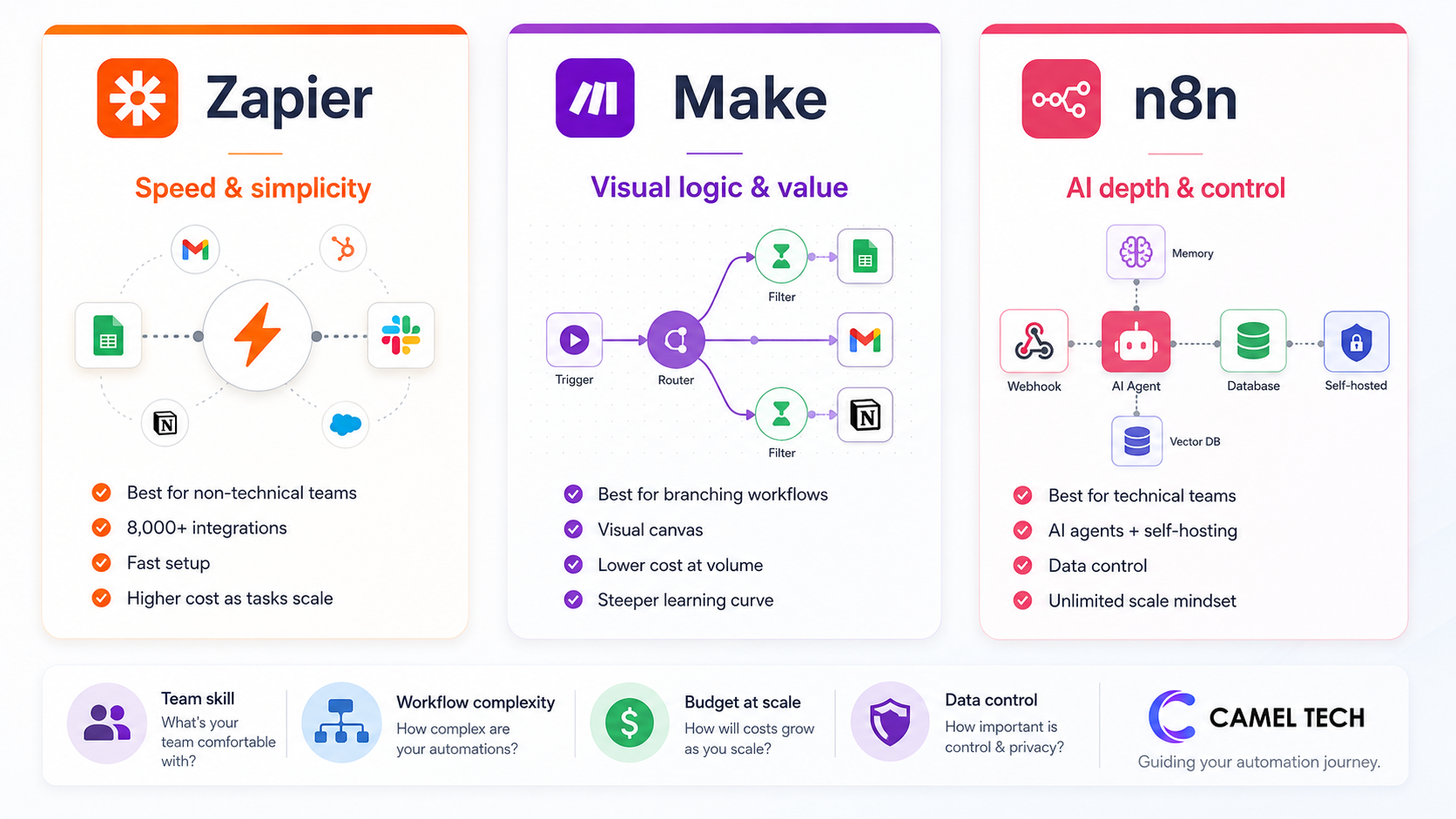
Pick Zapier when your priority is speed, simplicity, and the largest app library.
Zapier is the better fit if your team is non-technical and you want a working automation in five minutes. With 8,000+ app integrations (more than any competitor), if a SaaS tool exists, Zapier probably connects to it. Its Copilot AI builder turns plain English into Zaps. Tables, Forms, Interfaces, and MCP are now bundled into every paid plan. The trade-off: per-task pricing punishes complex workflows. A five-step Zap running 1,000 times burns 5,000 tasks. Costs scale fast.
Best industries for Zapier: solo founders, marketing teams, sales-driven SMBs, customer support teams, freelancers, and any business that values speed-to-first-automation over cost optimization at volume.
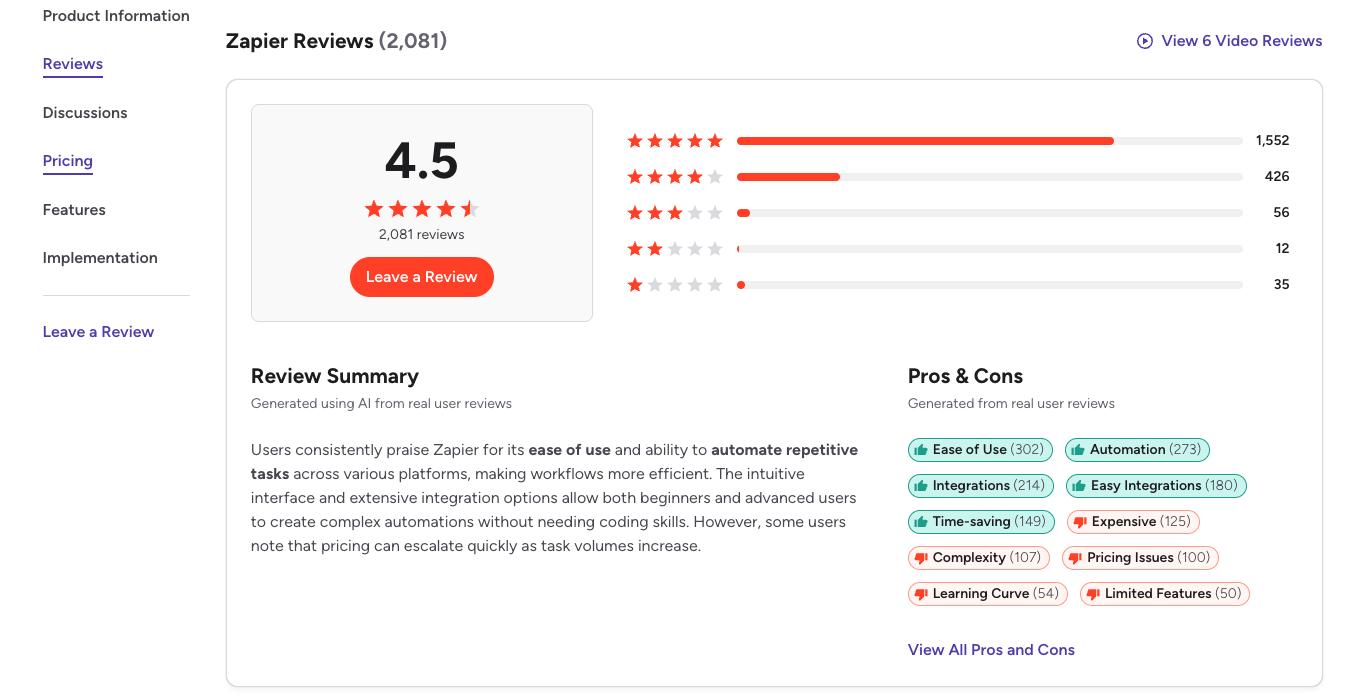
G2: 4.5/5 from 1,830+ reviews. $310M revenue in 2024, $5B valuation. 3M+ users, 100,000+ paying customers.
Pick Make when your priority is visual clarity, complex logic, and value for money.
Make is the better fit if your workflows have branching logic, conditional routing, and multi-step transformations, and you want to see all of it on a single canvas. Routers, iterators, aggregators, and error handlers are first-class citizens. At $9-10 per month for 10,000 operations, Make is roughly 3 to 5 times cheaper than Zapier for equivalent volume. The Maia AI builder generates scenarios from natural language. The trade-off: a steeper learning curve than Zapier, and “operations” count differently from Zapier’s “tasks”; every module action burns one, including triggers and filters. For example, filters in Make are completely free unless the data successfully passes through them. If a bundle is blocked by a filter, it does not consume an operation.
Best industries for Make: agencies running client automations, mid-market operations teams, e-commerce stores, content production pipelines, and any business where workflows need branching logic and the team has at least one operations-savvy person.
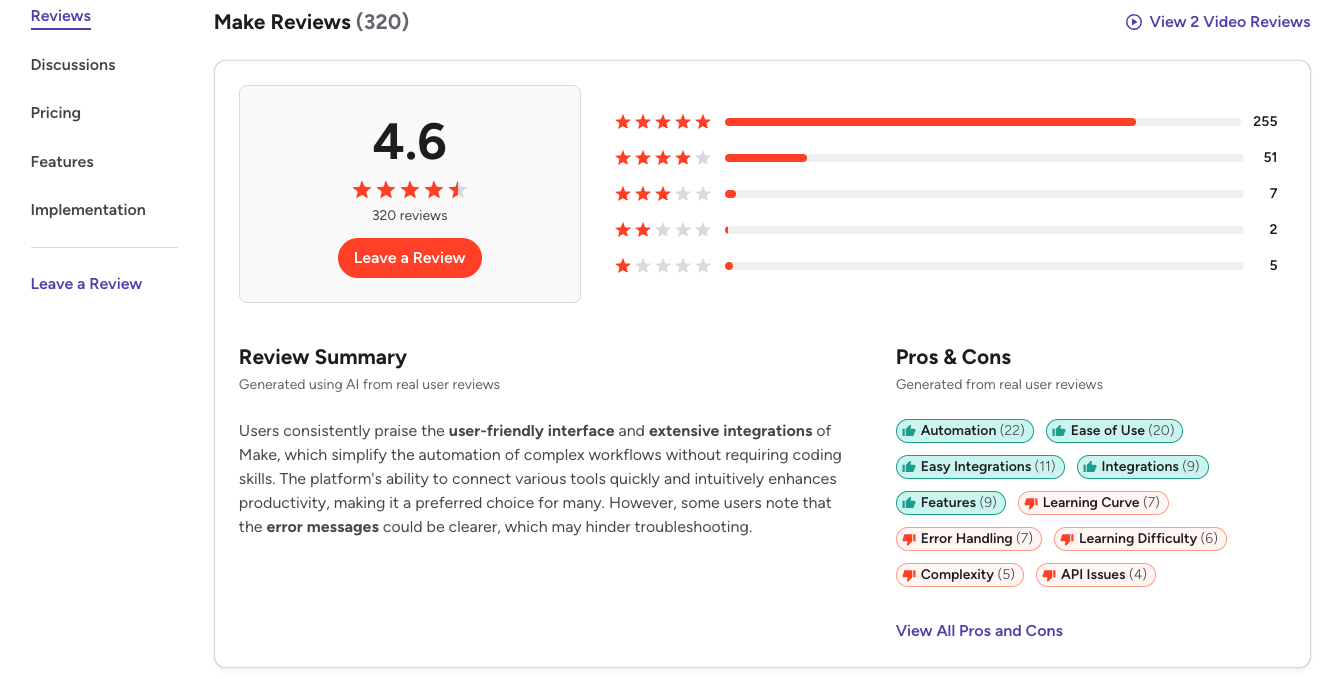
G2: 4.7/5 from 250+ reviews. 400,000+ organizations across 200+ countries. Owned by Celonis ($13B valuation).
Pick n8n when your priority is depth, AI agents, data control, and unlimited scale.
n8n is the better fit if you have technical capacity in-house, run high-volume workflows, build serious AI agents, or need full data sovereignty. Self-hosted Community Edition is free with unlimited executions. n8n operates under a sustainable “FairCode” license (specifically the n8n Enterprise License for self-hosting). It is free for internal business use, but companies cannot use it to resell automation services to others without a commercial agreement.
Native LangChain integration, 70+ AI nodes, persistent agent memory, vector store support, and bidirectional MCP. n8n charges per workflow execution (one full run), not per step , so a 50-step workflow costs the same as a 2-step one. The trade-off: the steepest learning curve of the three, and self-hosting adds DevOps responsibility.
Best industries for n8n: developer-led teams, AI-native startups, agencies building automation services for clients, regulated industries needing GDPR/HIPAA-grade data control, and any business running 5,000+ task-equivalent volume per month.
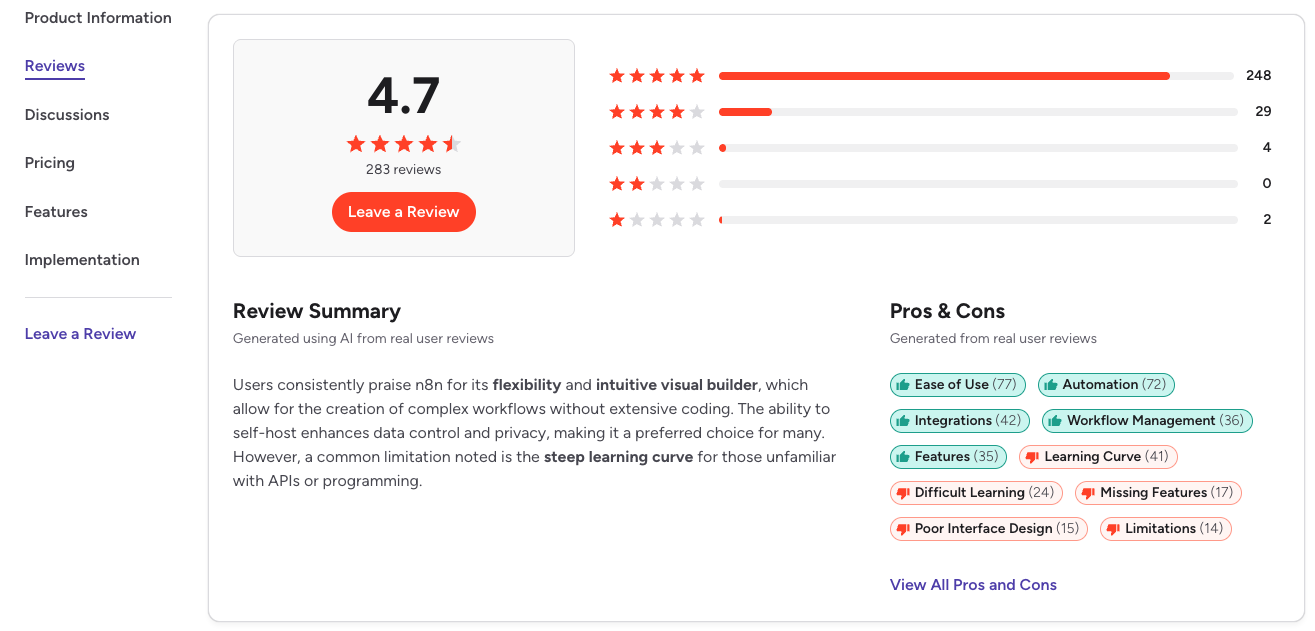
G2: 4.7/5. 230,000+ active users, 3,000+ enterprise customers. $40M ARR in 2025. $2.5B valuation after Accel-led Series C in October 2025.
Why Trust This Content
Most comparison articles are written by someone who tested a 14-day free trial or watched three YouTube reviews.
This one isn’t.
At Camel Tech, we’ve implemented Zapier, Make, and n8n across 80+ businesses , agencies, accounting firms, e-commerce stores, construction companies, and professional services. Some workflows we built started on Zapier and migrated to Make once costs climbed. Others started on Make and moved to n8n once AI agents became core to the business. A few are still on Zapier years later because the team values reliability over savings.
We’ve watched all three succeed. We’ve watched all three fail.
Methodology of This Article
This content is built on:
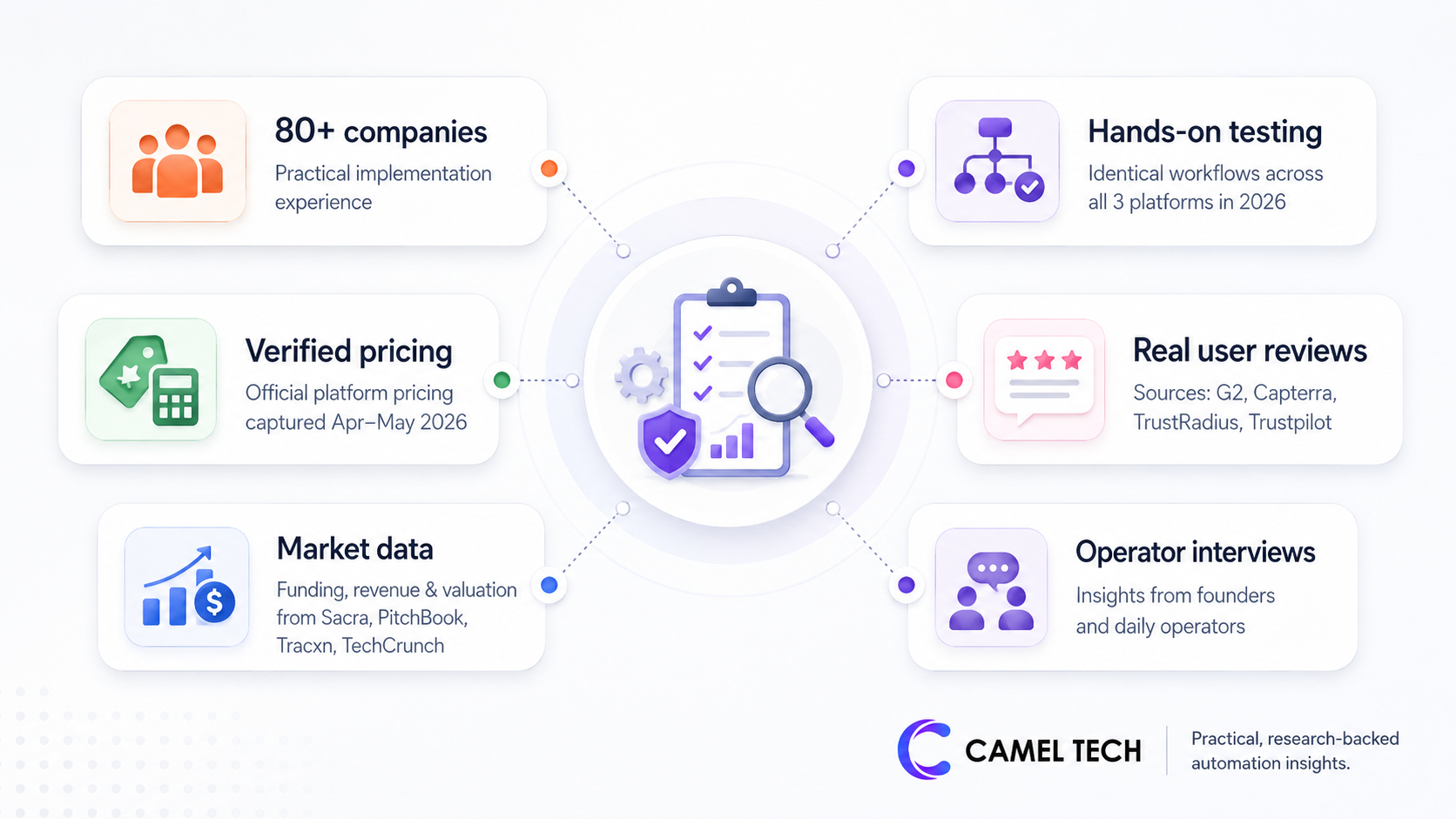
- Practical experience implementing Zapier, Make, and n8n for 80+ companies
- Hands-on testing across all three platforms in 2026 with identical workflows for direct comparison
- Verified 2026 pricing from each platform’s official pages, captured April-May 2026
- Authentic user reviews from G2, Capterra, TrustRadius, and Trustpilot
- Funding, revenue, and valuation data from Sacra, PitchBook, Tracxn, and TechCrunch
- Interviews with founders and operators using these tools daily
Key Takeaways
What is the main difference between Zapier, Make, and n8n?
Zapier bets on simplicity and integration breadth. The largest app library, the easiest builder, the highest cost per workflow at volume. Make bets on visual clarity and value. A canvas-based builder, complex branching logic, mid-priced operations-based billing. n8n bets on depth and control. Open source, self-hostable, execution-based billing, native AI agents.
How much does Zapier cost in 2026?
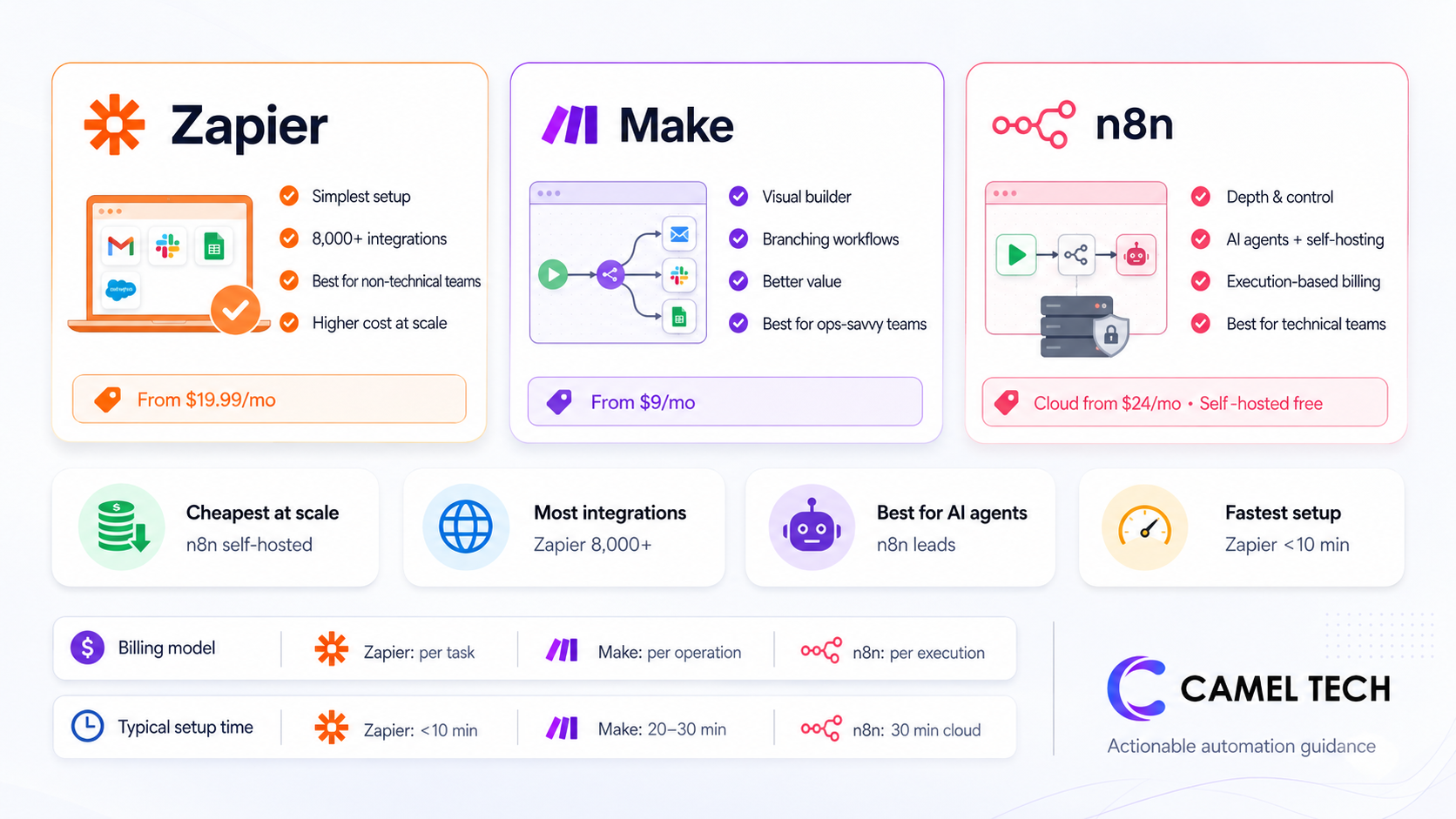
Zapier Free includes 100 tasks per month. Professional starts at $29.99/month for 750 tasks. Team is $69/month annual for 2,000 tasks. Enterprise is custom. Tasks count per action, so a 5-step Zap uses 5 tasks per run. Tables, Forms, and Zapier MCP are now bundled into every plan.
How much does Make cost in 2026?
Make Free includes 1,000 operations per month with 2 active scenarios. Core starts at $10.59/month for 10,000 operations. Pro is $16/month annually for 10,000 operations plus priority execution. Teams is $29/month for 10,000 operations plus team features. Enterprise is custom. Operations count per module action, including triggers and filters.
How much does n8n cost in 2026?
n8n Community Edition (self-hosted) is free forever with unlimited executions, you pay only for hosting (~$5-25/month on a VPS). n8n Cloud Starter is $24/month for 2,500 executions. Cloud Pro is $60/month for 10,000 executions. Cloud Business is $800/month for 40,000 executions plus SSO, Git integration, and multi-environment. n8n charges per workflow execution, so a 50-step workflow counts as one execution.
What’s the cheapest option for high-volume automation?
n8n self-hosted, by a wide margin. A 10-step workflow running 10,000 times per month costs the same as a 2-step workflow on n8n. On Zapier, that same volume burns 100,000 tasks and costs hundreds of dollars per month.
Which has the most app integrations?
Zapier has 8,000+ native integrations. Make has 3,000+. n8n has 500+ native nodes plus an HTTP Request node that connects to any REST API.
Which is best for AI agents?
n8n leads with native LangChain integration, 70+ AI nodes, persistent memory, and bidirectional MCP. Make is close behind with Make AI Agents, Maia builder, and a polished Skills Marketplace via MCP. Zapier Agents are the easiest to set up but the most opinionated and least customizable.
How long does each take to set up?
Zapier: first working automation in under 10 minutes. Make: 20-30 minutes for a basic scenario, 1-2 weeks for fluency with routers and iterators. n8n: 30 minutes for cloud setup, 1-3 hours for self-hosted on a VPS, 2-4 weeks to feel productive with AI agent workflows.
Zapier vs Make vs n8n Feature Comparison at a Glance (2026)
| Feature | Zapier | Make | n8n |
|---|---|---|---|
| Pricing & access | |||
| Free plan | 100 tasks/mo, unlimited Zaps | 1,000 operations/mo, 2 scenarios | Community Edition: unlimited (self-hosted) |
| Entry paid plan (annual) | Pro: $19.99/mo, 750 tasks | Core: $9/mo, 10,000 operations | Cloud Starter: $20/mo, 2,500 executions |
| Mid-tier paid plan | Team: $69/mo, 2,000 tasks | Pro: $16/mo, 10,000 operations | Cloud Pro: $50/mo, 10,000 executions |
| Billing unit | Per task (per action step) | Per operation (per module action, includes triggers/filters) | Per execution (full workflow run, any number of steps) |
| Self-hosting | No | No | Yes (free Community Edition, paid Business license) |
| Workflow & logic | |||
| Builder type | Linear step-by-step | Visual canvas (flowchart) | Visual node-based canvas |
| Branching logic | Paths (limited) | Routers, iterators, aggregators (advanced) | Switches, IF nodes, loops (advanced) |
| Multi-step Zaps/scenarios | Yes (Pro+) | Yes (all paid) | Yes (all plans) |
| Conditional filters | Free (don't count as tasks) | Count as operations | Free (don't count as executions) |
| Sub-workflows | Sub-Zaps | Yes | Yes (better isolation) |
| Custom code | JavaScript & Python (limited) | Make Code app: JavaScript & Python | Full JavaScript & Python nodes |
| Integrations | |||
| Native integrations | 8,000+ | 3,000+ | 500+ (plus 5,800+ community nodes) |
| HTTP / generic API | Webhooks (paid plans) | HTTP module (all plans) | HTTP Request node (all plans, easiest of the three) |
| Premium app gating | Yes (Salesforce, HubSpot, Xero require paid) | Limited gating | None |
| AI features | |||
| AI assistant | Copilot (natural language Zap builder) | Maia (natural language scenario builder) | AI Agent node (LangChain-based) |
| Autonomous AI agents | Zapier Agents (no-code) | Make AI Agents (visual canvas) | Native LangChain agents (most flexible) |
| Supported LLMs | OpenAI, Claude, Gemini, 450+ AI integrations | OpenAI, Claude, Gemini, plus native AI provider | OpenAI, Claude, Gemini, Mistral, Cohere, local Ollama |
| MCP support | Server: 30,000+ actions exposed to external AI | Server + Client | Server + Client (most flexible) |
| Persistent memory | Limited | Yes (Make AI Agents) | Yes (Window Buffer, Summary, Vector store) |
| RAG / vector stores | Via integrations only | Via integrations | Native nodes for Pinecone, Weaviate, Qdrant, etc. |
| Reliability & error handling | |||
| Error handling | Linear (Zap halts on failure, email alert) | Per-module error routes, retry directives | Dedicated error workflows, per-node retries, full payload replay |
| Concurrent executions | Plan-dependent | Plan-dependent | Cloud: 5-40 concurrent. Self-hosted: unlimited |
| Uptime SLA | 99.9% on paid plans | 99.9% on Enterprise | 99.9% on Cloud Pro+ |
| Built-in tools | |||
| Database / tables | Zapier Tables (free on all plans) | Data stores | Data Tables (added Dec 2025) |
| Forms | Zapier Forms (free on all plans) | Yes (Forms module) | Form Trigger node |
| Interfaces / app builder | Zapier Interfaces (free on all plans) | Limited | Limited |
| Chatbots | Zapier Chatbots | Via integrations | Via Chat Trigger node |
| Collaboration | |||
| Team workspaces | Team plan ($69/mo annual) | Teams plan ($29/mo annual) | Cloud: all plans. Business: SSO, Git |
| Shared connections | Team+ | Teams+ | All paid |
| Role-based access | Team+ | Teams+ | Business+ |
| Version control / Git | Enterprise | Limited | Business+ (Git integration) |
| Onboarding & UX | |||
| Time to first automation | <10 min | 20-30 min | 30 min cloud / 1-3 hr self-hosted |
| Learning curve | Lowest | Moderate | Steepest |
| Best for | Non-technical SMBs | Power users, agencies, mid-market | Developers, AI-native teams, regulated industries |
A detailed feature-by-feature breakdown follows below.
What is Zapier?
Zapier is the most established no-code automation platform on the market. Founded in 2011 in Columbia, Missouri, by Wade Foster, Bryan Helmig, and Mike Knoop, it now connects 8,000+ apps, more than any competitor. Bootstrapped to profitability since 2014 on just $1.4M in funding, Zapier reached a $5B valuation in 2021 via secondary share sales and serves 3M+ users with 100,000+ paying customers.
Zapier is structured around a linear, trigger-action workflow called a “Zap.”
Each Zap starts with one trigger (a new lead in HubSpot, an email in Gmail, a row added in Google Sheets) and runs one or more actions in sequence.
The platform expanded significantly in 2025-2026 to include AI Agents, Copilot, Tables, Forms, Interfaces, Chatbots, and an MCP server that exposes 30,000+ Zapier actions to external LLMs like Claude and ChatGPT.
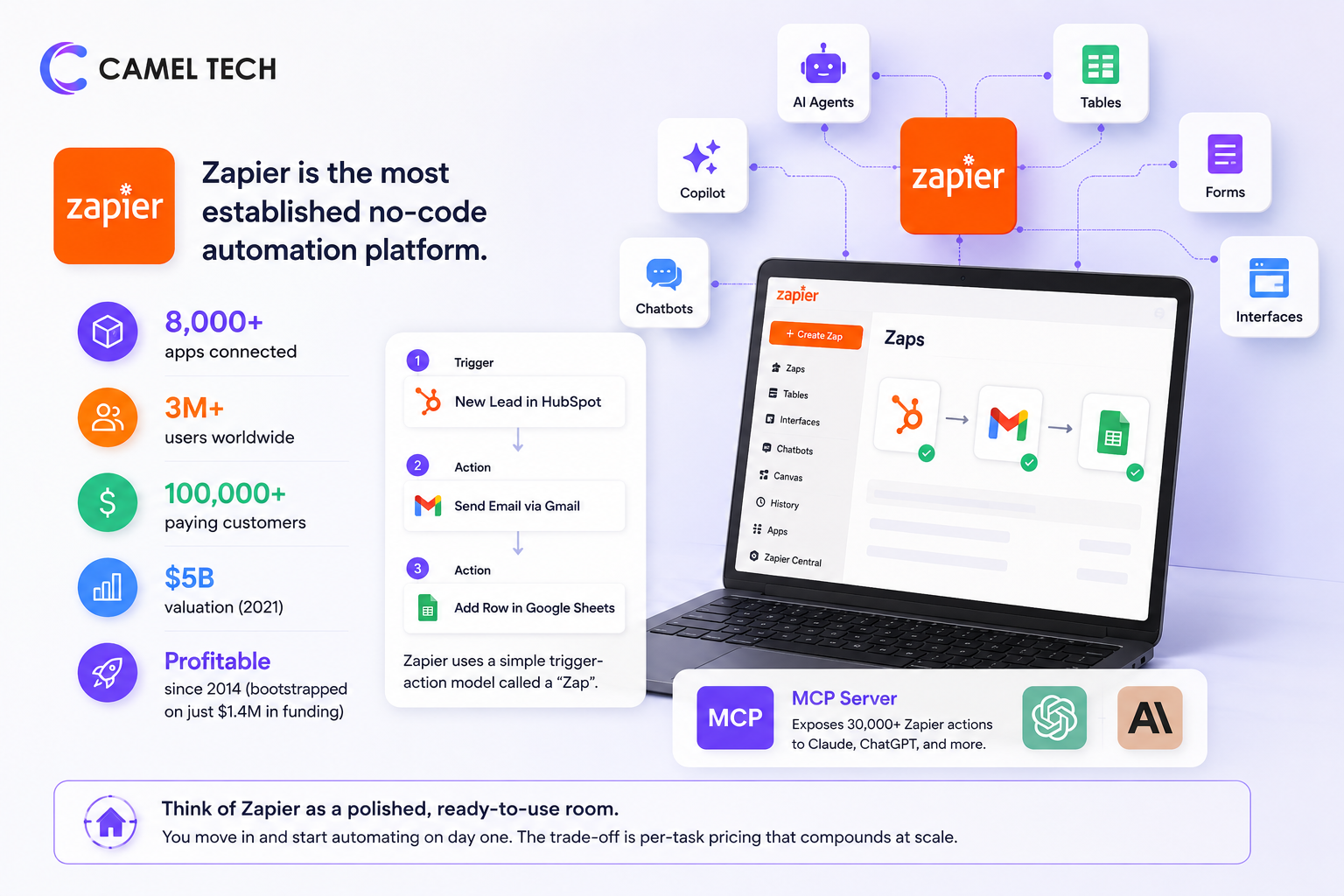
Think of Zapier as a polished, ready-to-use room. You move in and start automating on day one. The trade-off is per-task pricing that compounds at scale.
What is Make?
Make is a visual, canvas-based automation platform built around drag-and-drop workflows called “scenarios.” Founded in Prague in 2012 as Integromat, the company was acquired by Celonis in October 2020 for over $100M and rebranded to Make in February 2022. Today, Make operates as a business unit within Celonis (valued at $13B) and serves 400,000+ organizations across 200+ countries.
Make’s defining feature is its flowchart-style scenario builder. Where Zapier presents workflows as a linear list, Make shows them as a visual map.
Modules connect like nodes on a canvas, with routers branching paths, iterators looping through arrays, and aggregators consolidating data. This makes complex logic genuinely visible; a 30-step scenario fits on one screen and can be debugged at a glance.
In 2025-2026, Make introduced Maia (an AI scenario builder), Make AI Agents (autonomous agents on the visual canvas), Make Grid (real-time visualization of an organization’s automation landscape), Make Code (sandboxed JavaScript and Python execution), and a Model Context Protocol server.
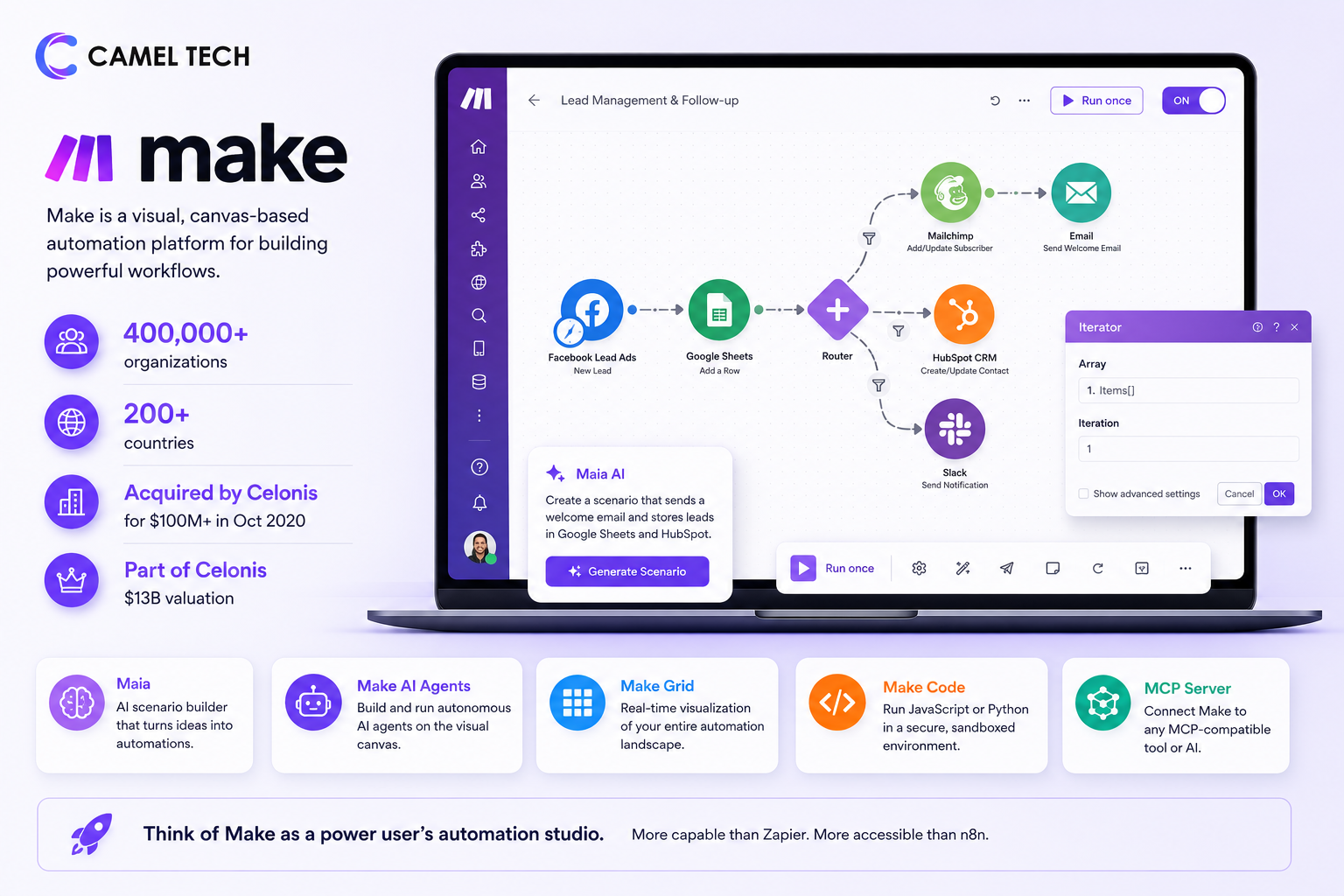
Think of Make as a power user’s automation studio. More capable than Zapier, more accessible than n8n.
What is n8n?
n8n (pronounced “n-eight-n”) is a source-available, fair-code workflow automation platform built around a node-based visual editor.
Founded in Berlin in 2019 by Jan Oberhauser, n8n started as a developer-friendly Zapier alternative and has rapidly grown into one of Europe’s most prominent AI startups. After raising €55M in Series B (March 2025) at a €300M valuation, n8n closed a $180M Series C in October 2025, led by Accel, pushing the total raised to $254M and the valuation to $2.5B. Backers include Sequoia, Felicis, Highland Europe, Meritech, Redpoint, and NVIDIA’s NVentures.
n8n’s defining feature is flexibility. The Community Edition is open source under a Sustainable Use License; you can self-host it for free with unlimited executions. Workflows are built by connecting nodes on a canvas, similar to Make, but with a stronger developer orientation: you can write JavaScript or Python directly inside any node, import cURL commands to generate API connections, and build custom integrations to any service with a public API.
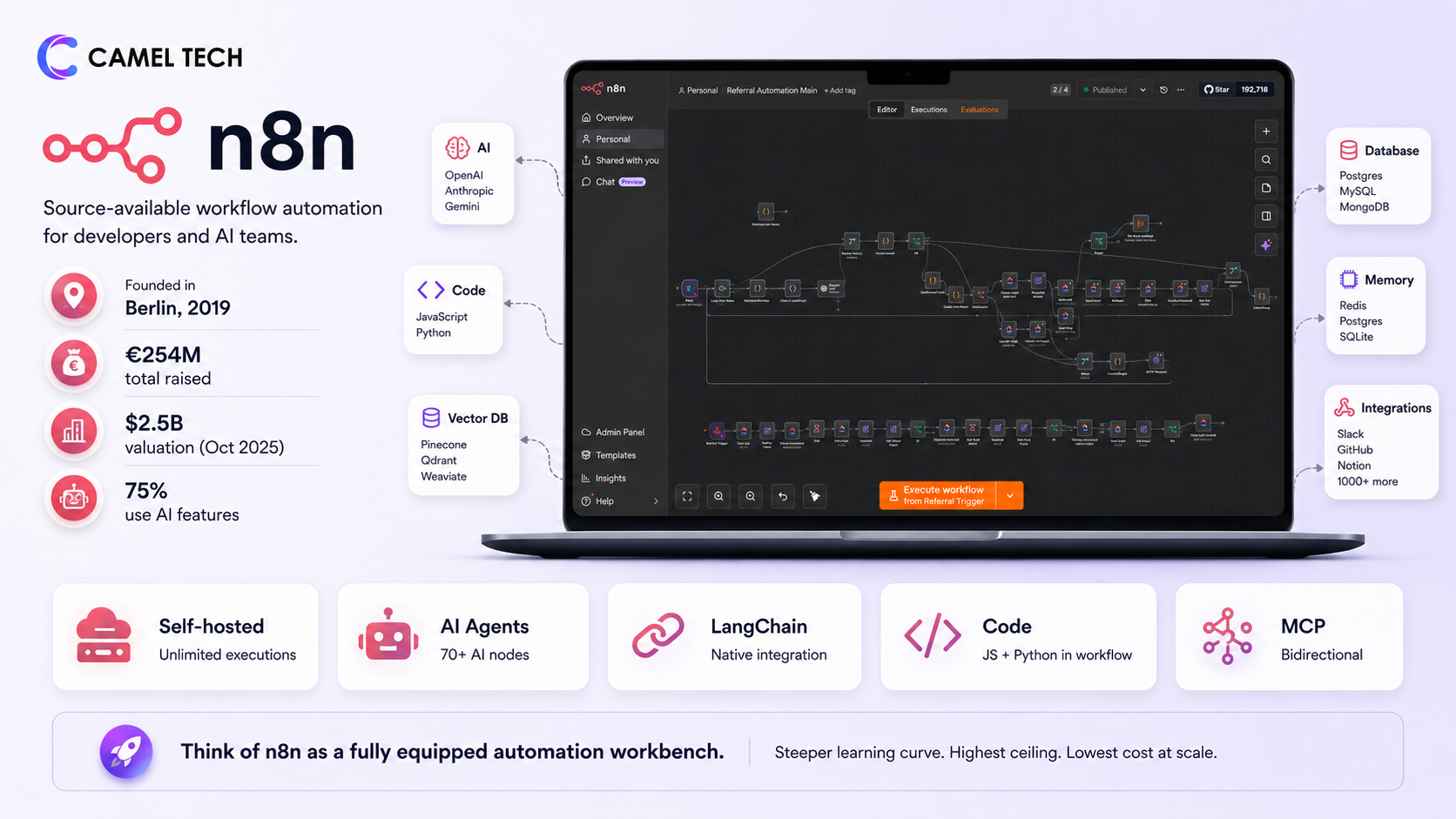
The platform is built for AI agents from the ground up. n8n 2.0 (launched December 2025) introduced isolated task runners, the AI Agent Tool Node for multi-agent orchestration, native LangChain integration with 70+ AI nodes, persistent agent memory, vector database support for RAG, and bidirectional MCP. About 75% of n8n customers now use AI features.
Think of n8n as a fully equipped automation workbench. Steeper learning curve. Highest ceiling. Lowest cost at scale.
Zapier vs Make vs n8n: Key Features
Pricing Models (Tasks vs Operations vs Executions)
This is the single most important difference between the three platforms, and it gets glossed over in most comparisons.
Zapier charges per task. n Zapier, Filter steps and Path steps do consume a task credit every time they execute successfully. Only the initial Trigger step is free.
Make charges per operation. An operation is any module action, including triggers, filters, and search modules. A 5-step scenario (1 trigger + 4 actions) running 1,000 times uses 5,000 operations, and that’s only if the trigger fires once. Make updated its polling mechanics to protect users from accidental overages. If a polling trigger checks an app and finds no new data, it does not consume an operation. It only costs 1 credit when it successfully retrieves data bundles to process.
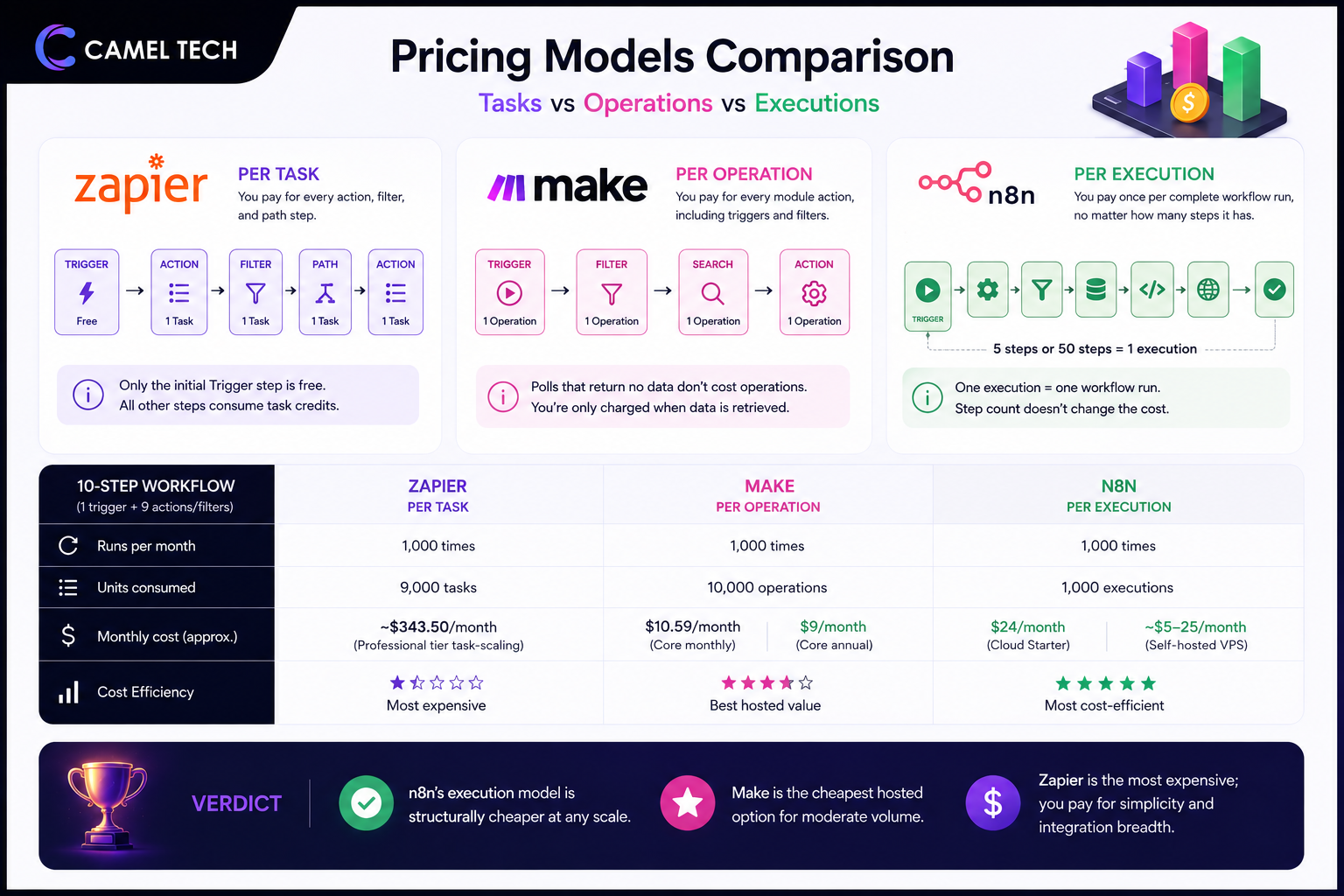
n8n charges per workflow execution. An execution is one complete workflow run, regardless of how many steps it contains. A 5-step workflow running 1,000 times uses 1,000 executions. A 50-step workflow running 1,000 times also uses 1,000 executions.
The math at scale is dramatic. For a 10-step workflow (1 trigger + 9 actions/filters) running 1,000 times per month:
- Zapier: 9,000 tasks (~$343.50/month on Professional tier task-scaling)
- Make: 10,000 operations ($10.59/month on Core monthly or $9/month annual)
- n8n Cloud: 1,000 executions ($24/month on Starter)
- n8n self-hosted: Unlimited executions (~$5-25/month VPS hosting)
Verdict: n8n’s execution model is structurally cheaper at any scale. Make is the cheapest hosted option for moderate volume. Zapier is the most expensive; you pay for simplicity and integration breadth.
Workflow Builder & Logic
Zapier: Zapier launched Zapier Canvas and integrated Copilot on-canvas editing. You are no longer restricted to a linear vertical checklist for complex processes; you can map out, split, group nodes, and build cross-product systems (Zaps, Tables, Interfaces, Agents) visually directly on a canvas ecosystem.
Make: Canvas-based flowchart. Modules connect with visible data flow lines. Routers split paths, iterators loop through arrays, aggregators consolidate. The entire scenario is visible on one screen. Excellent for complex logic, multi-route processing, and debugging. While grasping raw JSON bundle structures and data mapping historically created a steep learning curve, the addition of the Maia AI scenario builder and Make Code sandboxes allows users to bypass complex formatting by describing what they want or dropping in quick scripts.
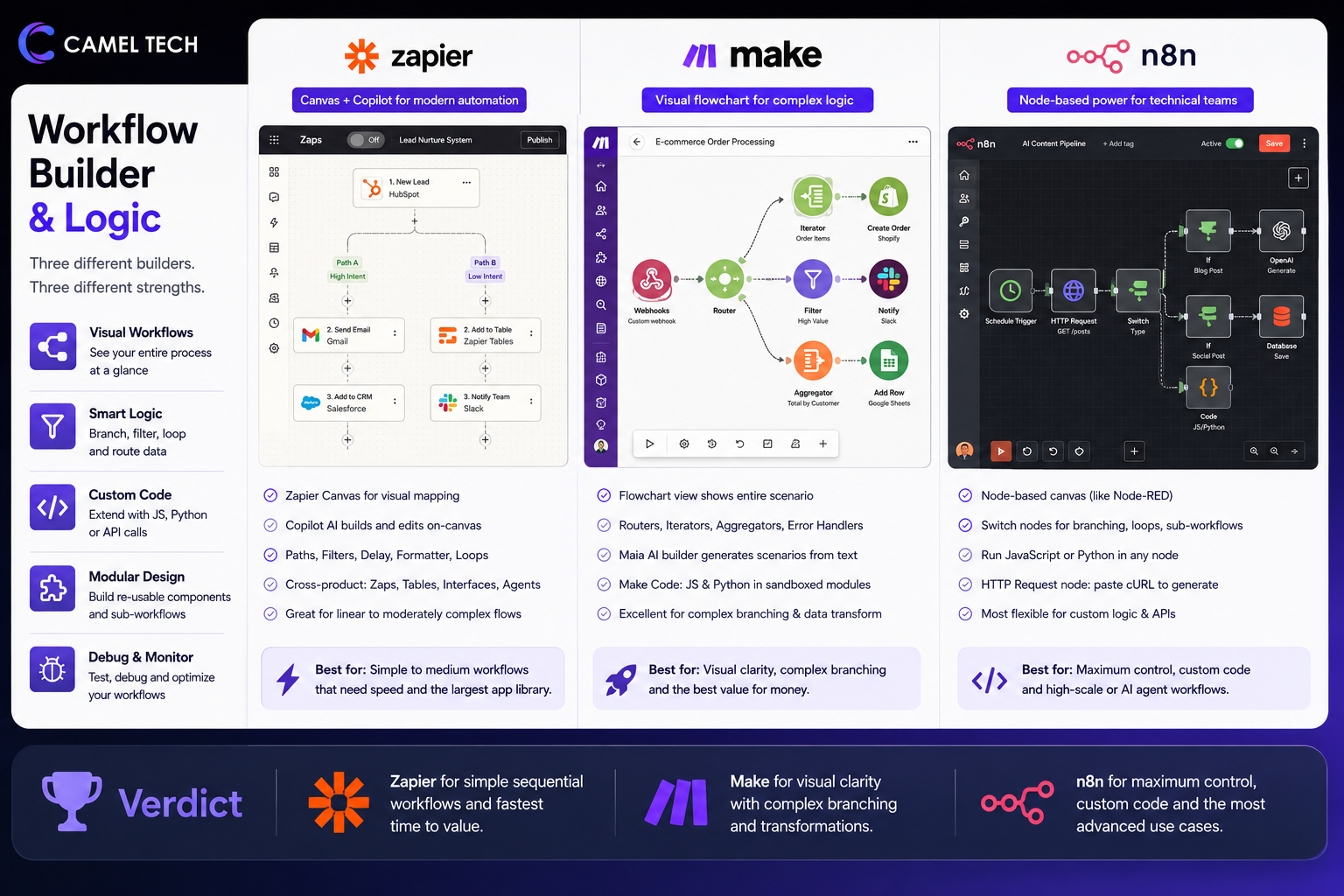
n8n: Node-based visual canvas similar to Node-RED. Most technical of the three. Switch nodes for branching, loops for iteration, sub-workflows for modular design. JavaScript and Python code can run inside any node. The HTTP Request node is the cleanest of the three for connecting to custom APIs (you can paste in a cURL command and n8n generates the connection setup).
Verdict: Zapier for simple sequential workflows. Make for visual clarity with complex branching. n8n for maximum control and complex logic that benefits from custom code.
Integration Library
Zapier: 8,000+ native integrations. The most comprehensive library by a wide margin. Niche CRMs, legacy accounting software, regional SaaS tools- Zapier connects them all. About 70 apps are gated behind paid plans (Salesforce, HubSpot, Xero, Zendesk).
Make: 3,000+ native integrations. Smaller catalog than Zapier, but Make’s integrations often go deeper. The Google Sheets module, for example, supports more granular operations than Zapier’s. Make also has 9,000+ pre-built scenarios in its template library. The HTTP module fills any gaps.
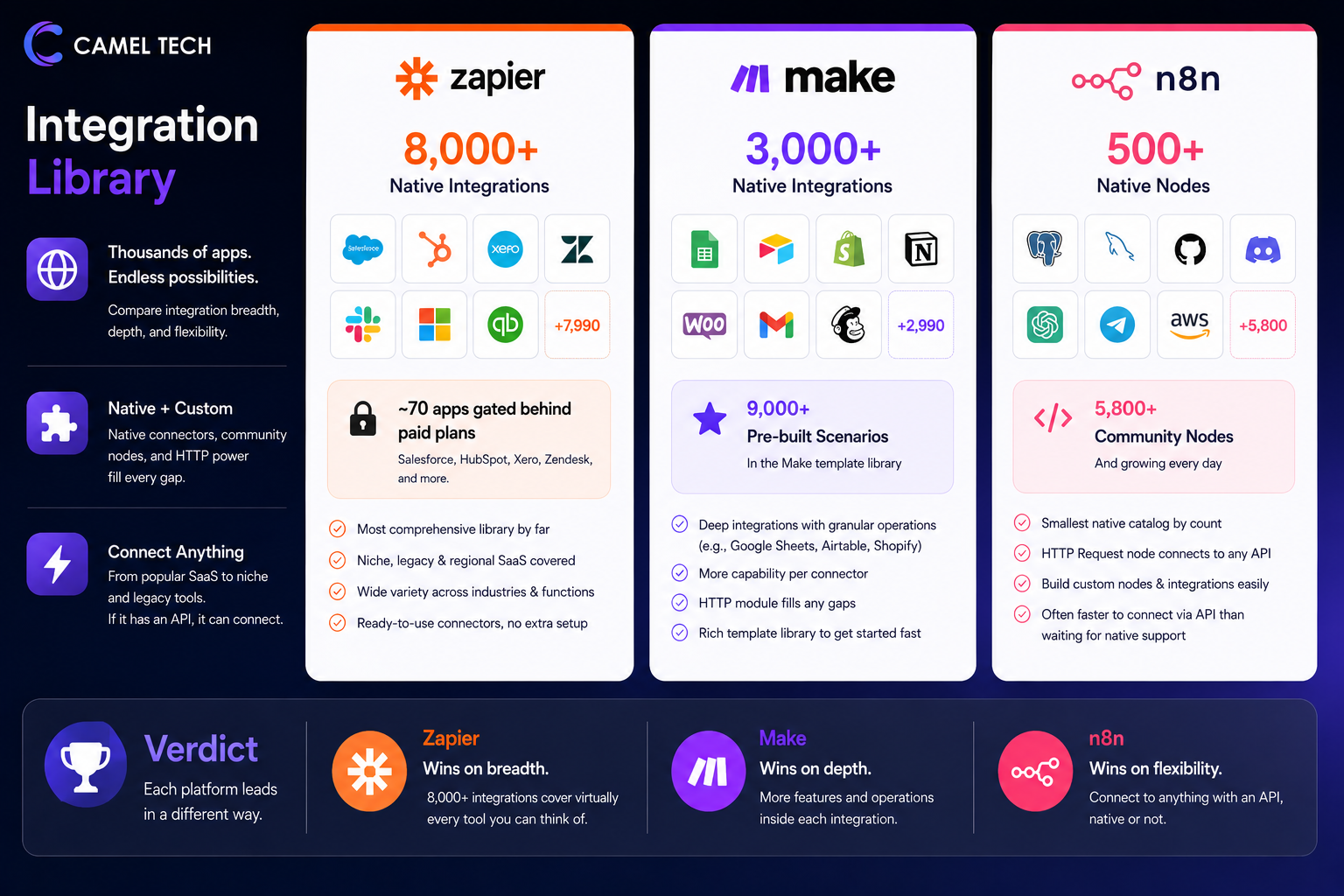
n8n: 500+ native nodes plus 5,800+ community-built nodes. The smallest native catalog by raw count, but the gap is largely closed by the HTTP Request node and the developer-friendly approach to custom connections. If a service has a public API, n8n can connect to it , usually faster than building a custom Zapier connector.
Verdict: Zapier wins on integration breadth, full stop. Make wins on integration depth (more capability per connector). n8n wins on flexibility (can connect to anything with an API, even if no native node exists).
AI & Agent Capabilities
Zapier: AI Copilot builds Zaps from natural language. Zapier Agents are autonomous AI teammates configured through a no-code interface. The MCP server exposes 30,000+ actions to external LLMs. Best for non-technical teams who want AI agents without configuration. Trade-off: limited customization. You can’t easily change the agent’s reasoning loop or memory model.
Make: Make AI Agents now run on the visual canvas with a reasoning panel that shows what the agent is doing in real time. Maia generates scenarios from natural language. Custom AI provider connections on all paid plans. Multimodal inputs (documents, images, audio). Better balance of accessibility and customization than Zapier.
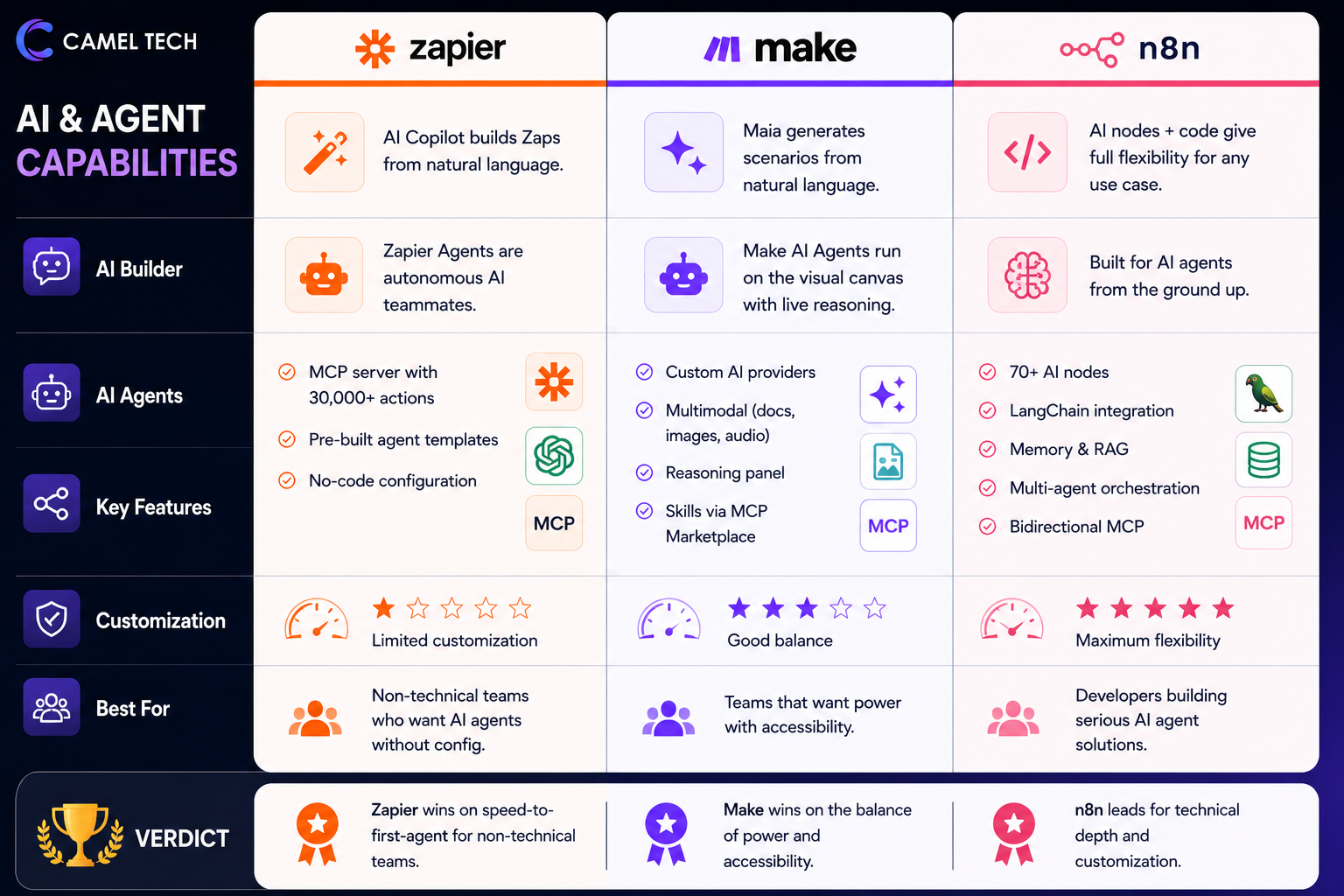
n8n: Native LangChain integration. 70+ AI nodes covering language models, memory (window buffer, summary, vector store), tools (web search, code execution, HTTP, databases), and output parsers. Persistent agent memory across executions. RAG with native vector store nodes. Multi-agent orchestration through the AI Agent Tool Node. Bidirectional MCP. The clear leader for serious AI agent development.
Verdict: n8n leads for technical depth and customization. Make wins on the balance of power and accessibility. Zapier wins on speed-to-first-agent for non-technical teams.
Custom Code & Developer Power
Zapier: Code by Zapier supports JavaScript and Python. While the base plan defaults to 30 seconds, it offers configurable extended runtimes up to 10 minutes on a per-step basis. Furthermore, it now natively supports package imports across thousands of npm and PyPI libraries, making it functional for advanced data parsing.
Make: The Make Code app supports JavaScript and Python with a 30-second runtime (300 seconds on Enterprise) and library imports on Enterprise. Better than Zapier, but still constrained.
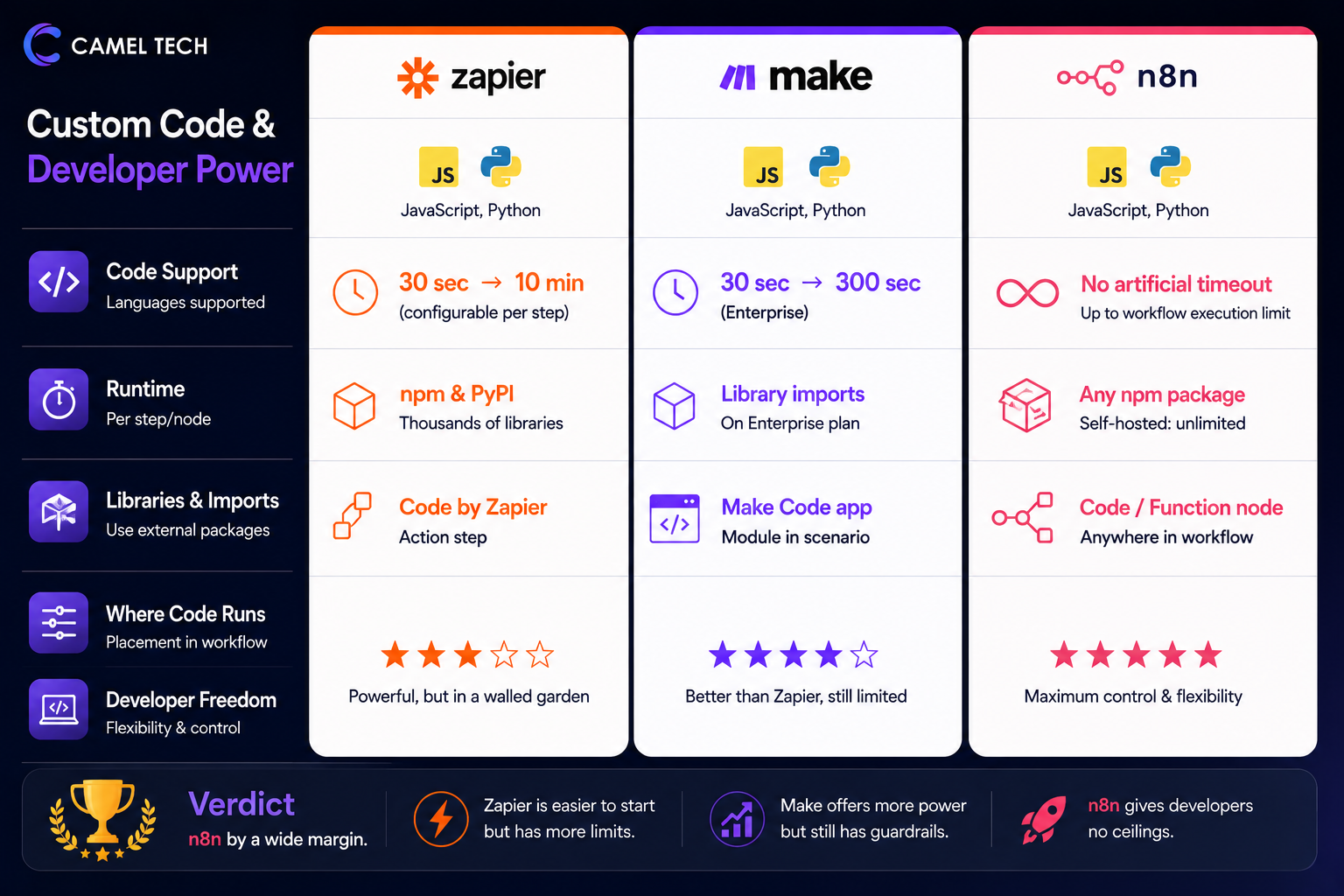
n8n: Full JavaScript and Python support inside any Code node or Function node. No artificial timeout below the workflow execution limit. Self-hosted instances can install any npm package. The clear winner for any workflow that requires real computation, custom parsing, or complex data transformation.
Verdict: n8n by a wide margin. This is one of the main reasons developers migrate from Zapier and Make to n8n.
Error Handling & Reliability
Zapier: Zapier introduced Custom Error Handling alongside version rollbacks and Error Paths. You can explicitly choose how an individual step reacts to a failure (e.g., completely ignore the error and proceed, or divert down a custom error-mitigation fallback route)
Make: Per-module error routes (a separate path that fires only on error), break/retry directives, and conditional error handling. Cleanest visual error handling of the three. You can see exactly which path the data took and why.
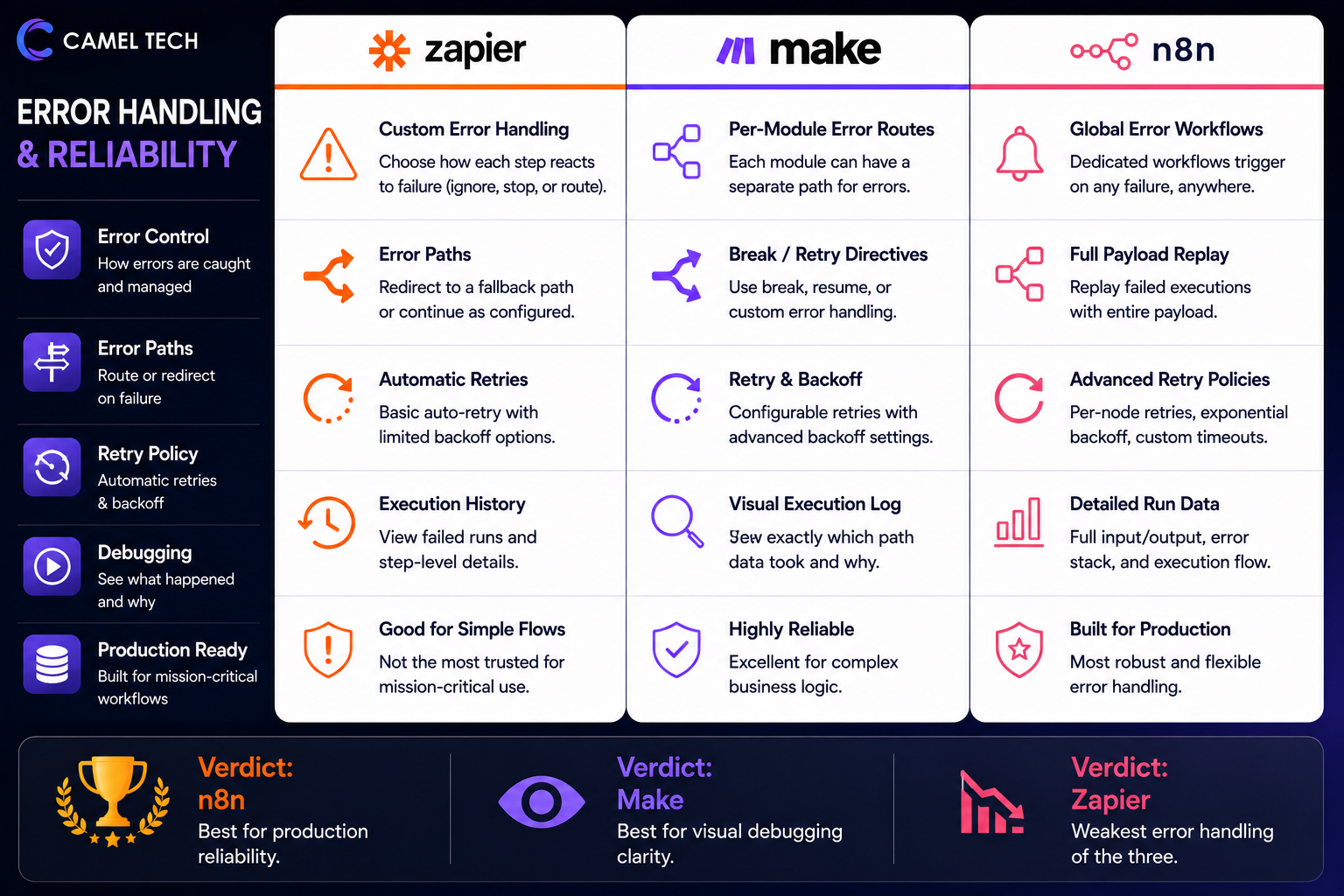
n8n: Dedicated error workflows that trigger on any failure across any workflow, with full payload replay. Per-node retry policies (configurable retries, exponential backoff, custom timeouts). Sub-workflows isolate brittle steps. Most production-grade error handling of the three.
Verdict: n8n for production reliability. Make for visual debugging clarity. Zapier is the weakest here , multiple operators we work with have migrated specifically because they couldn’t trust Zapier’s error path.
Self-Hosting & Data Control
Zapier: Cloud-only. SOC 2 Type II, GDPR, CCPA. Data resides on Zapier’s infrastructure. No self-hosting option, even for Enterprise.
Make: Cloud-only. SOC 2 Type II, GDPR. Make is owned by Celonis and benefits from enterprise-grade security infrastructure. No self-hosting option.
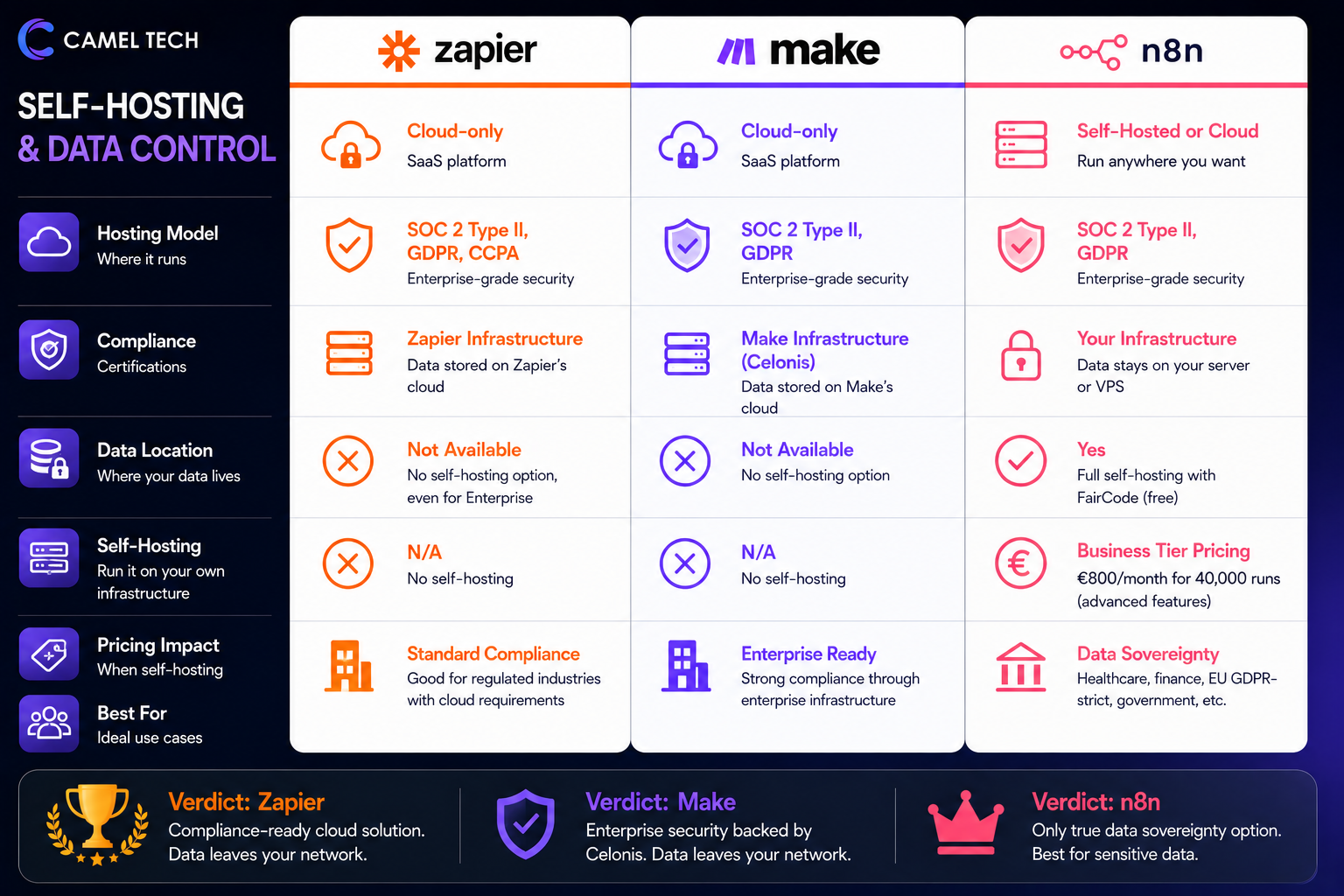
n8n: The only platform of the three with true self-hosting. The free FairCode edition allows you to run unlimited executions on your own server or VPS, meaning data never leaves your infrastructure. However, note that if you scale to n8n’s Self-Hosted Business Tier to unlock advanced features like SSO, Git integration, and multi-environments, n8n transitions you away from flat-rate server pricing and applies execution-based licensing costs starting at €800/month for 40,000 runs.
Verdict: n8n is the only viable option for healthcare, finance, EU GDPR-strict, government, or any team that requires data sovereignty. Zapier and Make can serve regulated industries through their compliance certifications, but the data still leaves your network.
Performance & Speed
Zapier: 1-15 minute polling intervals, depending on plan and trigger type. Webhook-triggered Zaps fire near-instantly. Plan-tier-based execution priority. Free and Pro plans can experience delays during peak usage.
Make: Polling intervals from 15 minutes (Free) down to 1 minute (Core+). Pro plan adds priority execution, scenarios run faster during peak times. Some users report 5-minute delays on Core during busy periods, which is why agencies typically upgrade to Pro.
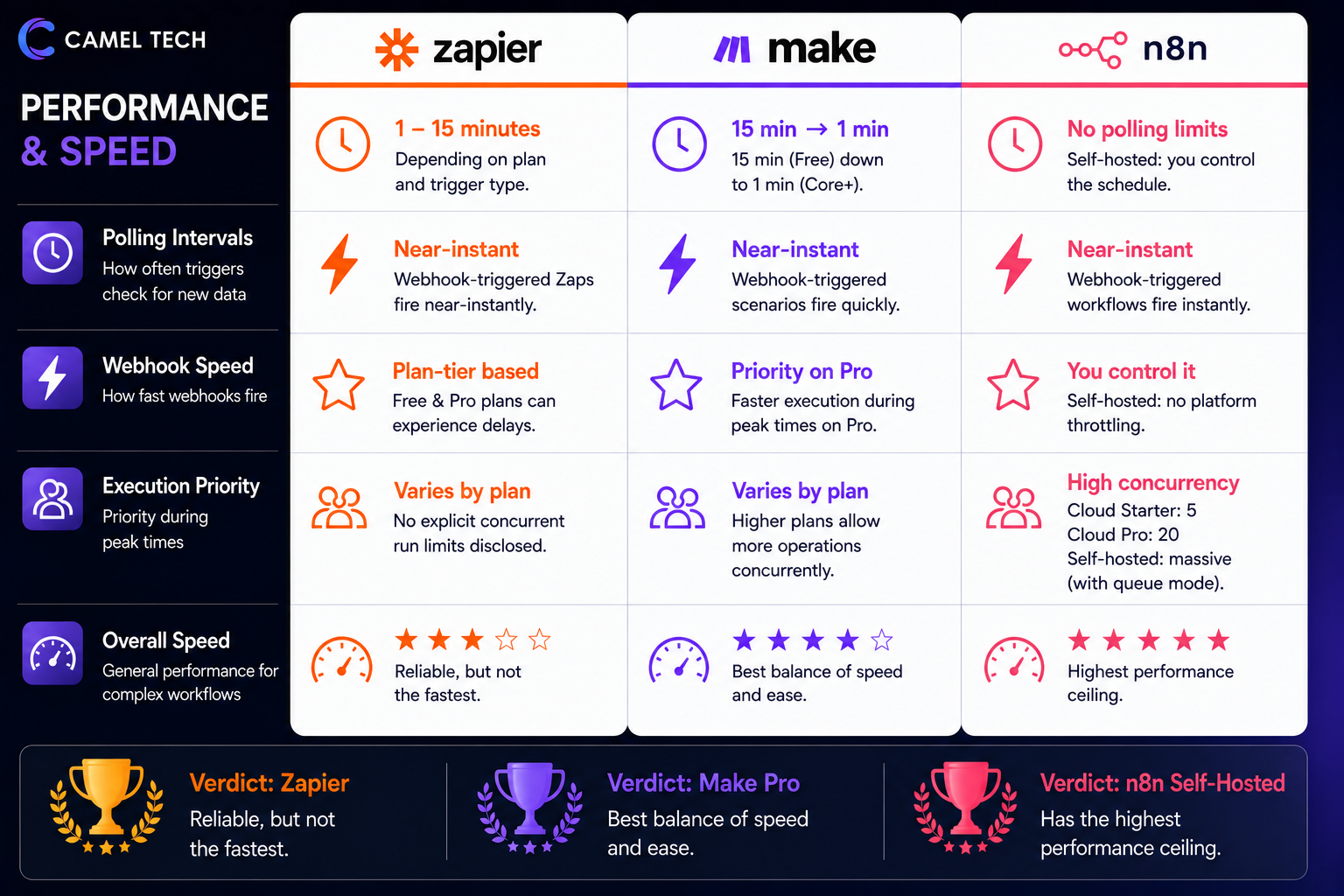
n8n: No polling delay limits on self-hosted (you control the schedule). Cloud Starter has 5 concurrent executions, Cloud Pro has 20. Self-hosted with queue mode (Redis-backed workers) handles massive concurrency. Generally faster than Zapier and Make for complex workflows.
Verdict: n8n self-hosted has the highest performance ceiling. Make Pro is the best balance of speed and ease. Zapier is reliable but not the fastest.
Collaboration & Team Features
Zapier: Team plan (starting at $103.50/month billed annually) adds shared folders, shared app connections, user roles and permissions, and SAML SSO. Enterprise adds advanced admin permissions, observability, custom data retention, and a dedicated Technical Account Manager.
Make: Teams plan ($29/month annual) adds team roles, shared scenario templates, and collaboration features. Enterprise adds SSO, SCIM, audit logs, and 24/7 support.
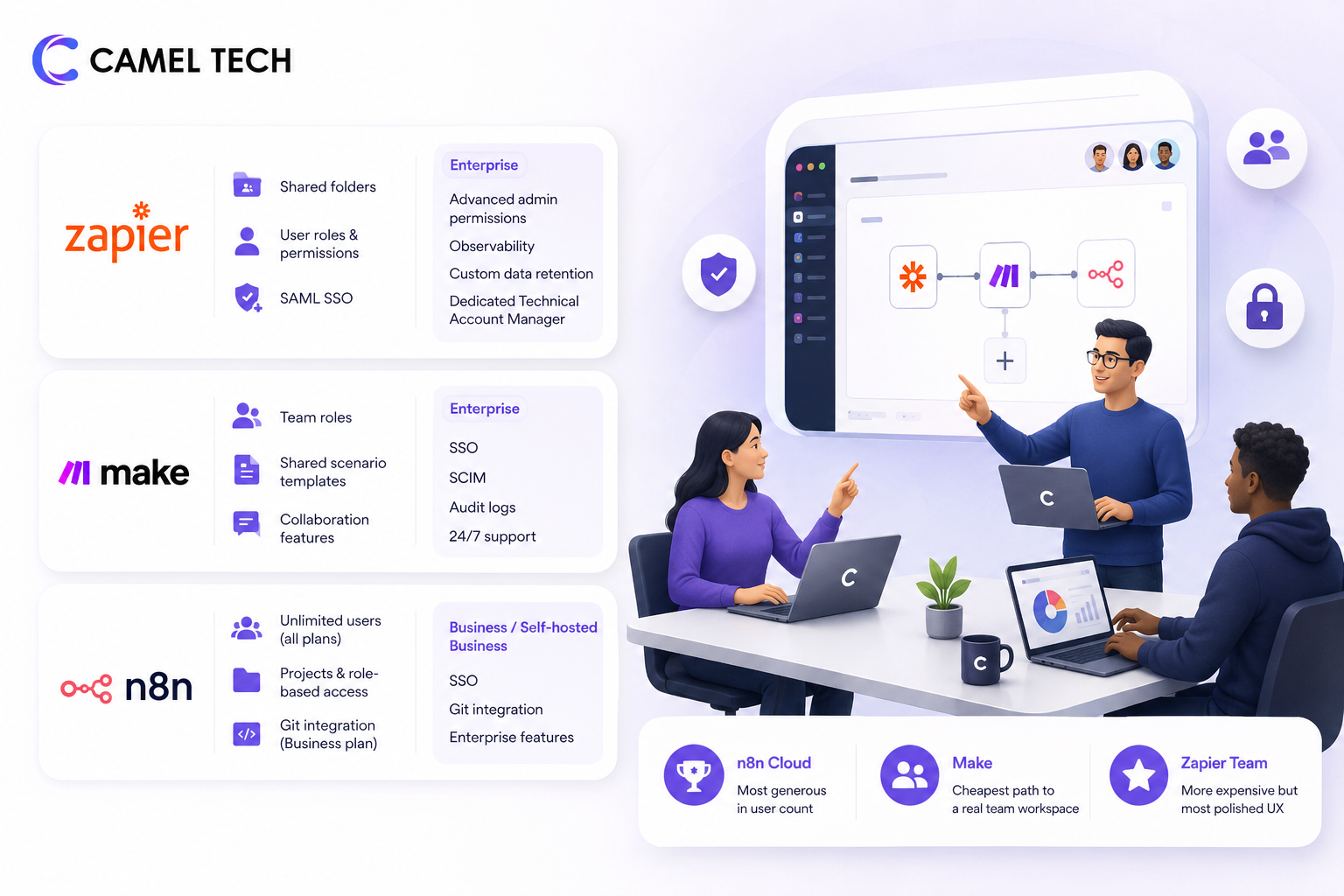
n8n: Cloud all plans support unlimited users (rare in this category). Cloud Pro adds projects, role-based access. Business plan adds SSO and Git integration for proper version control of workflows. Self-hosted Business gets the same enterprise features.
Verdict: n8n Cloud is the most generous in terms of user count. Make is the cheapest path to a real team workspace. Zapier Team is more expensive but has the most polished collaboration UX.
Templates & Pre-Built Workflows
Zapier: Thousands of pre-built Zap templates organized by app and use case. The largest template library by raw count. Most templates cover simple 2-3 step workflows.
Make: 9,000+ pre-built scenarios across apps and industries. Templates often demonstrate more sophisticated patterns (routers, iterators, error handling).
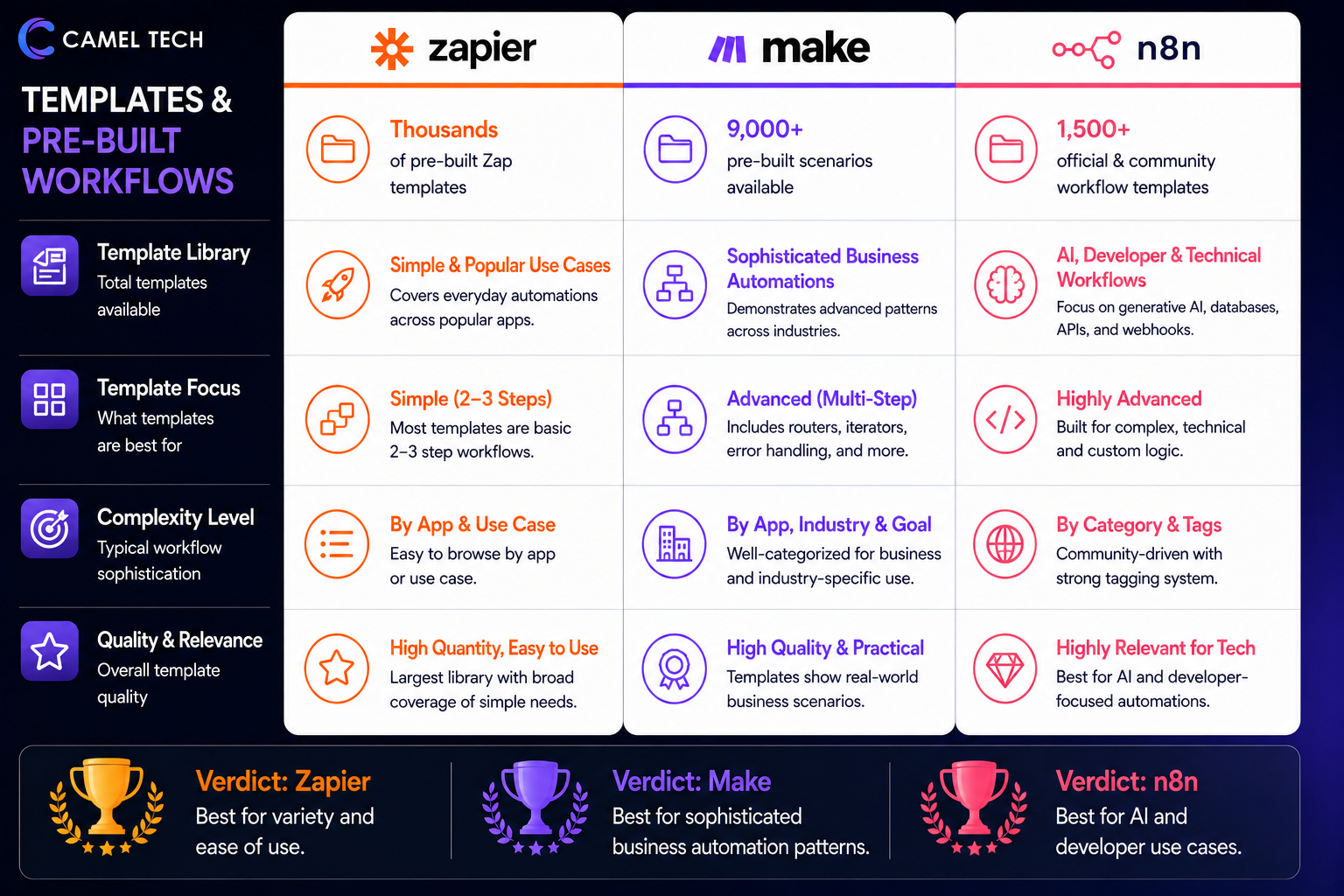
n8n: 1,500+ official and community-contributed workflow templates, skewing heavily toward generative AI, advanced database transformations, and technical webhook pipelines.
Verdict: Zapier for variety and ease. Make for sophisticated business automation patterns. n8n for AI and developer use cases.
MCP & Agent Interoperability
Model Context Protocol (MCP) is the emerging standard for AI agents to discover and use tools. All three platforms support it as of 2026, but the implementations differ.
Zapier MCP: Server-side. Exposes 30,000+ Zapier actions as tools to external AI clients (Claude, ChatGPT, Cursor, Microsoft Copilot Studio). In Zapier’s 2026 Model Context Protocol (MCP) server architecture, calling a single tool execution counts exactly as one task, following the standard “one successful action step = one task” billing logic.
Make MCP Server and Client: Make’s native MCP integration functions exclusively as an MCP Server (exposing Make scenarios out to AI clients like Claude or ChatGPT). Make does not natively include an “MCP Client” node to ingest and connect out to external third-party MCP servers from within a scenario canvas.
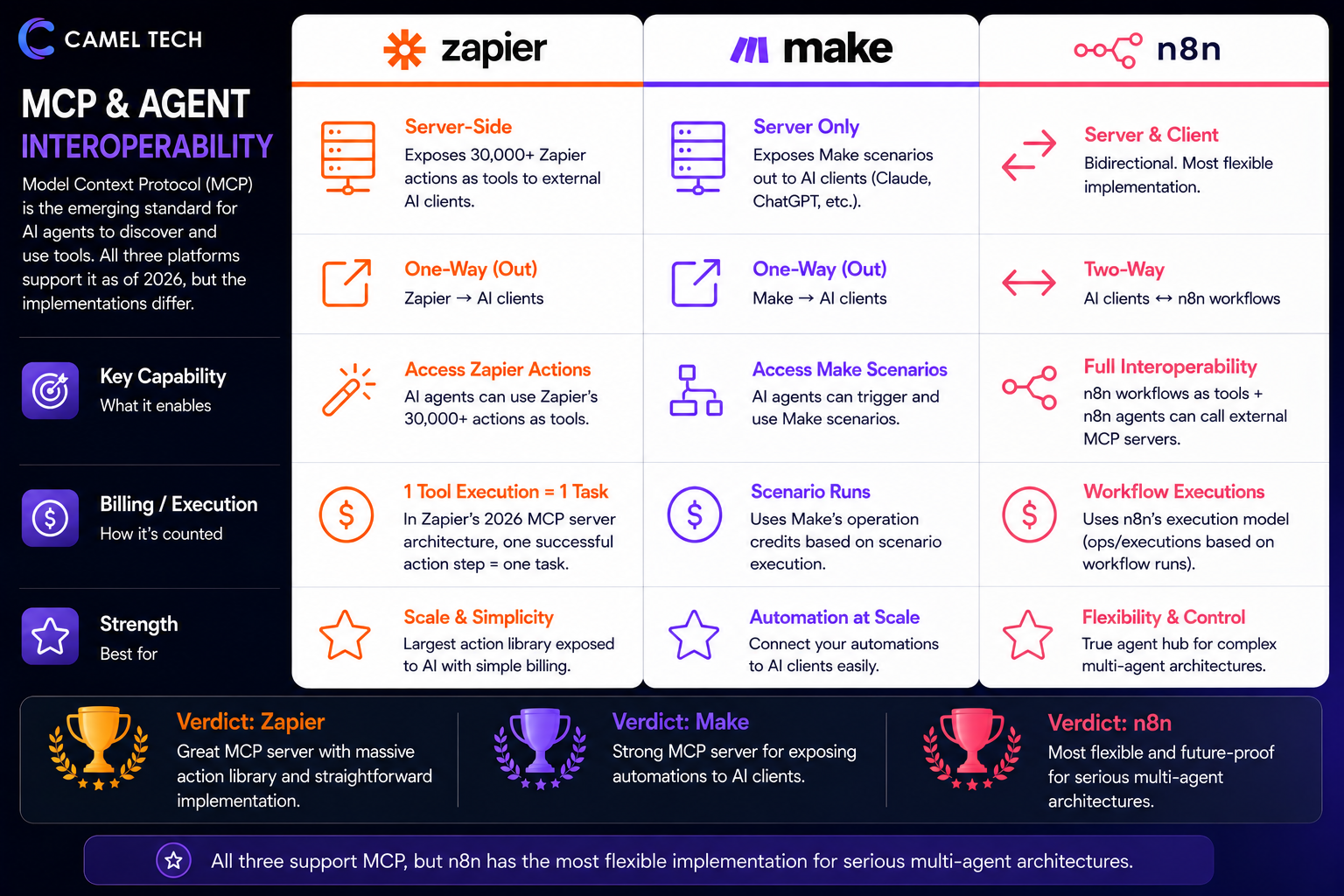
n8n MCP Server Trigger and Client nodes: Bidirectional. Most flexible of the three. Any n8n workflow can be exposed as an MCP tool. n8n agents can call external MCP servers. This positions n8n as a true agent hub, your agents call external tools, external agents call your workflows.
Verdict: All three support MCP, but n8n has the most flexible implementation for serious multi-agent architectures.
Built-in Database, Forms, and Interfaces
Zapier: Includes Tables (database), Forms (form builder), and Interfaces (no-code app builder) on all paid plans. Tables, Forms, and Interfaces are unlimited and don’t count toward task usage. This is one of Zapier’s biggest 2025-2026 changes, these were previously $20/month add-ons.
Make: Has Data Stores (key-value storage) and a Forms module. No equivalent to Zapier Interfaces or a no-code app builder. Teams typically pair Make with Airtable or a separate UI tool.
n8n: Added Data Tables in December 2025 (lightweight built-in database). Form Trigger node handles forms. No app builder. Self-hosted users typically connect n8n to PostgreSQL, Redis, or any other database directly.
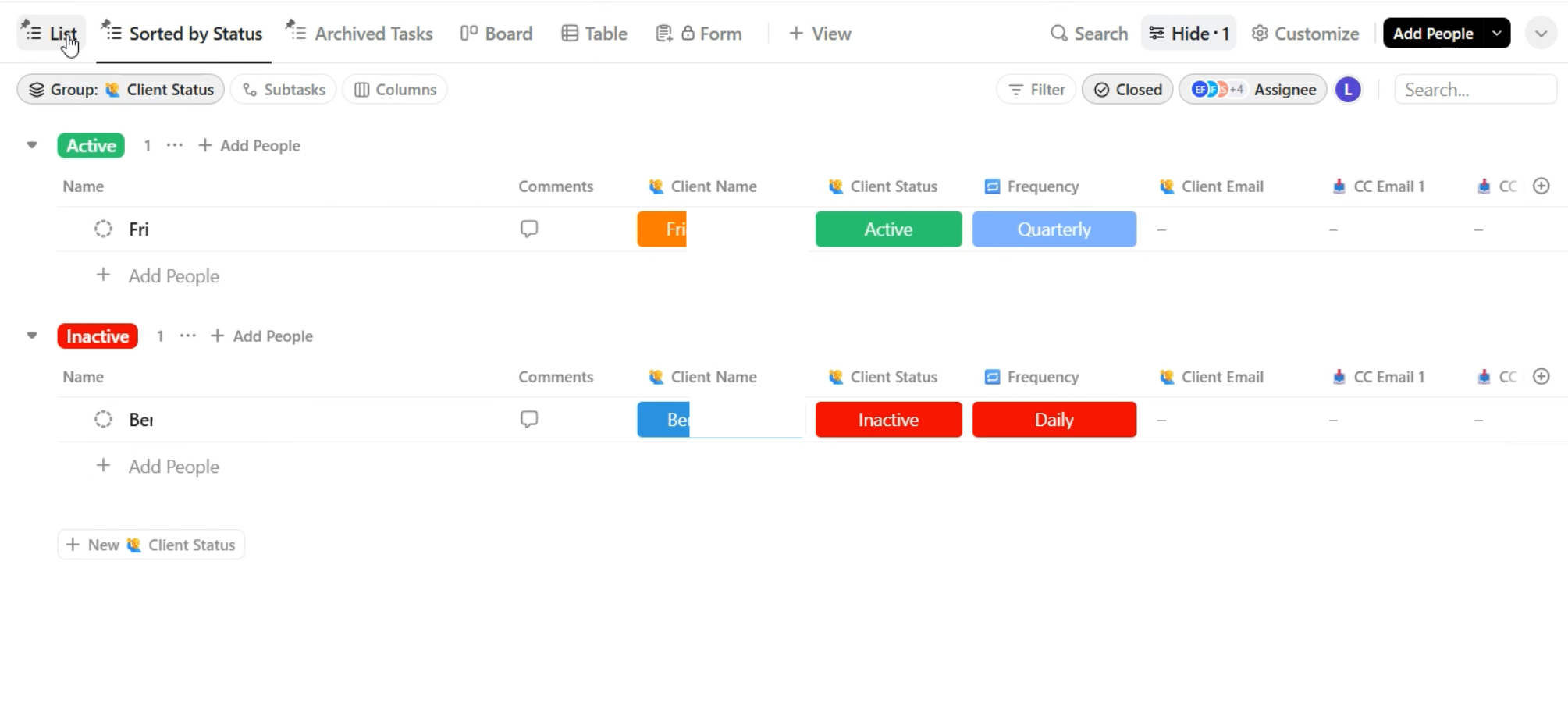
Features built-in Data Tables for integrated internal storage. These allow workflows to read, insert, update, or upsert data natively without spinning up external servers. However, they are engineered for light-to-moderate storage utility (capped at a default 50MB limit per instance) to hold AI state evaluations, lookup maps, or execution histories, rather than acting as a full relational database
Verdict: Zapier’s bundled Tables, Forms, and Interfaces are a genuine differentiator for teams that want one tool to handle workflows, data, and lightweight UI. Make and n8n are stronger as automation engines but require pairing with separate tools for data storage and UI.
Beyond the Features: Security, Support, Permissions & Compliance
How Secure Are Zapier, Make, and n8n?
All three are enterprise-grade, with differences worth understanding.
Zapier: SOC 2 Type II certified, GDPR compliant, CCPA compliant. Hosted on AWS. Enterprise plan adds SAML SSO, audit logs, custom data retention, and dedicated support. HIPAA available on Enterprise.
Make: SOC 2 Type II certified, SOC 3, GDPR compliant. Hosted across AWS, Azure, and Google Cloud. Make does offer an on-premise execution agent for Enterprise users to securely connect to local, firewalled networks. However, it is not a full hybrid workflow engine or a self-hosted platform like n8n. But Make does not offer an on-premise hybrid agent architecture for local networks. That specific feature is actually a core component of Zapier Enterprise (which features Secure Local Gateways/on-prem connectivity) or n8n’s hybrid execution framework
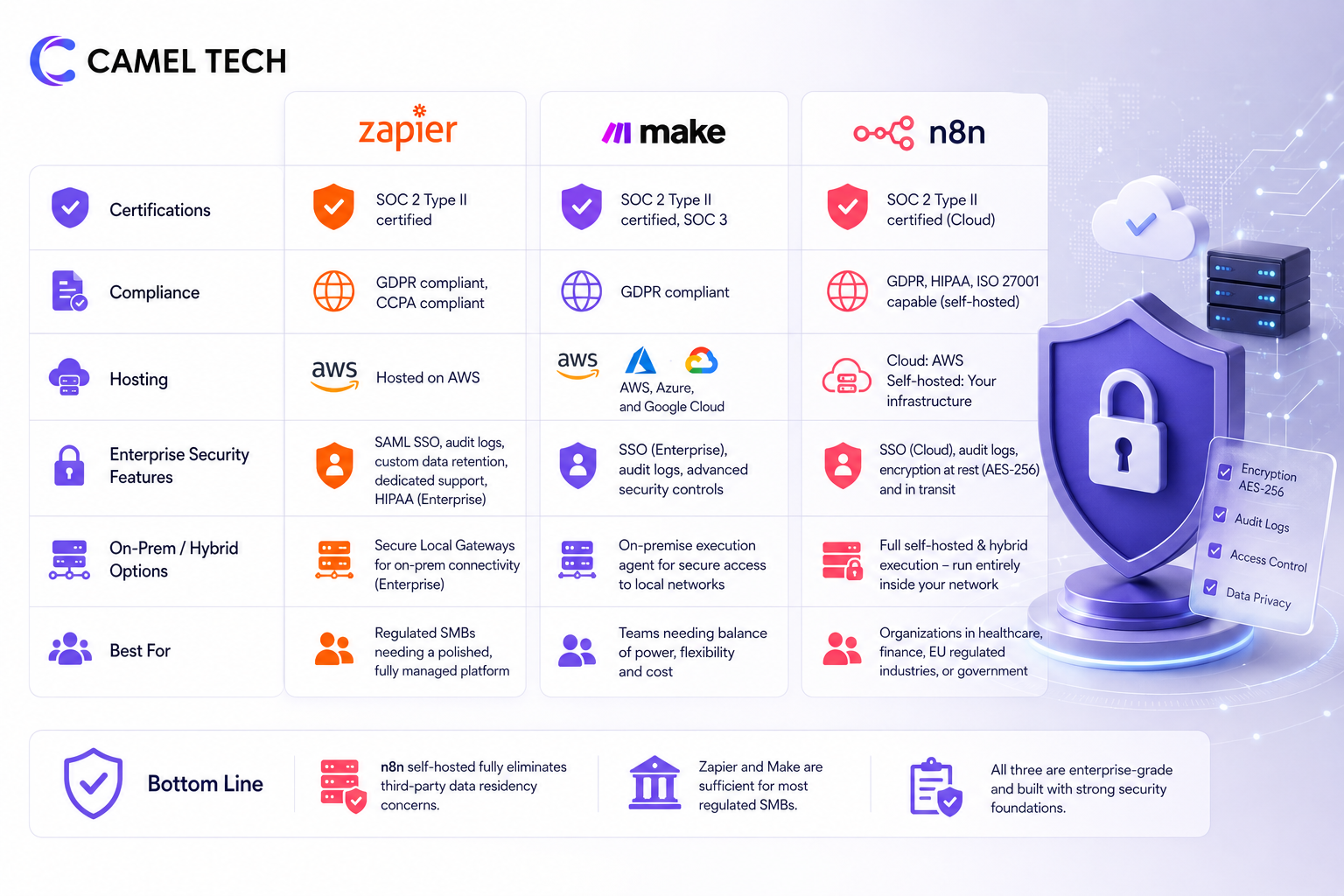
n8n: SOC 2 Type II certified for Cloud. Self-hosted security depends entirely on how you configure it. The Cloud infrastructure is built with enterprise-grade data encryption at rest (AES-256) and in transit, n8n officially holds both SOC 2 Type II and SOC 3 certifications for its operations and cloud infrastructure. However, n8n’s self-hosted FairCode layout completely bypasses this by allowing you to anchor the architecture entirely within your own pre-certified networks (making it fully capable of fulfilling HIPAA, GDPR, and ISO 27001 requirements)
If you operate in healthcare, finance, EU regulated industries, or government, n8n self-hosted is the only option that fully eliminates third-party data residency concerns. Zapier and Make are sufficient for most regulated SMBs through their compliance certifications.
How Good Is Customer Support for Each?
Zapier: 24/7 chatbot. Email support on Pro plan, live chat on Pro plans with 2,000+ tasks. Premier Support on Team and above. Response times can exceed 24 hours on lower tiers. Enterprise gets dedicated Technical Account Manager. Trustpilot reviews are notably negative (1.4/5) , primarily complaints about billing and overage charges, while G2 (4.5/5) skews more positive on platform quality.
Make: 24/7 chat support on all paid plans. Quality is functional but not exceptional. Make Academy provides extensive learning resources. 90-day expert access on free plans. Enterprise gets 24/7 dedicated support and access to the Value Engineering team.
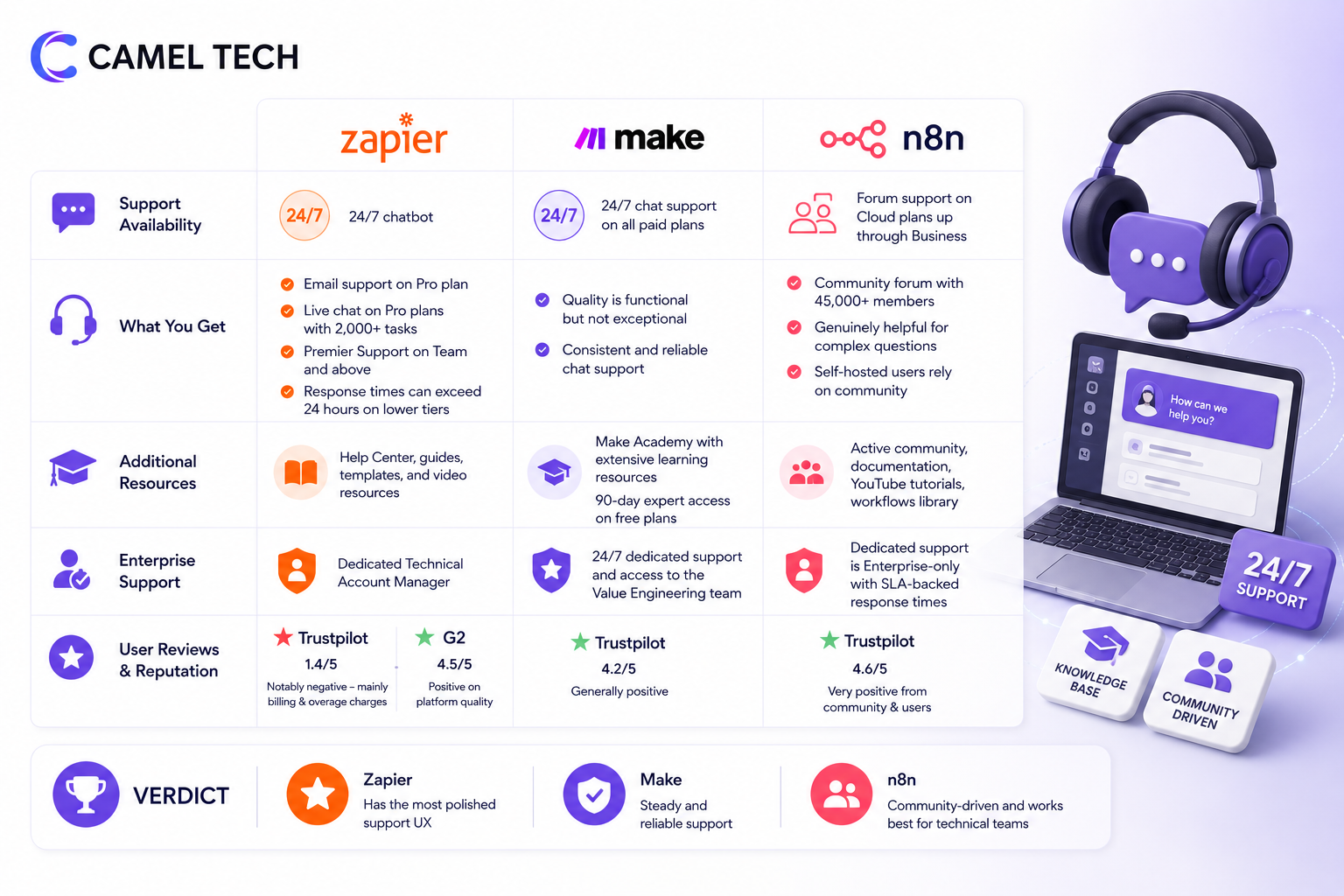
n8n: Forum support on Cloud plans up through Business (the n8n community has 45,000+ members and is genuinely helpful for complex questions). Dedicated support is Enterprise-only with SLA-backed response times. Self-hosted users rely on community, which works well for technical teams.
Verdict: Zapier has the most polished support UX, Make is steady and reliable, n8n is community-driven and works best for technical teams comfortable with forums.
Does Each Platform Work Offline?
None of the three has a meaningful offline mode for building or running workflows , these are cloud-based services. n8n self-hosted can run on an internal network without internet access if all integrated services are also internal, which is genuinely useful for air-gapped environments. Zapier and Make are pure cloud and require internet for everything.
How Do User Permissions Compare?
Zapier: Owner, Admin, Member, Limited Member, Guest. Permissions at the workspace, folder, and Zap level. Custom roles on Enterprise.
Make: Owner, Admin, Member, Member with restricted access, Operator. Permissions at the organization and team level. SSO and audit logs on Enterprise.
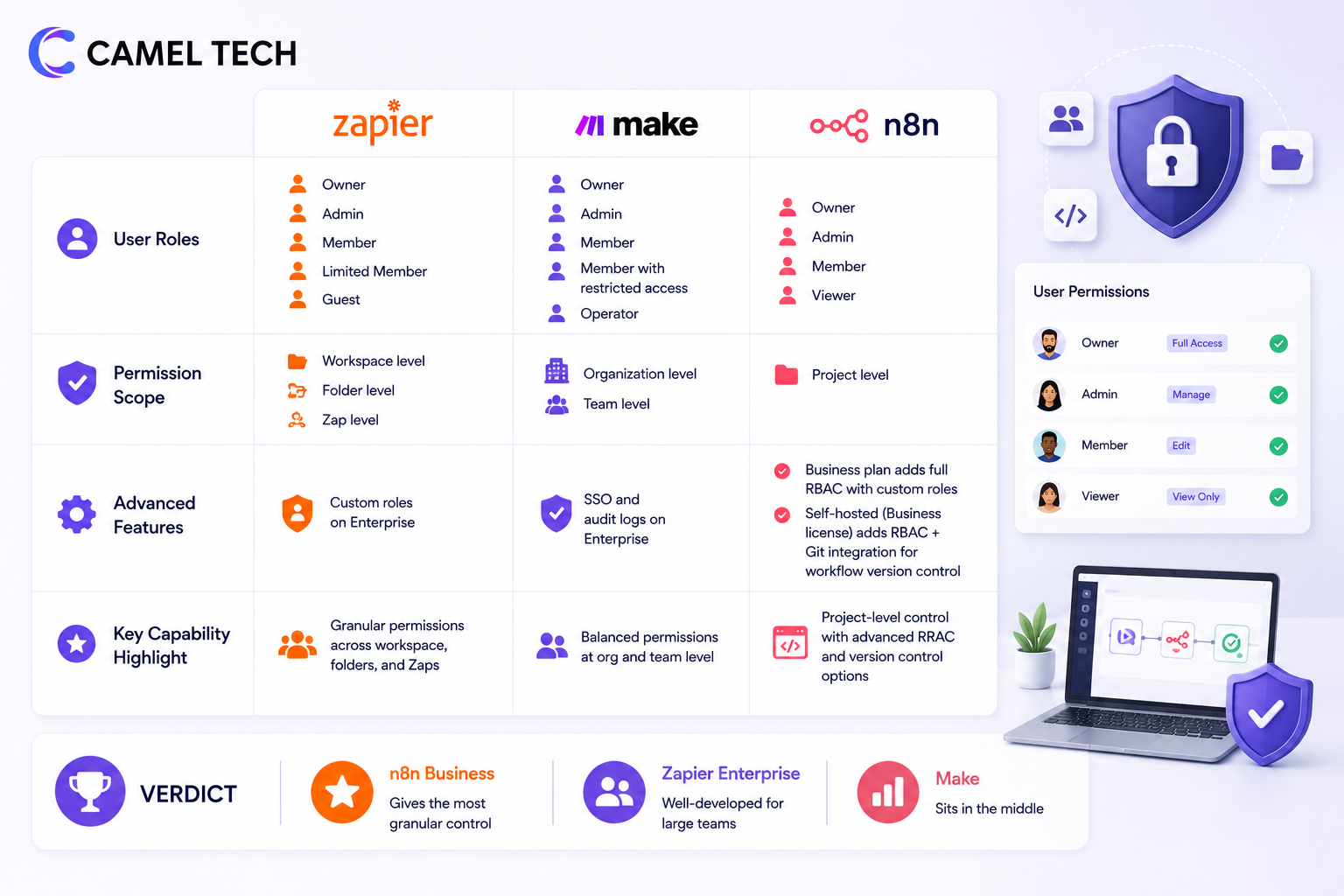
n8n: Cloud has Owner, Admin, Member, Viewer. Project-level access controls. Business plan adds full role-based access control (RBAC) with custom roles. Self-hosted with the Business license gets the same RBAC plus Git integration for workflow version control.
Verdict: n8n Business gives the most granular control. Zapier Enterprise is well-developed for large teams. Make sits in the middle.
Can You Control Your Data?
All three let you export and delete your data. None of them train models on your data.
- Zapier: Customer data isn’t used for model training. AI features use OpenAI and Anthropic with zero-retention agreements.
- Make: Customer data isn’t used for model training. AI features go through Make’s own AI provider or your custom-connected provider.
- n8n: Customer data isn’t used for model training. Self-hosted gives you complete control over what data goes where.
The AI Battle: Zapier Agents vs Make AI Agents vs n8n LangChain
Zapier Agents, The Easiest On-Ramp
Zapier Agents launched in January 2025 and went GA in May 2025. The model is “one agent, one job” with Agent Pods for grouping related agents and an Activity dashboard for monitoring. Configuration is no-code: describe the agent’s role, attach knowledge sources (Box, Dropbox, Google Drive), and it works.
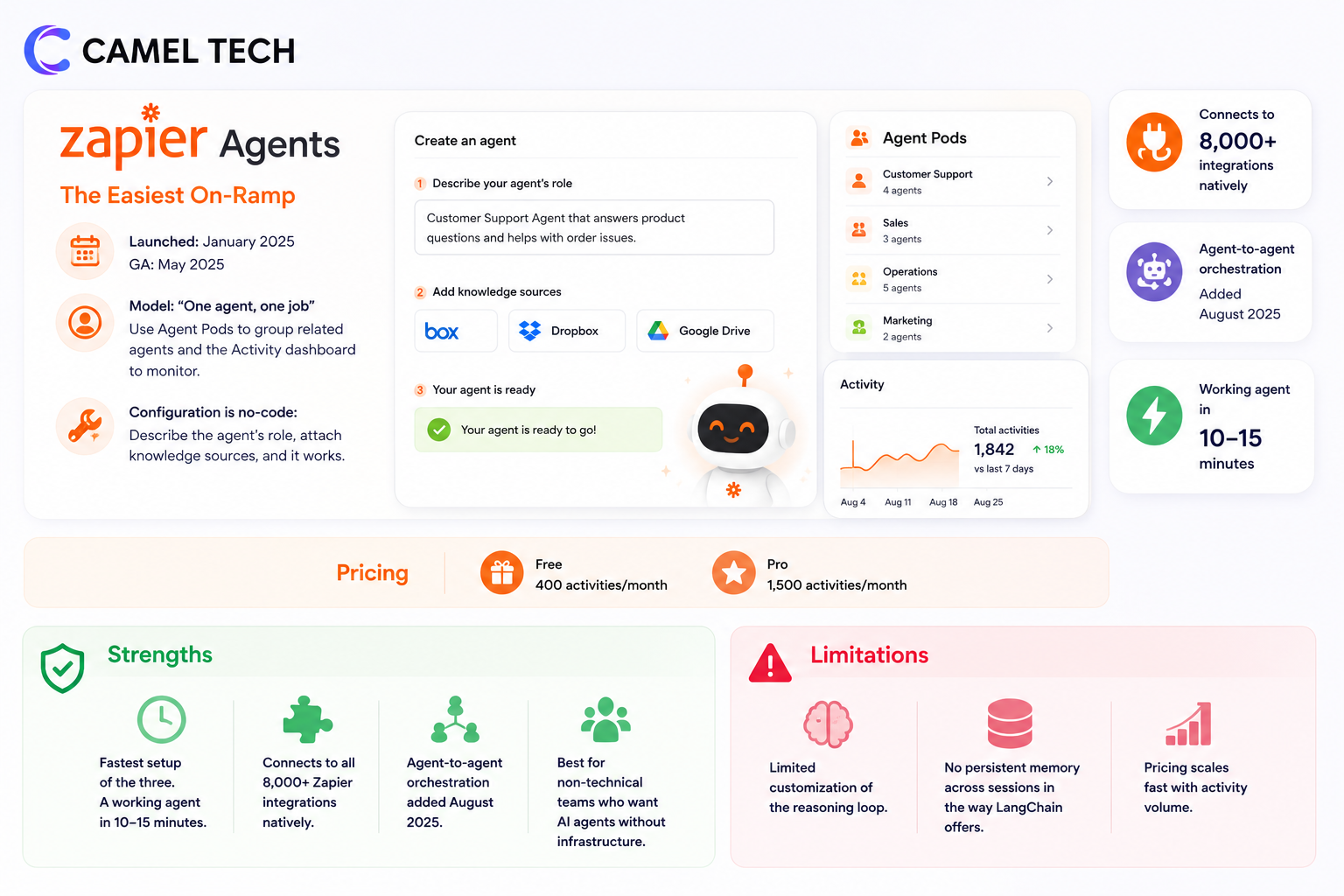
Pricing: 400 activities/month on Free, 1,500 activities/month on Pro.
Strengths:
- Fastest setup of the three. A working agent in 10-15 minutes.
- Connects to all 8,000+ Zapier integrations natively.
- Agent-to-agent orchestration added August 2025.
- Best for non-technical teams who want AI agents without infrastructure.
Limitations:
- Limited customization of the reasoning loop.
- No persistent memory across sessions in the way LangChain offers.
- Pricing scales fast with activity volume.
Make AI Agents, Visual Orchestration
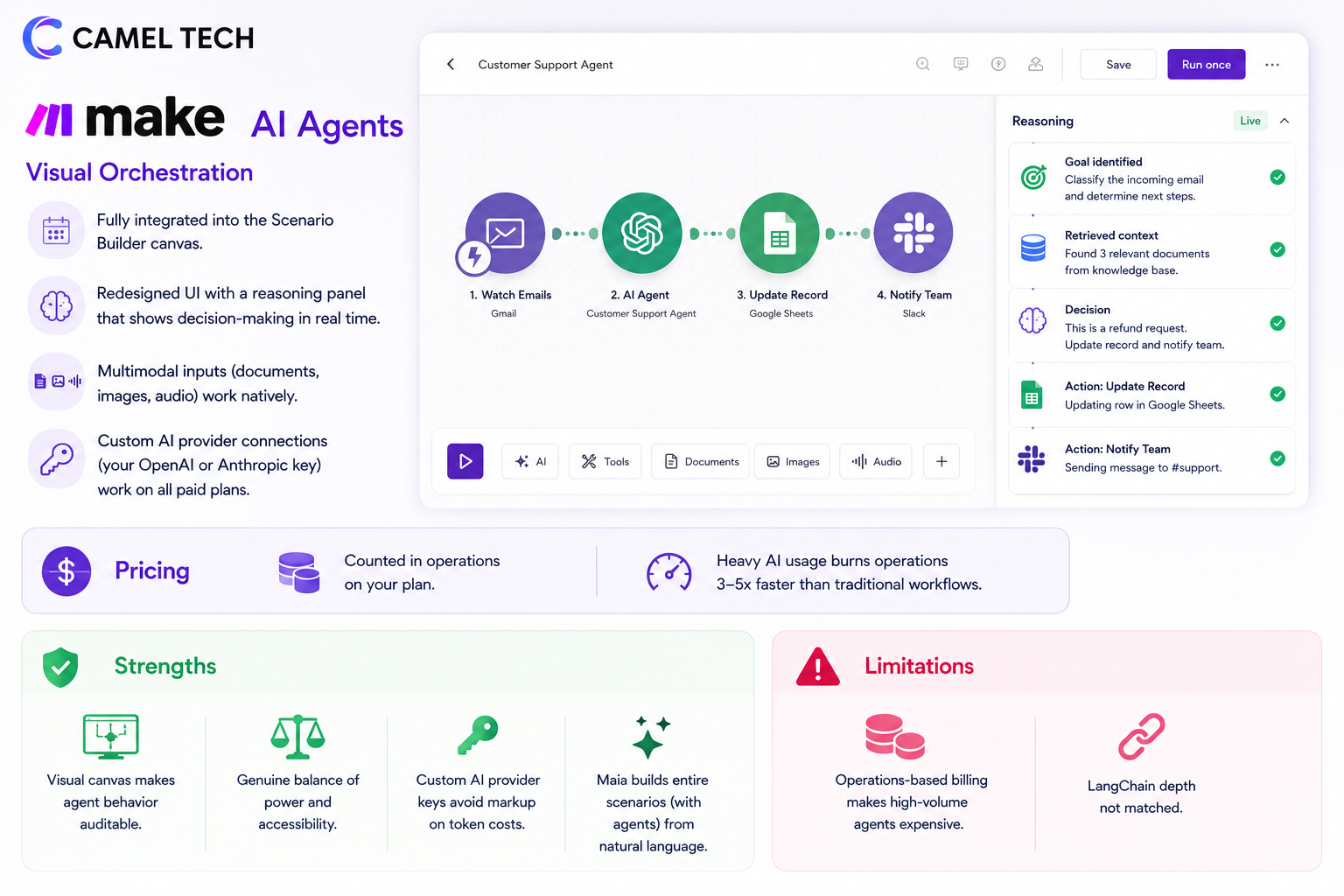
Make AI Agents are now fully integrated into the Scenario Builder canvas. The redesigned UI includes a reasoning panel that shows the agent’s decision-making in real time. Multimodal inputs (documents, images, audio) work natively. Custom AI provider connections (your OpenAI or Anthropic key) work on all paid plans.
Pricing: counted in operations on your plan. Heavy AI usage burns operations 3-5x faster than traditional workflows.
Strengths:
- Visual canvas makes agent behavior auditable.
- Genuine balance of power and accessibility.
- Custom AI provider keys avoid markup on token costs.
- Maia builds entire scenarios (with agents) from natural language.
Limitations:
- Operations-based billing makes high-volume agents expensive.
- LangChain depth not matched.
n8n + LangChain, The Power User's Choice
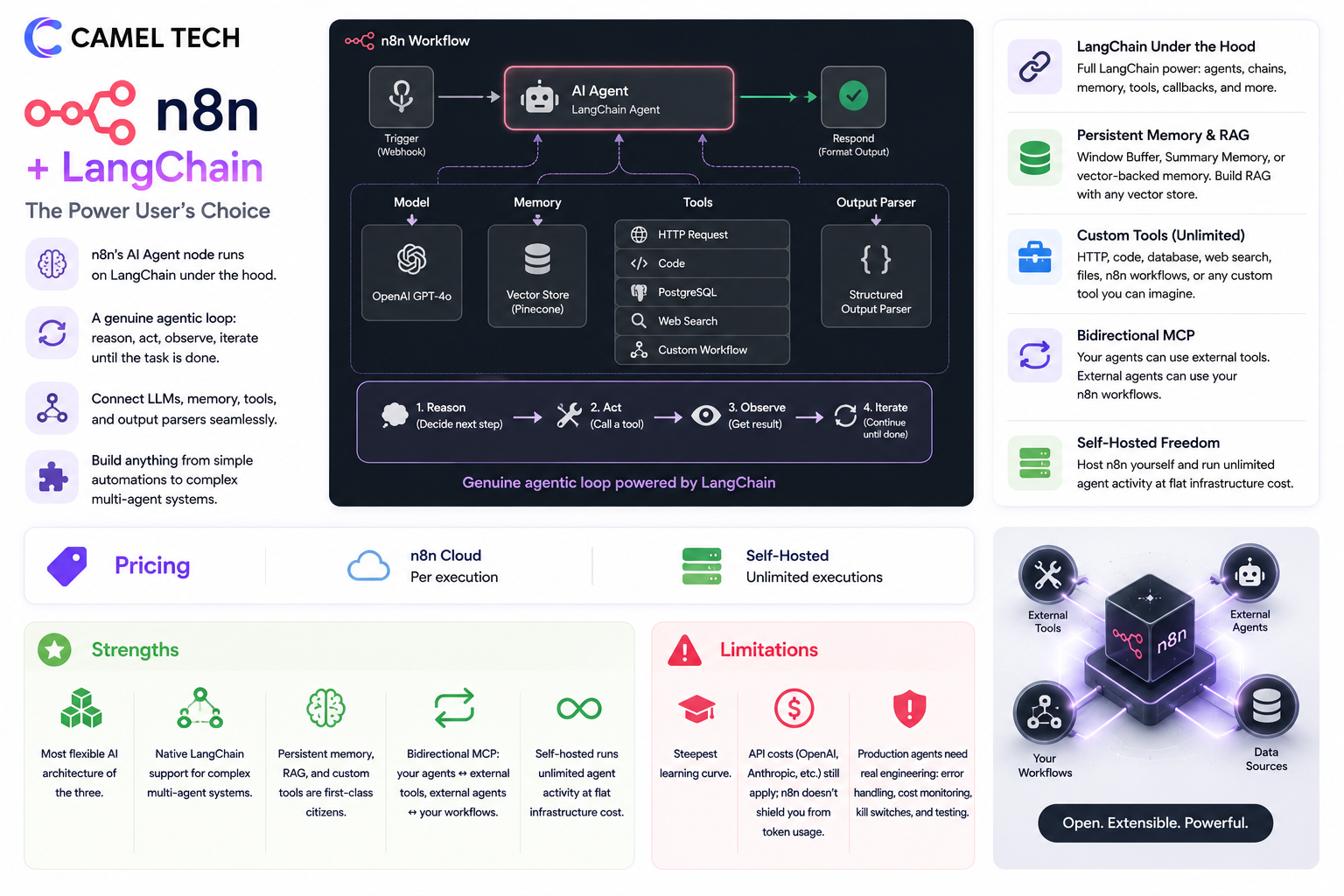
n8n’s AI Agent node runs on LangChain under the hood. Connect a language model, memory (Window Buffer, Summary, or vector-backed), tools (HTTP, code, database, web search, custom workflows), and an output parser. The agent reasons, calls tools, observes results, and iterates until the task is done. This is a genuine agentic loop.
Pricing: cloud per execution, self-hosted unlimited.
Strengths:
- Most flexible AI architecture of the three.
- Native LangChain support means you can build complex multi-agent systems.
- Persistent memory, RAG with vector stores, custom tools are all first-class.
- Bidirectional MCP, your agents can use external tools, external agents can use your workflows.
- Self-hosted runs unlimited agent activity at flat infrastructure cost.
Limitations:
- Steepest learning curve.
- API costs (OpenAI, Anthropic) still apply; n8n doesn’t shield you from token usage.
- Production agents need real engineering, error handling, cost monitoring, kill switches.
The 2026 AI Verdict
Zapier Agents are the fastest path to a working AI assistant. Make AI Agents are the best balance of power and visual clarity. n8n with LangChain is the only realistic choice for production AI agents that need custom logic, persistent memory, RAG, or multi-agent orchestration.
For agencies building AI automation services for clients, n8n is increasingly the default. For internal teams that want AI assistants without engineering, Zapier or Make work. Pick based on where the work is, not the marketing.
How Much Does Zapier vs Make vs n8n Actually Cost? (Monthly Breakdown)
Most articles compare annual rates. Most teams start month-to-month. Here’s what you actually pay.
Zapier, Month-to-Month Pricing
| Plan | Monthly Price | Key Features |
|---|---|---|
| Free | $0 | 100 tasks/mo, unlimited Zaps, Tables, Forms, MCP |
| Professional | $29.99/user | 750 tasks/mo, multi-step Zaps, premium apps, Copilot |
| Team | $103.50 | 2,000 tasks/mo, shared workspace, SAML SSO, Premier Support |
| Enterprise | Custom | Unlimited users, observability, dedicated TAM |
Annual billing saves ~33% (Professional drops from $29.99 to $19.99/month). Tasks scale with extra cost; 1,500 tasks on Professional is roughly $49/month annually.
Make, Month-to-Month Pricing
| Plan | Monthly Price | Key Features |
|---|---|---|
| Free | $0 | 1,000 operations/mo, 2 active scenarios, 15-min interval |
| Core | $10.59 | 10,000 operations/mo, unlimited scenarios, 1-min interval, API |
| Pro | $18.82 | 10,000 ops + priority execution, custom variables, full-text search |
| Teams | $34.12 | 10,000 ops + team roles, scenario templates, collaboration |
| Enterprise | Custom | Custom credit volumes, SSO, SCIM, audit logs, on-prem agents |
Annual billing saves ~15% (Core drops to $9/month). Higher operation tiers scale linearly , 80,000 operations on Pro is roughly $80/month annual.
n8n , Month-to-Month Pricing
| Plan | Monthly Price | Key Features |
|---|---|---|
| Community Edition (self-hosted) | $0 (+ hosting) | Unlimited executions, all 500+ integrations, AI nodes |
| Cloud Starter | $24 (€24) | 2,500 executions/mo, 5 concurrent workflows |
| Cloud Pro | $60 (€60) | 10,000 executions/mo, 20 concurrent workflows |
| Cloud Business | $800 (€800) | 40,000 executions/mo, SSO, Git, multi-environment |
| Enterprise | Custom | Custom executions, dedicated support, advanced governance |
Annual billing saves ~17%. Self-hosted Business license is custom-priced. Startup program: $400/month for companies with <20 employees and <$5M funding (50% off Business).
Two Hidden Costs Most Blogs Skip
Hidden Cost #1 , How “tasks” vs “operations” vs “executions” actually count. A 5-step Zap running 1,000 times burns 4,000 Zapier tasks (triggers don’t count). The same workflow on Make burns 5,000 operations (triggers do count). The same workflow on n8n burns 1,000 executions (the entire run counts as one). This isn’t a small difference. At higher volumes it’s 5x or 10x. Run the math on your actual workflow before picking a tier.
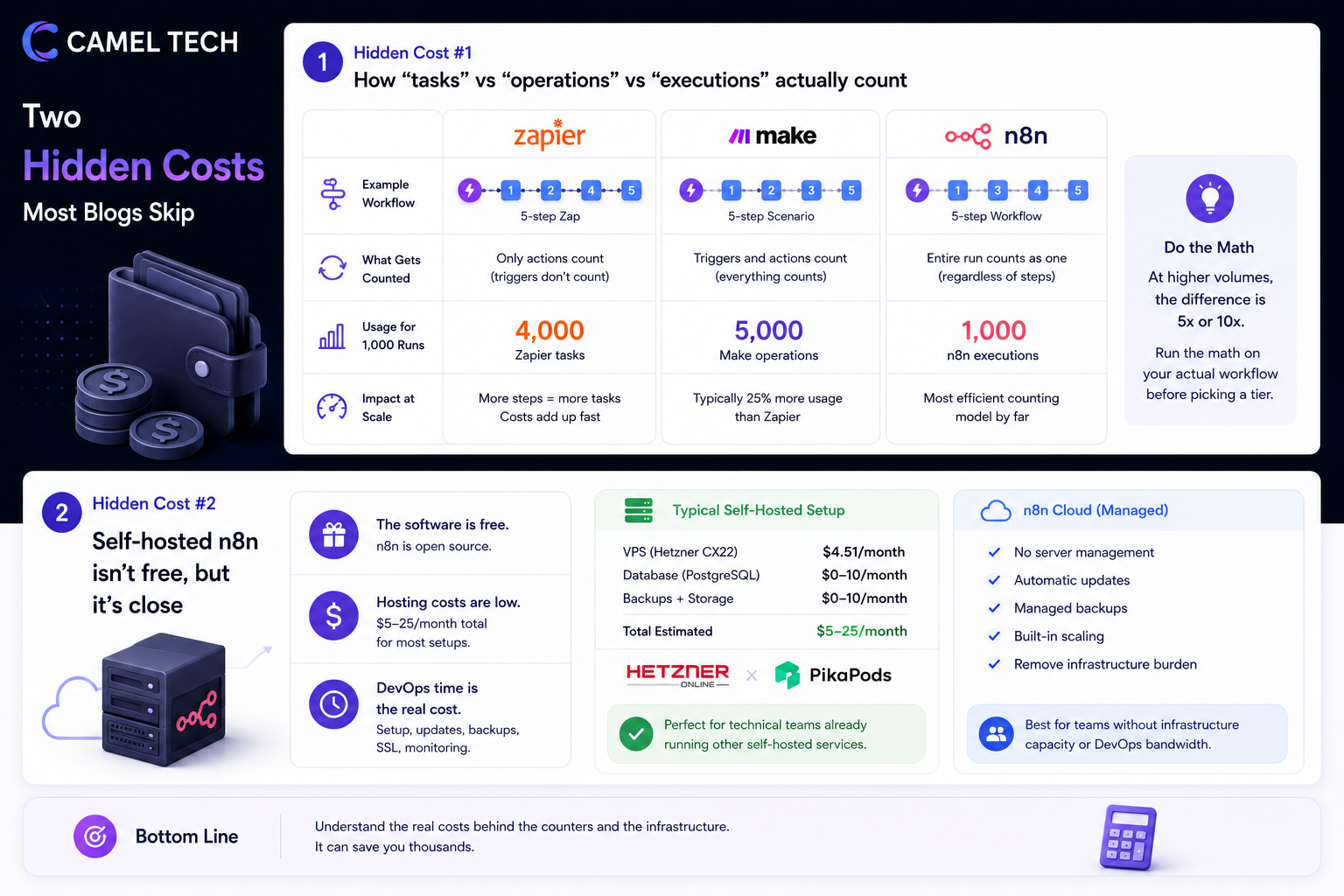
Hidden Cost #2 , Self-hosted n8n isn’t free, but it’s close. The software is free. Hosting on a Hetzner CX22 ($4.51/month) or PikaPods ($3-7/month) plus a database adds $5-25/month total. DevOps time is the real cost , Docker setup, SSL renewals, backups, breaking updates. For technical teams already running other self-hosted services, this is marginal. For teams without infrastructure capacity, n8n Cloud removes the burden.
Real-World Cost Scenarios for a 5-Step Workflow
Let’s price the same workflow on all three platforms. The job: a webhook fires for every new lead, the workflow enriches it via an external API, scores it with an OpenAI call, writes to a CRM, and posts a Slack alert if the score is above 80. Five steps, 5,000 leads per month.
| Workflow | Zapier | Make | n8n Cloud | n8n Self-Hosted |
|---|---|---|---|---|
| Tasks/Operations/ Executions consumed | 20,000 tasks | 25,000 operations | 5,000 executions | 5,000 executions |
| Required plan | Team + extra tasks (~$103.50 + add-ons) | Pro with 40k ops package (~$33-40) | Cloud Pro ($60) | Free + hosting (~$10) |
| Approximate monthly cost | $200-300 | $33-40 | $60 | $10 |
At 5,000 leads per month with five steps, n8n self-hosted is 20-30x cheaper than Zapier. Multiply across 10-15 production workflows and the annual delta becomes the cost of a junior hire. This is the single biggest reason mid-market companies migrate off Zapier.
For low-volume workflows (under 500 runs/month with 2-3 steps), Zapier is genuinely competitive on total cost when you factor in the implementation time advantage.
Not sure which tier is right for your team? We help businesses figure this out every week. Book a free discovery call at camelai.tech.
What We Have Seen Work Best by Industry (Based on 80+ Implementations)
Every recommendation below is a pattern, not a rule. Either tool can work in any industry. Your team, workflow complexity, and implementation quality matter more than the platform.
Agencies and creative studios, Make for most, n8n for AI-heavy work.
Agencies running standard client onboarding, content calendars, social posting, and reporting do well on Make. The visual canvas makes scenarios easy to hand off between team members, and operations-based pricing scales reasonably for agency volume. Agencies building AI automation services for clients tend to land on n8n, the per-execution model and AI agent depth become decisive.
E-commerce and retail, Zapier for SMB, Make for mid-market.
Shopify, WooCommerce, and Klaviyo integrations are deepest on Zapier. For stores under 1,000 orders/month, Zapier is fine. For mid-market stores with complex inventory, vendor management, and multi-channel logistics, Make’s branching logic and lower per-operation cost win.
Accounting and finance, Zapier for compliance simplicity, n8n for high-volume firms.
Accounting firms often start on Zapier because Xero, QuickBooks, and Bill.com integrations are pre-built and reliable. Larger firms processing high transaction volumes migrate to n8n for cost reasons.
SaaS companies and technical startups, n8n.
AI-native workflows, custom code requirements, webhook-heavy integrations, and the ability to self-host for compliance all push toward n8n. Most SaaS companies we work with run n8n alongside their production stack.
Marketing teams (non-technical), Zapier or Make.
Zapier wins on speed-to-launch and the largest library of marketing tool integrations. Make wins when campaigns need branching logic (different paths for different lead sources, A/B testing, multi-channel orchestration).
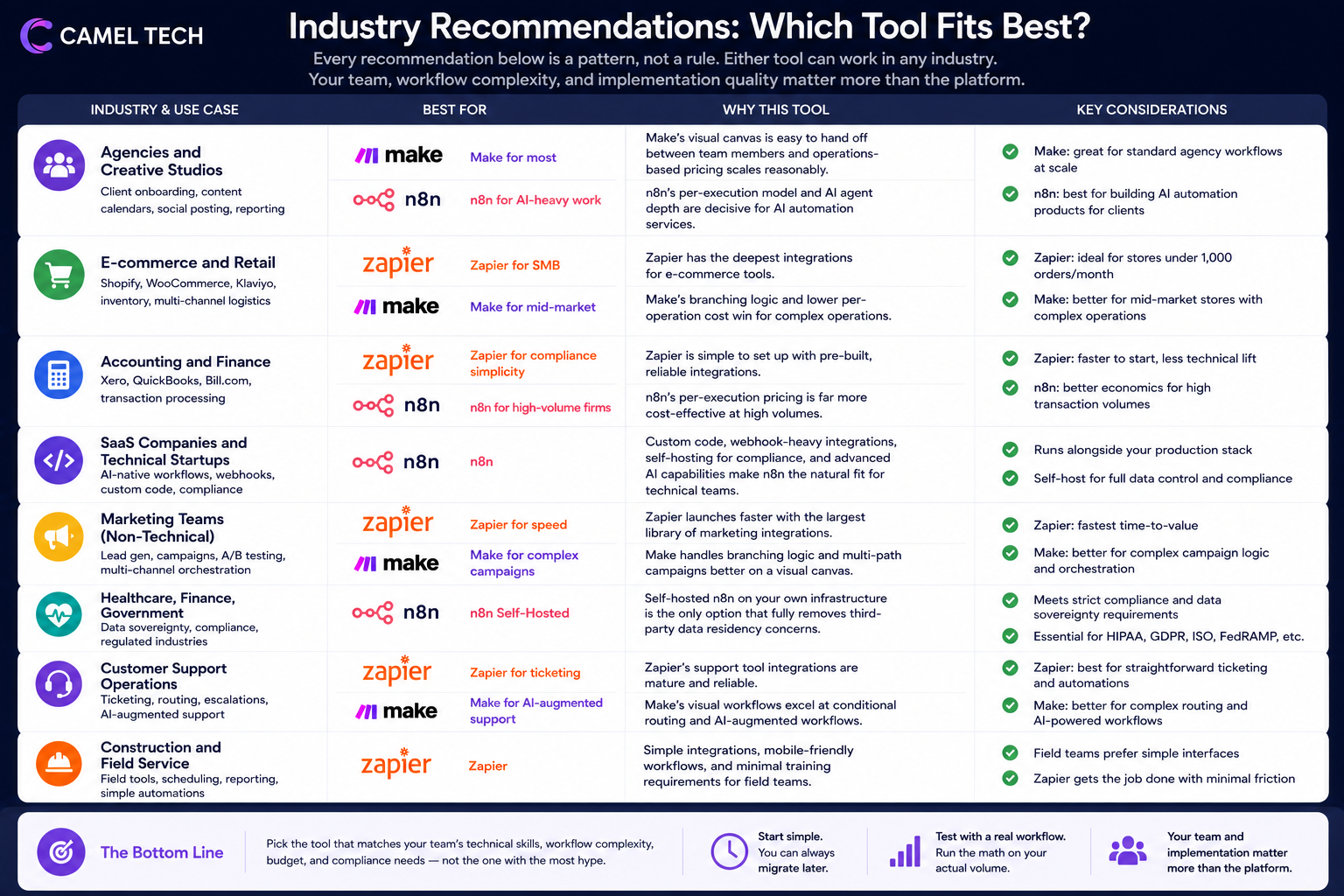
Healthcare, finance, government, n8n self-hosted.
Data sovereignty isn’t optional. Self-hosted n8n on internal infrastructure is the only option that fully removes third-party data residency concerns.
Customer support operations, Zapier for ticketing, Make for AI-augmented support.
Zapier’s Zendesk, Intercom, and Freshdesk integrations are mature. Make’s visual canvas works well for support workflows that need conditional routing.
Construction and field service, Zapier.
Mobile-friendly, simple integrations with field service tools, and minimal training overhead. Most field teams won’t engage with a flowchart UI.
What Do Real Users Say About Zapier, Make, and n8n in 2026?
| Zapier | Make | n8n | |
|---|---|---|---|
| Ratings & review volume | |||
| G2 rating | 4.5/5 from 1,830+ reviews | 4.7/5 from 250+ reviews | 4.7/5 |
| Capterra rating | 4.7/5 from 3,000+ reviews | 4.8/5 from 400+ reviews | Strong but smaller volume |
| Trustpilot rating | 1.4/5 from hundreds of reviews | Mixed | Mostly positive |
| What users love | |||
| Top praise | “Easiest automation tool. Working Zap in 5 minutes” | “Visual canvas, I can see every step and debug fast” | “Self-host saves us thousands per month at scale” |
| Standout feature | 8,000+ integrations and Copilot natural language | Routers, iterators, and rollover operations | Native LangChain and unlimited self-hosted executions |
| AI feedback | Zapier Agents praised for ease of setup | Make AI Agents and Maia getting genuine adoption | LangChain depth wins for production AI |
| What frustrates users | |||
| #1 complaint | Surprise billing and per-task pricing at scale | Operations math and credit consumption rates | Steep learning curve and self-host DevOps overhead |
| #2 complaint | Linear failure handling, Zap halts, no replay | Automation limits hit faster than expected | Cloud execution limits feel restrictive vs self-hosted |
| #3 complaint | Premium app gating (Salesforce, HubSpot) | Support response time on lower tiers | Documentation gaps on advanced features |
| Hidden pain point | Runaway Zap loops can exhaust task quotas overnight | Polling triggers checking every minute can burn 43,000+ ops/month before any work runs | Self-hosted Business license caps executions at 480k even though you self-host |
Zapier, What Users Love
The integration breadth and simplicity come through consistently. From a recent G2 review: “Zapier just works. We have 30+ Zaps running, integrating tools nobody else connects to. The 5-minute setup time is real.” (G2, March 2026)
Copilot is landing well with non-technical users: “I described what I wanted in plain English and Copilot built the entire workflow. I would have spent an hour clicking through dropdowns before.” (Capterra, February 2026)
Zapier, What Frustrates Users
The Trustpilot rating tells the story most G2 reviews don’t: pricing surprises. From a Trustpilot review: “We hit our task limit on day 14 of the month. Zapier didn’t throttle, just kept running and billed us for the overage. $400 surprise charge.” (Trustpilot, January 2026)
The split between G2 (4.5/5, mostly positive) and Trustpilot (1.4/5, mostly negative) is one of the sharpest splits in SaaS. The pattern: G2 users tend to be on stable plans, Trustpilot users tend to be people who got burned by overages.
Make, What Users Love
The visual canvas is Make’s strongest asset. From G2: “Make’s flowchart view shows me exactly what’s happening. When something breaks, I can trace the data flow in seconds. Zapier’s linear list never gave me that.” (G2, March 2026)
The cost-to-value ratio gets consistent praise: “We were paying $300/month on Zapier for workflows we now run on Make for $40/month. Same business outcome.” (Capterra, February 2026)
Make, What Frustrates Users
Operations math is the recurring complaint: “I built a polling-based scenario checking for new tickets every 5 minutes. Burned through my monthly operations in 12 days. Had to redesign with webhooks.” (G2, January 2026)
Support response time on lower tiers: “Tickets routinely take 2-3 days for a response on Pro. For business-critical workflows, that’s painful.” (Capterra, March 2026)
n8n, What Users Love
Self-hosting and AI agent depth dominate the praise. From a developer review: “We replaced $800/month of Zapier with $25/month of n8n self-hosted. Same workflows, better error handling, full control over our data.” (G2, February 2026)
The AI agent capabilities are getting strong reviews: “n8n is the first tool where I could actually build a production AI agent without writing custom Python. LangChain integration is real, not marketing.” (G2, March 2026)
n8n, What Frustrates Users
The learning curve is real: “I spent two weeks getting comfortable with n8n. Coming from Zapier, every concept was different. Worth it now, but the ramp-up was rough.” (Reddit r/n8n, January 2026)
Cloud execution limits frustrate teams who didn’t realize how fast polling-based workflows burn through quotas: “Cloud Starter felt expensive for 2,500 executions. Migrated to self-hosted on a $5 VPS. Should have done it from day one.” (Reddit, February 2026)
The Business license execution cap (480k executions even when self-hosted) draws criticism: “Paying for a self-hosted license shouldn’t cap my executions. That’s the whole point of self-hosting.” (Reddit, March 2026)
What The Experts Say
“We’re not just an automation company anymore. With Tables, Forms, Interfaces, Agents, and MCP, we’re the orchestration layer for AI in business. The bet is that companies want one platform, not five.”
Jan Oberhauser, Founder and CEO at n8n:“Our mission is to give technical people the powers of a 10x developer. The future isn’t about more integrations, it’s about fundamentally changing how people interact with technology, with humans and AI on the same canvas.”
Imrul Hasnat, Camel Tech (80+ implementations):“The biggest mistake I see companies make is choosing Zapier because it’s the most popular, then quietly outgrowing it for two years before they migrate. The right question isn’t ‘which tool is best?’ It’s ‘which tool fits where I’ll be in 18 months?’ If you’re scaling fast or adding AI, Make or n8n save you a painful migration later. If you’re a 5-person team automating 10 workflows, Zapier is fine. I’ve seen all three fail; always because of bad implementation, not the tool itself.”
Md. Hisham (AI & Automation Systems Architect):
“Having spent a considerable amount of time building workflows across different industries, niches, and business models, I’ve realized that while all three platforms can technically automate the same baseline tasks, they handle complex logic very differently.
Zapier is great for straightforward, linear data plumbing because of its massive out-of-the-box library. However, you hit a structural wall when dealing with advanced logic. For example, once you start a loop in Zapier, every subsequent step is trapped inside that loop, making it incredibly difficult to exit or run a final action.Make offers a highly intuitive, multi-directional canvas that makes tracking data flow visually simple, but complex data routing and looping can quickly burn through your operations and spike your costs.
This is why my personal preference has heavily shifted toward n8n. It gives you complete architectural freedom. You can easily branch out of loops, route data paths anywhere across the canvas, and build deeply customized workflows without the constant anxiety of hitting hard execution limits or ballooning your monthly bill. Once you get past the initial learning curve, the level of control is unmatched.”
Who Should Choose What?
Who should choose Zapier?
- Your team is non-technical and you need automation working today, not next month
- You use 5+ niche SaaS tools that need integration (Zapier almost certainly has them all)
- Your workflow volume stays under 5,000 tasks per month
- You want Tables, Forms, Interfaces, and AI agents bundled into one tool
- You value reliability and polished support over cost optimization
- You’re a solo founder, freelancer, or sub-10-person team
- Your workflows are mostly 2-4 steps with minimal branching
Who should choose Make?
- You need branching logic, conditional routing, or multi-step transformations
- You want a visual canvas that shows the entire workflow on one screen
- Your team has at least one operations-savvy person willing to learn flowcharts
- Your workflow volume is moderate to high (10,000-100,000 operations/month)
- You’re an agency running similar workflows for multiple clients (scenario sharing helps)
- You need AI agents but want them visible and debuggable on a canvas
- You want strong value-for-money on a managed cloud platform
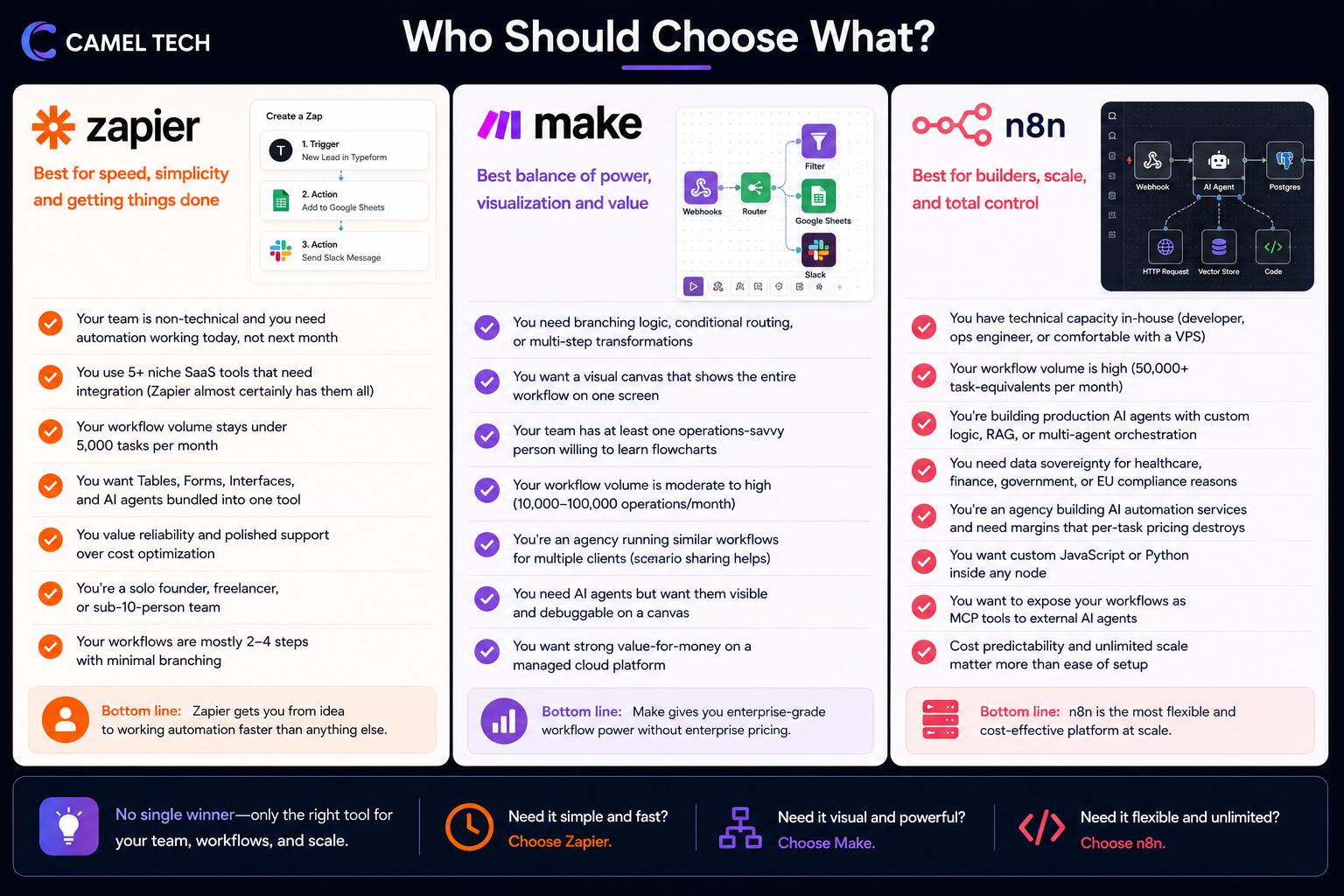
Who should choose n8n?
- You have technical capacity in-house (developer, ops engineer, or comfortable with a VPS)
- Your workflow volume is high (50,000+ task-equivalents per month)
- You’re building production AI agents with custom logic, RAG, or multi-agent orchestration
- You need data sovereignty for healthcare, finance, government, or EU compliance reasons
- You’re an agency building AI automation services and need margins that per-task pricing destroys
- You want custom JavaScript or Python inside any node
- You want to expose your workflows as MCP tools to external AI agents
- Cost predictability and unlimited scale matter more than ease of setup
Frequently Asked Questions (FAQ)
For non-technical teams running under 1,000 tasks per month with broad app integration needs, yes. The 5-minute setup time and 8,000+ integrations are genuinely unmatched. Above 5,000 tasks per month, Zapier starts costing 3-10x more than Make or n8n for equivalent work, and the migration becomes financially obvious.
Make charges per operation (every module action including triggers and filters). Zapier charges per task (only successful action steps). At equivalent volume, Make is roughly 3-5x cheaper. Zapier has 8,000+ integrations vs Make's 3,000+. Make's visual canvas handles complex branching better; Zapier's linear builder is simpler for sequential workflows.
The Community Edition (self-hosted) is free under a Sustainable Use License. You can run it on your own server with unlimited executions, no time limit, no user limit. You pay only for hosting, which can be as low as $5/month on a Hetzner VPS. n8n Cloud (managed hosting) starts at $24/month.
For technical teams: yes, comfortably. n8n covers 80-90% of common Zapier workflows and goes significantly further with custom code, AI agents, and self-hosting. The trade-offs are a steeper learning curve, smaller native integration library (offset by the HTTP node), and infrastructure management for self-hosted deployments.
n8n leads for technical depth , native LangChain integration, 70+ AI nodes, persistent memory, vector store support, multi-agent orchestration, and bidirectional MCP. Make is close behind with visual AI Agents on a canvas. Zapier Agents are the easiest to set up but the most opinionated. For production AI agents with custom logic, n8n is the clear choice.
Zapier: comfortable in 1-2 hours, fluent in 1-2 weeks. Make: comfortable in 1-2 days, fluent in 2-4 weeks (routers, iterators, aggregators take time). n8n: comfortable in 3-5 days for cloud, 1-2 weeks for self-hosted, fluent in 1-2 months for AI agent workflows.
There's no automatic migration tool between any of them as of 2026. You rebuild workflows manually. For most teams with 5-15 active workflows, migration takes 2-8 hours per platform. The logic maps closely enough that it's painful but not impossible. Most teams running both in parallel for 2-4 weeks before cutting over.
n8n self-hosted, by a wide margin. Execution-based billing means a 50-step workflow costs the same as a 2-step workflow. At 100,000+ workflow runs per month, n8n self-hosted on a $25/month VPS replaces $1,500-3,000/month of Zapier or $200-400/month of Make.
For Zapier: usually no. The platform is self-serve enough that most teams can set up their first 10 workflows independently. For Make: helpful but not required. The canvas takes practice. For n8n: highly recommended for production deployments. Self-hosting, AI agents, and complex error handling benefit from someone who's done it before.
n8n self-hosted is the only option that fully eliminates third-party data residency concerns. Zapier and Make are SOC 2 Type II compliant and serve regulated SMBs through their compliance certifications, but data still resides on their cloud infrastructure. For HIPAA, GDPR-strict, or government work, n8n self-hosted is usually the right answer.
Zapier: $200-500/month depending on workflow complexity and volume. Make: $30-100/month. n8n Cloud Pro: $60/month plus AI API costs. n8n self-hosted: $25-50/month total infrastructure. AI API costs (OpenAI, Anthropic) are separate on all three platforms.
Yes, and many teams do. A common pattern: Zapier for simple integrations with niche SaaS tools that only Zapier supports, Make for branching marketing automation, n8n for AI agents and high-volume backend workflows. This sounds expensive but often costs less than running everything on Zapier alone.
Not Sure Which One Is Right for You?
That’s exactly what we help businesses figure out.
At Camel Tech, we’ve helped 80+ companies implement ClickUp, Notion, and Monday.com across agencies, construction firms, accounting practices, ecommerce stores, and professional services businesses. We don’t just configure the tool. We build the system- workflows, templates, automations, and training built around how your business actually operates.
Book a free discovery call. We’ll tell you which platform fits your team and what a proper implementation looks like.
Read Related Articles
ServiceTitan is purpose-built for plumbing dispatch, GPS, and pricing. Monday.com is cheaper and flexible but

Should you migrate from Airtable after the Bending Spoons deal? Review the risks, compare alternatives,

Compare the best ClickUp consultants and agencies in 2026 by pricing, specialty, and red flags
Build a business that thrives without you
Unlock your ultimate life goals: Focus on high-leverage tasks, personal growth, and family time while pursuing your next big initiative.
Let's book a call with our expert.

Selected resource
Enter your email and we’ll send the resource directly to your inbox.
✓
Check your inbox
We’ve received your request and will send the resource to your email.
Please check your spam or promotions folder if you don’t see it shortly.