
Camel Tech

Notion Productivity System for a Solo Property Developer

Notion productivity system for property developers managing compliance, projects, finances, and multiple entities in one dashboard

Quick Answer

To systemize a property development business, build a centralized Notion productivity system that connects properties, entities, projects, compliance obligations, finances, emails, and action items into a single operational command center. Layer in structured email triage, automated daily briefings, risk and compliance monitoring, and portfolio-level financial dashboards to give business owners complete visibility across their operations.

This approach was implemented for Zac Rowlandson, an Australian property developer and civil earthmoving business owner, to replace fragmented information spread across emails, notes, and spreadsheets with a unified Notion system. The result was 10+ hours reclaimed per week, $100K+ in potential land tax exposure brought under active monitoring, zero missed follow-ups, and a scalable operating system capable of managing multiple entities, properties, and development projects from one source of truth.

10+

hours reclaimed each week through centralised dashboards and structured triage workflows

100%

of properties, entities, and compliance obligations logged inside one Notion productivity system

$100K+

in potential land tax liability identified and brought under active monitoring

60%

reduction in context switching by consolidating communication, tasks, and financials into a single workspace

 Results at a Glance
  • Streamlined portfolio operations: All properties, entities, and active developments are now managed from one source of truth, reducing the time spent locating information by an estimated 40%.
  • Reliable compliance tracking: GST risk, land tax thresholds, BAS deadlines, and insurance renewals surface automatically through a unified Risk and Compliance database, with nothing buried across scattered notes or inboxes.
  • Email-to-action discipline: Every inbound email is classified, linked to the correct property and entity, and converted into a trackable action item, eliminating the risk of missed follow-ups.
  • Scalable foundation: Adding a new property or project does not require rebuilding workflows from scratch. The system absorbs growth without increasing administrative overhead.

Company

Regional Project Solutions

Location

New South Wales, Australia

Industry

Property development and civil earthmoving

Team Size

Owner-operated (spouse involvement in select areas)

Scale

7 portfolios across Australia

Use Case

Notion system design, compliance tracking, financial visibility

Introduction

When Zac Rowlandson, the owner of a multi-entity property development and civil earthmoving operation, came to us for help, his business had outgrown the tools he was using to manage it. Across four entities, he was receiving over 200 emails each day, tracking compliance obligations in ad hoc notes, and relying on memory to stay on top of DA deadlines and tax triggers.
He needed something more structured. Not just a note-taking tool, but a genuine command center that could surface what mattered, flag what was at risk, and give him a clear picture of the full portfolio in under 30 seconds. We built that system in Notion.

Company Overview

Zac Rowlandson is an owner-operator running a property development and holding portfolio across multiple trusts and special purpose vehicles, alongside an active civil and earthmoving business. Most decisions, follow-ups, and compliance responsibilities are managed directly by him.
His day-to-day work involves tracking 10 or more properties at various stages of development, managing entity-level tax obligations, reviewing inbound communication across four accounts, and keeping construction costs in line. As his portfolio grew, the administrative demands of managing multiple entities simultaneously became a significant drag on his ability to focus on the work that drives the business forward.
Location: Australia Use cases: Notion system design, compliance tracking, financial visibility Industry: Property development and civil earthmoving Employees: Owner-operated (spouse involvement in select areas)

Challenges

Despite running a sophisticated multi-entity portfolio, Zac’s daily operations were consistently slowed by several structural gaps.
Severe email overload: More than 200 emails arrived each day across four separate entity inboxes. With no triage system in place, identifying which messages required action and which could be filed was a daily drain on Zac’s attention and time.
Critical information was scattered across multiple tools: Property details, compliance notes, project updates, and financial records lived in a combination of email threads, phone notes, and disconnected files. Retrieving the right information before a meeting or decision often required more effort than the task itself.
Missed deadlines are a real operational risk: Without a centralized calendar of compliance and development milestones, DA deadlines, BAS lodgement dates, and insurance renewals were at genuine risk of being overlooked. A single missed DA deadline could set a project back by months.
No visibility over land tax exposure: Owning properties across multiple trusts and companies creates aggregation risk under land tax legislation. Without a system to track entity-level property holdings and threshold proximity, Zac had no clear view of his total exposure, a gap that represented more than $100,000 in potential liability.
Undetected construction cost drift: Job costs were tracked inconsistently, making it difficult to identify budget overruns before they became significant problems. Financial summaries existed in isolation rather than rolling into a single portfolio view.
No scalable operational model: Everything ran on Zac’s personal effort and memory. As the portfolio grew, so did the cognitive load. There was no system capable of absorbing new properties or projects without adding proportionally more manual work.

Transformation Implemented

We delivered a structured, mobile-first Notion productivity system that centralizes Zac’s full operation into one workspace. The system handles communication triage, task management, compliance tracking, and financial visibility, all governed by a single source of truth.
 
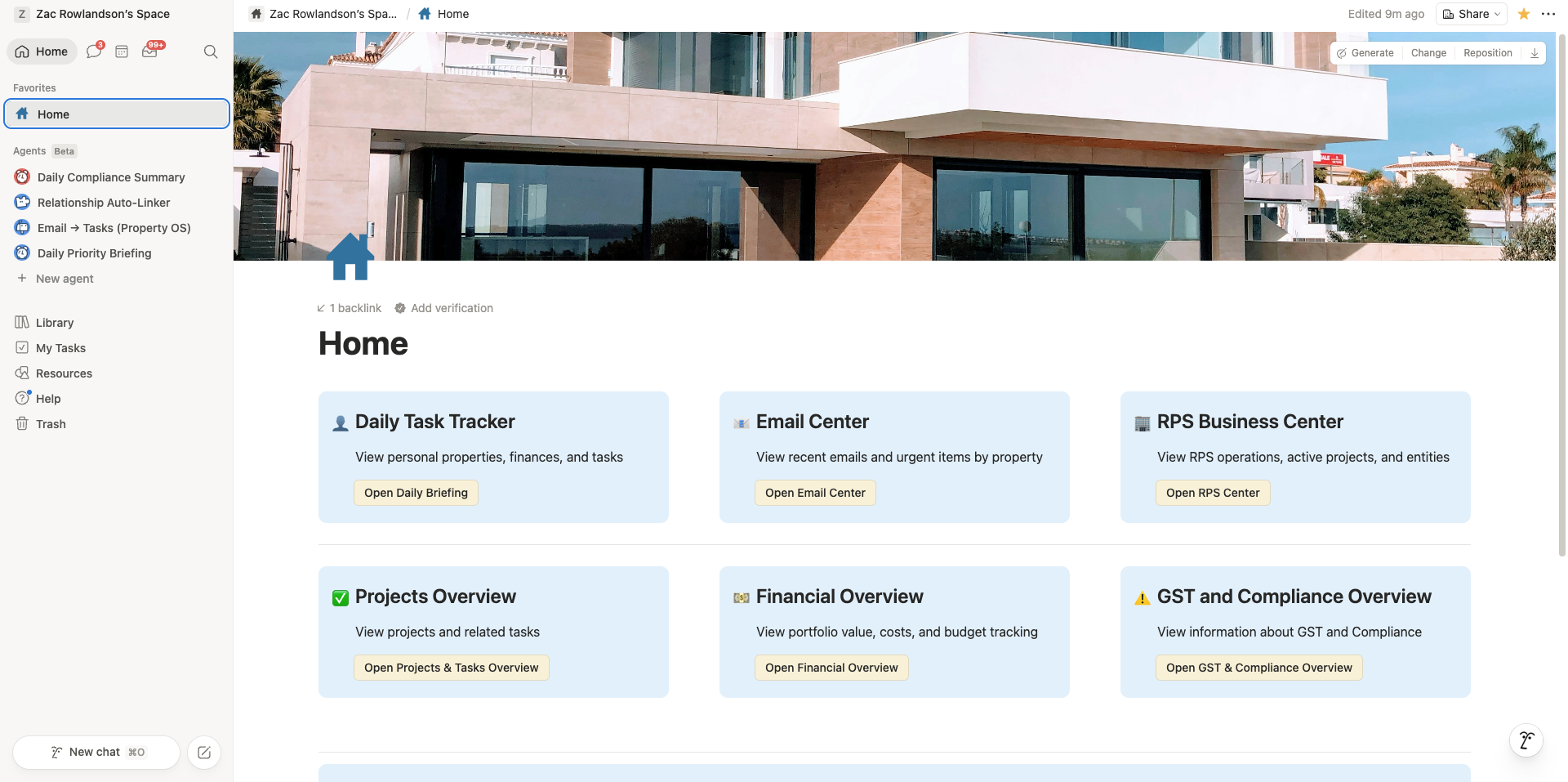
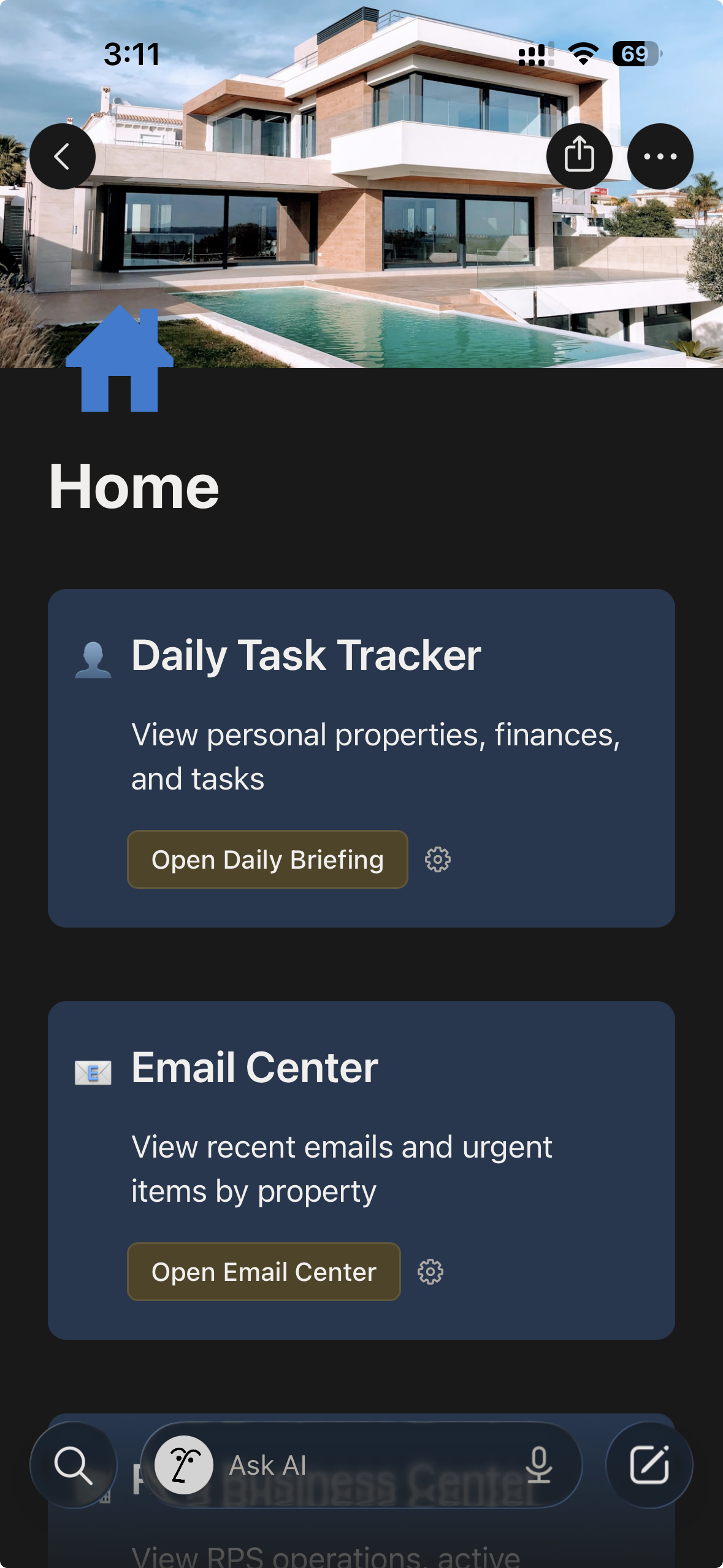
1. Mobile-first command centre
The entry point to the system is a home page designed for fast, field-based use. From there, Zac can access the Daily Tasks Tracker, Email Center, RPS Dashboard, Financial Overview, Projects Overview, Entity Dashboard, and GST and Compliance Overview in a single tap. Every dashboard is built to deliver a clear picture in under 30 seconds on a phone screen.
 
 
2. Structured database backbone
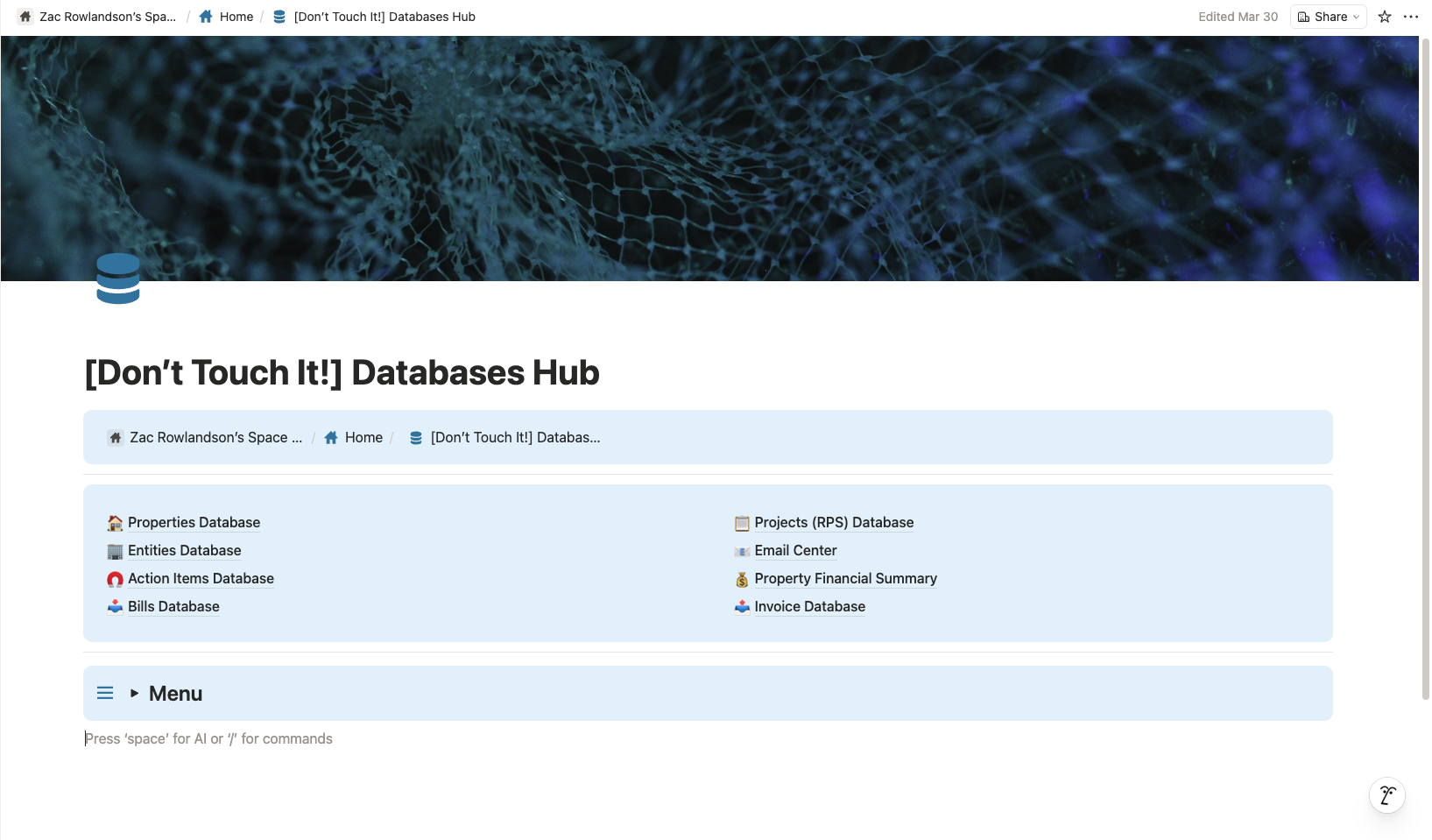
All authoritative data lives in a dedicated databases hub, governed to prevent duplicates and inconsistencies. Core databases include Properties, Entities, Projects, Action Items, Email Center, Risk and Compliance, Costs, Documents, Bills and Invoices, and Property Financial Summary. Each record is connected to the right property and entity so that context is never lost.
 
 
3. Email triage and task creation
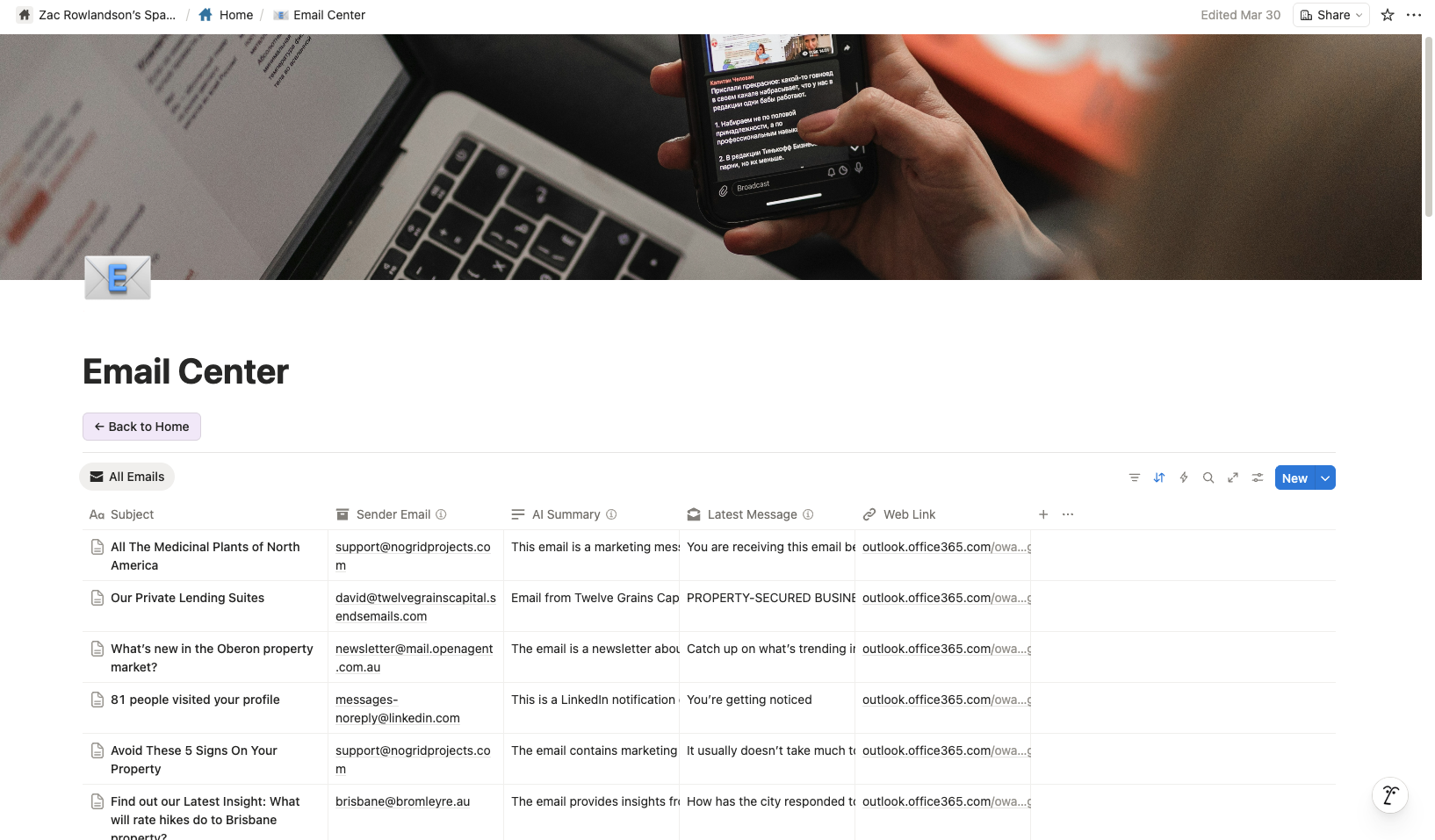
Email Center records follow a consistent classification structure: Priority (urgent, important, or FYI), Category (council, legal, contractor, financial, tenant, and others), Status (to review through to done or delegated), Next Step (the specific action required), and links to the relevant property and entity. A documented instruction set governs when actionable emails create tasks in the Action Items database, with duplicate control and consistent naming built in.
 
4. Daily execution rhythm
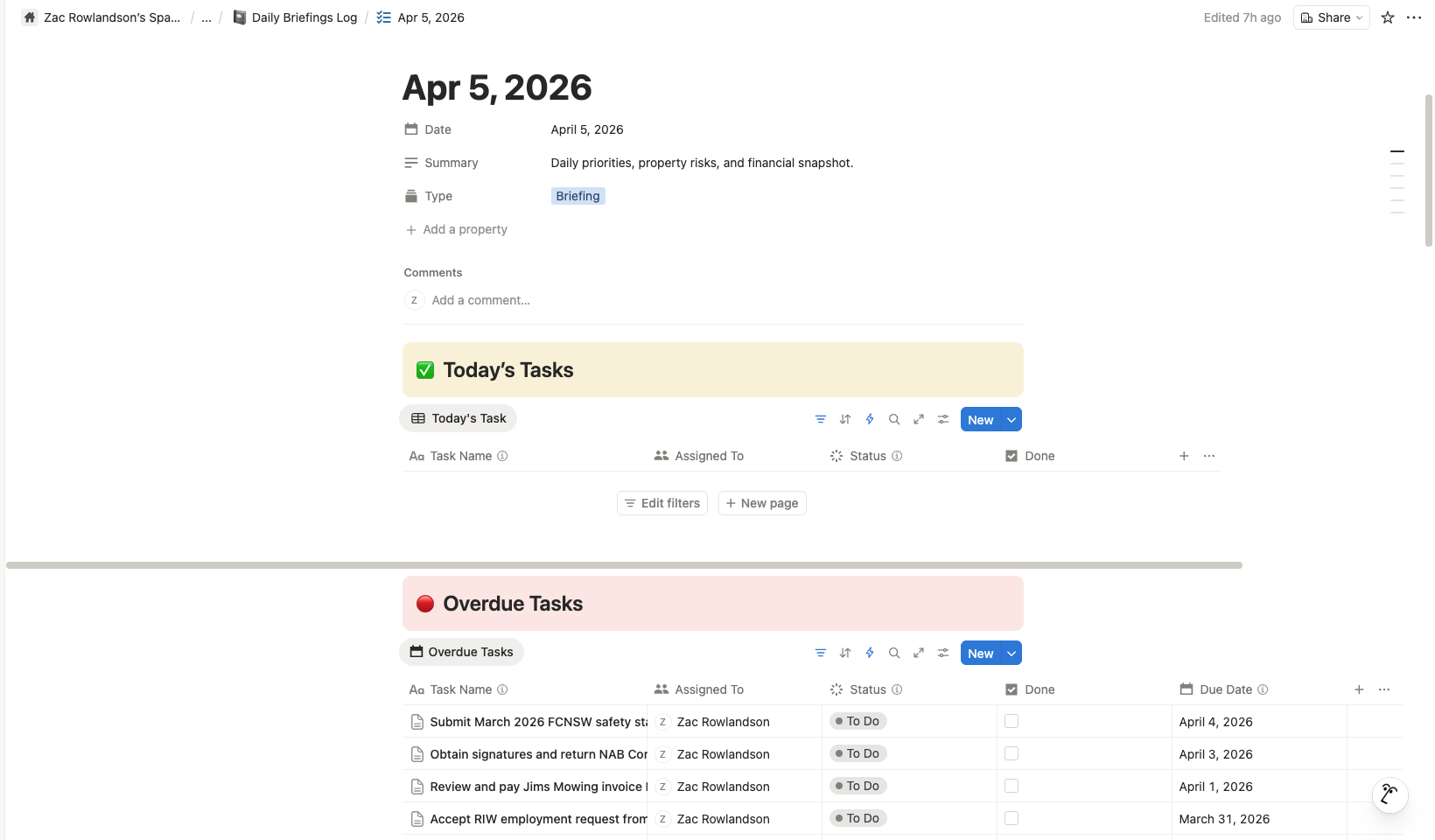
A daily briefings log produces short, mobile-ready briefings each morning covering today’s tasks, overdue items, a project pulse, and a financial snapshot. This creates a consistent daily loop that ensures nothing slips through without surfacing first.
 
5. Risk and compliance visibility
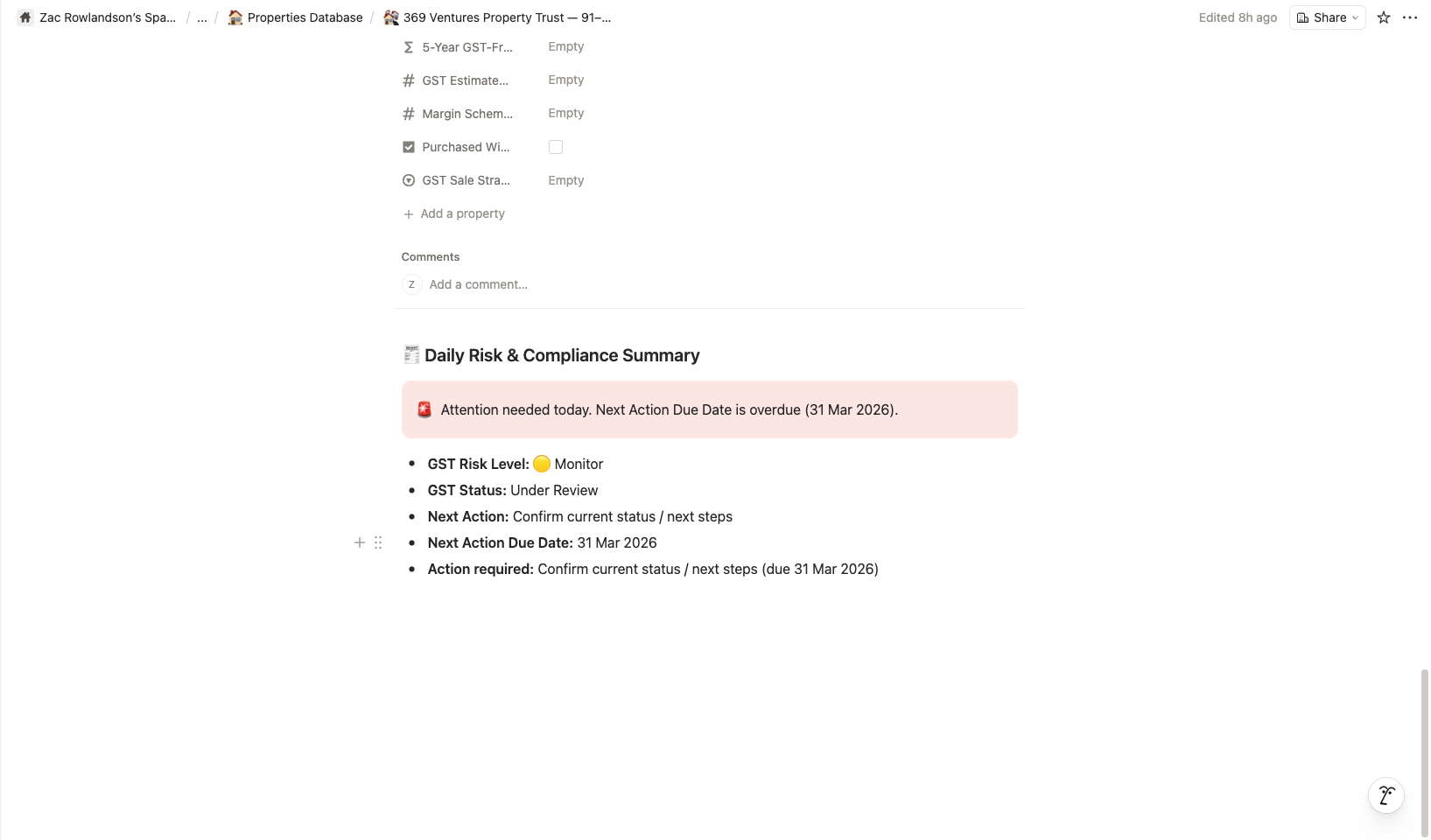
The Risk and Compliance database unifies every compliance obligation under one schema, distinguished by type. GST risk per property (including hold period strategies and margin scheme notes), land tax exposure per entity, BAS and tax deadlines, insurance renewals, and council or planning compliance items all live in one place. This was the direct answer to the $100K+ liability gap identified at the outset.
 
6. Financial tracking and rollups
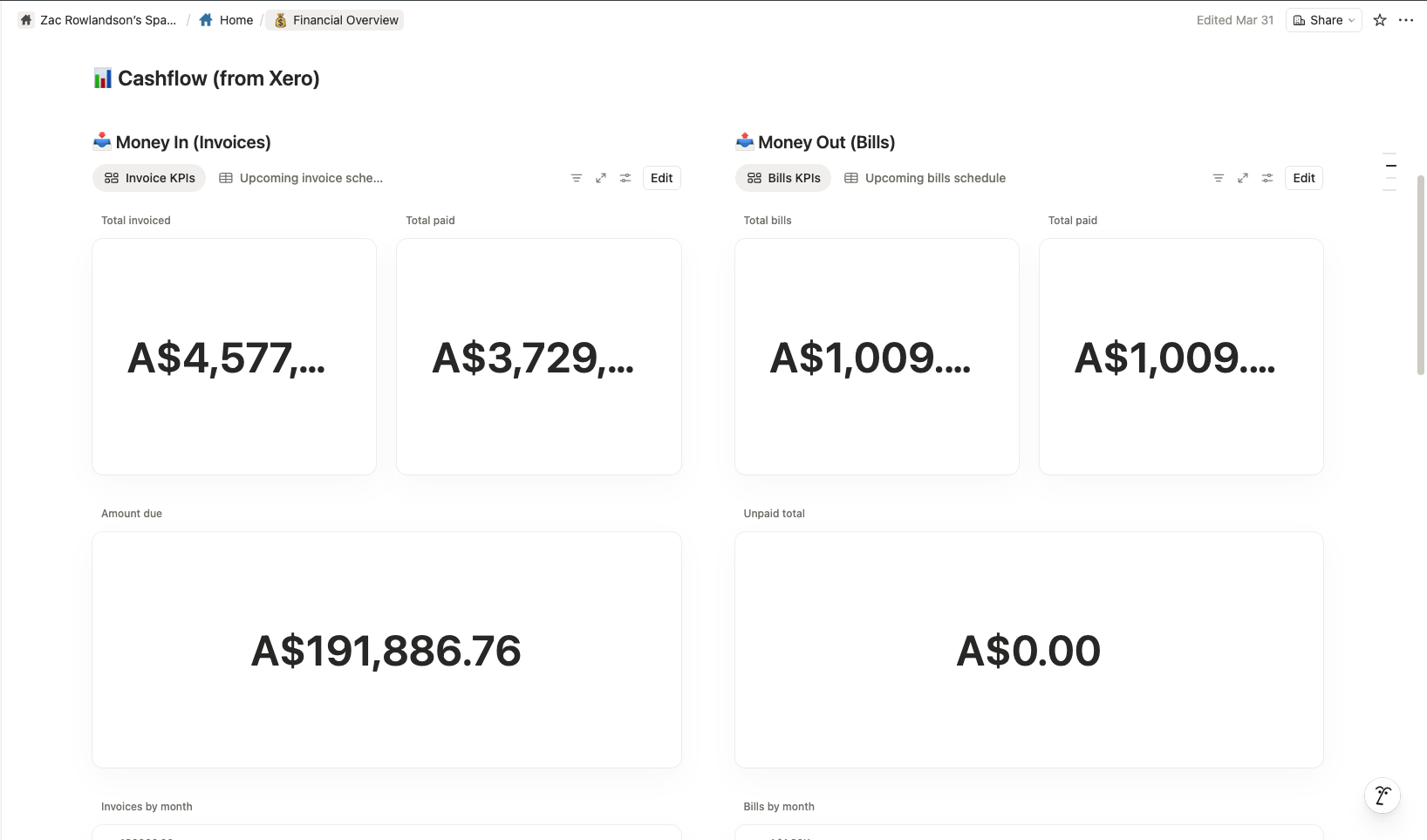
Job costs and construction budgets feed into property financial summary records, which roll up into a portfolio-level financial overview dashboard. Cost drift is visible before it becomes a problem, and Zac can see a full financial picture without opening a spreadsheet.
 
7. SOP documentation
Every workflow, naming convention, and triage rule is documented inside Notion. Each SOP explains what the system does, why it works the way it does, and how to maintain it. This protects the system against drift over time and makes it straightforward to onboard another team member when the time comes.

Results

The Notion productivity system produced clear, durable improvements across Zac’s operation.
10+ hours reclaimed each week. Structured triage, centralized task management, and daily briefings eliminated the time previously spent hunting for information, re-reading email threads for context, and manually reconstructing what needed to happen next.
$100K+ in land tax liability brought under active monitoring. The entity-level compliance database now tracks property holdings and threshold proximity across every trust and company. What was previously invisible is now visible and being actively managed.
Zero missed follow-ups. Every email is classified, linked, and converted into a trackable action item. Nothing sits unresolved in an inbox without a corresponding record in the system.
Faster decisions with less effort. Because every item is anchored to a property, entity, or project, Zac can assess priorities and act without searching for context first.
A scalable foundation. New properties and projects slot into the existing structure without requiring new workflows. The system grows with the business rather than creating more friction as it does.

Conclusion

A well-designed Notion productivity system can serve as a genuine operational command center, not just a tool for keeping notes. For Zac, the system transformed a fragmented, high-risk operation into one where every property, entity, obligation, and follow-up has a defined home, a clear owner, and a visible status.
The result is a business that runs on structure rather than memory, with enough clarity built into the daily workflow that the owner can make faster decisions, take on more projects, and trust that nothing critical is sitting undetected.

Frequently Asked Questions (FAQ)

“Excellent service provider and also a great human! Part of our team now on an ongoing basis.”

Picture of John Crease

John Crease

CEO, Crease Group

An AI-based Notion command center is a custom operating system built inside Notion that combines property management, compliance tracking, email triage, project oversight, financial visibility, and AI-powered workflows into one workspace. Australian property business owners use it to manage properties, trusts, development projects, tax obligations, and daily operations from a single source of truth instead of relying on multiple disconnected tools.

AI reduces administrative workload by automatically classifying emails, generating task recommendations, creating daily briefings, summarizing project updates, and surfacing compliance risks. Instead of manually reviewing hundreds of emails or notes, property developers receive prioritized actions and insights that help them make faster decisions.

Property businesses often manage multiple entities, development projects, consultants, contractors, lenders, and compliance obligations simultaneously. Without a centralized system, critical information becomes scattered across email inboxes, spreadsheets, accounting platforms, and messaging apps. A Notion command center brings all operational data together, reducing administrative overhead and improving decision-making.

Yes. An AI-powered Notion system can track properties, projects, financial records, compliance obligations, and communication across multiple trusts, companies, and special purpose vehicles (SPVs). Each record can be linked to the relevant entity, providing a complete portfolio view while maintaining entity-level visibility.

A properly designed system centralizes BAS deadlines, GST obligations, land tax monitoring, insurance renewals, development approval milestones, and council compliance requirements. Automated reminders and dashboard alerts help ensure critical obligations are visible before deadlines are missed.

Yes. AI can classify incoming emails by urgency, category, property, project, or entity. Important emails can automatically create tasks, assign priorities, and link to the relevant records within Notion. This helps property business owners manage high email volumes without manually sorting every message.

A comprehensive property operating system should track:
  • Property portfolio data
  • Development projects
  • Trust and company structures
  • Compliance obligations
  • GST and tax risks
  • Land tax exposure
  • Construction costs
  • Bills and invoices
  • Email communication
  • Action items and follow-ups
  • Documents and contracts
  • Financial performance metrics
Managing all these elements inside one workspace provides complete operational visibility.

Yes. Notion is highly flexible and can be customized for property developers, property investors, civil contractors, and owner-operators. Unlike traditional property management software, it can be adapted to track development pipelines, feasibility studies, compliance requirements, project delivery, and entity-level financial performance.

The exact savings depend on portfolio size and complexity. However, property business owners commonly reclaim several hours each week by reducing manual administration, improving email management, automating routine workflows, and eliminating the need to search across multiple systems for information.

Traditional property management software focuses primarily on tenancy management, rent collection, maintenance requests, and lease administration. An AI-based Notion command center manages the broader operational requirements of a property business, including development projects, compliance, construction costs, entity structures, financial visibility, strategic planning, and executive decision-making.

Yes. Through platforms such as Zapier and Notion's API, a command center can integrate with Gmail, Google Calendar, accounting platforms, CRM systems, and document management tools. This allows information to flow automatically between systems while maintaining a single operational dashboard.

An AI-based Notion command center is particularly valuable for:
  • Property developers
  • Property investors
  • Multi-entity portfolio owners
  • Civil and construction business owners
  • Family office property operators
  • Real estate entrepreneurs
  • Owner-operated property businesses
The system becomes increasingly valuable as portfolio complexity, project volume, and compliance obligations grow.

Related Success Stories

Scaling a global clothing manufacturer is complex. Crease Group partnered with Camel Tech to implement custom systems and automation—transforming their operations and setting the foundation for scalable, end-to-end production.

Learn how a landscaping business automation system replaced email chaos, centralized operations, and helped a Northern Virginia firm scale toward $30M using ClickUp and Zapier.

Residential child care organisations often face operational chaos as they scale, with information scattered across emails and spreadsheets. Heart and Home Living solved this by centralizing operations in ClickUp, creating standardized workflows and automated tracking. The result is full visibility, improved compliance, and a system built to scale confidently.

Build a business that thrives without you

Unlock your ultimate life goals: Focus on high-leverage tasks, personal growth, and family time while pursuing your next big initiative.

Let's book a call with our expert.

Trusted by 60+ Companies Social Proof