
Stitch Connections operates as the connective tissue between personal injury attorneys, patients, and medical providers. When a law firm refers a patient, Stitch Connections’ nurses coordinate every appointment, referral, and recommendation while the medical records team builds the documented history attorneys need to negotiate and settle the case. As the company grew past 100 patients a month across multiple states, the informal systems that worked at a smaller scale started to create real risk: missed provider notifications, no deadline tracking for medical records requests, and a near-miss travel incident that could have gone much worse.
The 8 problems that create chaos in legal-medical support services companies
These are the exact operational gaps that were creating risk for Stitch Connections, and they are the same problems most medical case management and legal-medical support services companies face as they grow past their first 100 patients.
1. Multiple fragmented spreadsheets
Stitch Connections ran nearly the entire business through Excel: one sheet for medical management, another for medical records reconciliation, another for deadlines, and another for the medical provider database, with more scattered across the team. Cross-referencing a single patient’s information meant switching between tabs and hoping nothing had drifted out of sync. This is the same wall most medical case management companies hit before they are ready to scale: a spreadsheet system that works at 20 patients starts to break at 100.
2. No standardized nurse protocol
When a new patient came in, the process lived almost entirely in the lead intake nurse’s head. There was no checklist for common injury patterns like spinal herniations or traumatic brain injuries, and no protocol a second nurse could follow without weeks of shadowing. That created a single point of failure for patient care. Training new nurses meant hand-holding instead of handing them a system, a bottleneck that caps growth for any legal-medical support services company.
3. Duplicate provider data entry
Provider information lived in one spreadsheet for medical management and had to be manually retyped into the medical records tracking sheet every time a new provider was added. Nurses and the medical records team were maintaining two versions of the same data with no link between them. Details drifted out of sync, and duplicate entry ate hours every week that could have gone toward patient care or processing medical records faster.
4. No reliable handoff signal to medical records
The only way the medical records team knew a nurse had added a new treating provider was a manually turned-red cell in a shared spreadsheet. If that step got missed, medical records had no way of knowing a new provider existed until someone caught it during an audit. For a company that depends on requesting and receiving medical records before litigation deadlines, an informal color-coded signal is not a system.
5. No leadership or attorney visibility
Founder had no single view of what was happening across active cases without manually pulling and formatting information from several spreadsheets. Attorneys who needed a quick update on medical records status or overall case progress had no self-serve way to get one. For a company built on being the reliable bridge between law firms and patient care, that gap meant more back-and-forth than the business could afford as it scaled.
6. Travel coordination with no safety net
Patients traveling out of state for specialist care were tracked with a note buried inside a surgery record, not a dedicated system. That gap once led to a patient arriving in another city for care with no hotel booked, discovered on a weekend with no time to spare to fix it. As Stitch Connections takes on more multi-state and mass tort cases, a travel process built on memory instead of tracking becomes a liability, not just an inconvenience.
7. No deadline reminder system for medical records requests
Medical records had to be requested on a recurring quarterly cycle, with additional deadlines set by each law firm for mediation and trial. None of it had a formal reminder built in. Missing a mediation or trial deadline because outstanding medical records were not requested in time can directly weaken a case, making this one of the highest-stakes gaps in the entire operation.
8. No connection between intake and ongoing charting
Information gathered during the initial patient intake had to be manually re-entered into the ongoing patient chart, and the same disconnect existed between the intake form and the medical records team’s own tracking. Every new patient meant retyping data that had already been collected once. For a company managing close to 100 new and active patients a month, that repetition adds up fast and raises the odds of a transcription error making it into a legal record.
How Camel Tech removed the chaos and systemized the entire operation
Camel Tech partnered with Stitch Connections to move the entire operation off Excel and into a single ClickUp workspace built around how patient care and medical records actually flow, from intake through provider coordination to deadline tracking. Here is exactly how we organized medical records and patient management for this legal-medical support services company.
Solution 1: Two-space ClickUp architecture
We structured the ClickUp workspace around two core spaces: Patient Management and Resources Hub. Patient Management holds every list tied to active patient care and medical records, while Resources Hub houses SOPs, training videos, and reusable templates. This gave every team member, from nurses to the medical records analyst, a clear home for their work instead of six disconnected files.
Solution 2: A centralized, relational patient list
We built a Patient List that functions as the single source of truth for every patient. It tracks assignee, patient status (New Patient, Active Care, On Hold, Closed), priority tier, law firm, date of birth, SSN, date of injury, chief complaints, history of present illness, and injuries, all connected through relationship fields to Appointments, Medical Providers, Outcome Goals, and Medical Records.  Instead of multiple spreadsheets that could drift out of sync, every piece of a patient’s story now lives in one connected record.
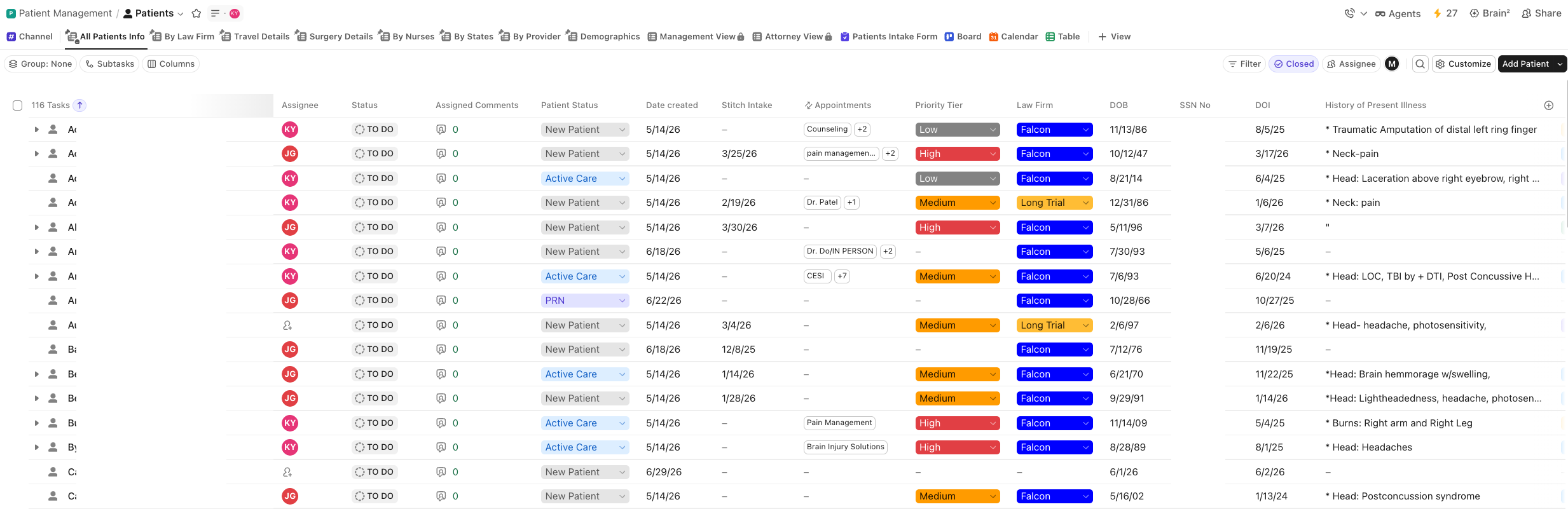 Instead of multiple spreadsheets that could drift out of sync, every piece of a patient’s story now lives in one connected record.
Solution 3: Automated outcome goals tied to injuries
We built an Outcome Goals list connected directly to the Patient List. When a nurse selects an injury, such as a specific organ or body system, the corresponding health outcome goal populates automatically instead of being typed out by hand for every patient. This eliminated duplicate free-text entry for one of the most repetitive fields in the entire intake process.
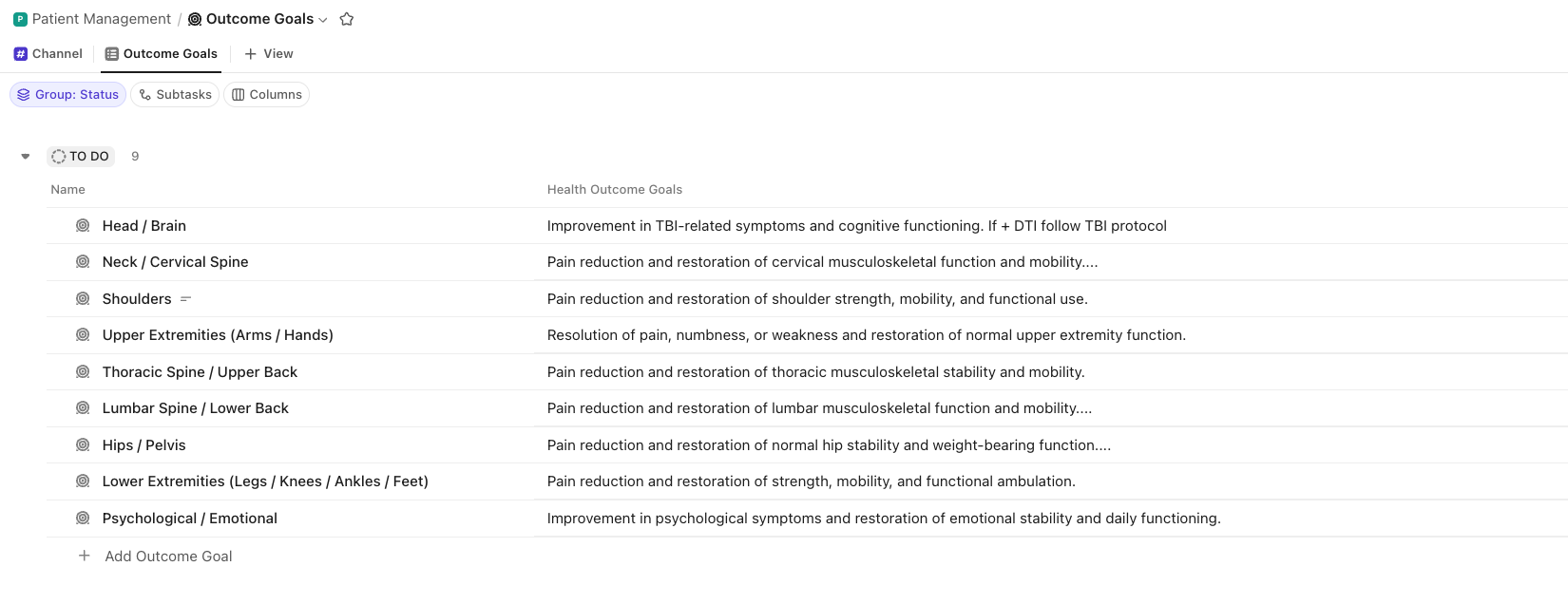 This eliminated duplicate free-text entry for one of the most repetitive fields in the entire intake process.
Solution 4: A medical provider database with automatic n8n handoff to records
We built a Medical Provider List segmented by state, city, and specialty, with fields for LOP acceptance, contact details, and record request methods, plus a form so staff can add a new provider without leaving the patient’s chart. When a patient is linked to a current or past-case-related provider, an n8n automation notifies the medical records team with a message and creates a subtask under that patient in the Medical Records list, labeled “provider added.” If a provider is later unlinked, the same automation creates a matching “provider removed” subtask, so the medical records team has an accurate, timestamped trail of every change instead of relying on a manually flagged spreadsheet cell.
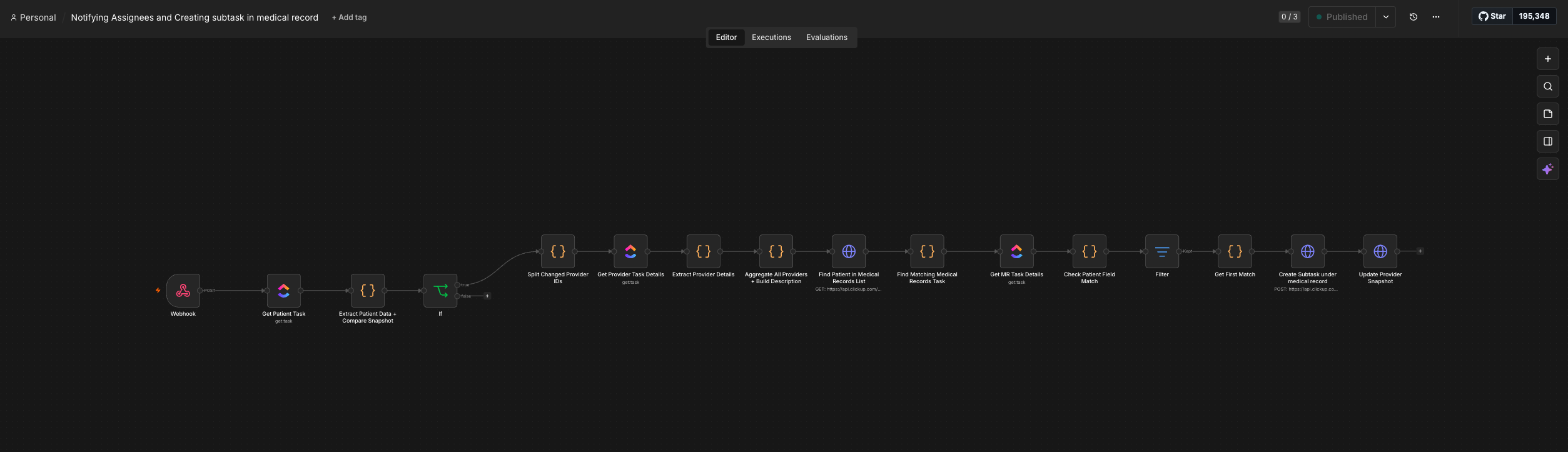 If a provider is later unlinked, the same automation creates a matching “provider removed” subtask, so the medical records team has an accurate, timestamped trail of every change instead of relying on a manually flagged spreadsheet cell.
Solution 5: A deadline-driven medical records list
We built a dedicated Medical Records list tracking case status (Hold, Mediation, Trial, Settled), whether records were requested, expired deadlines, mediation deadlines, trial deadlines, and an overall deadline date. Automations fire 45 days before the next records request date and again when that date arrives, giving the medical records team lead time on every quarterly cycle instead of tracking deadlines from memory.
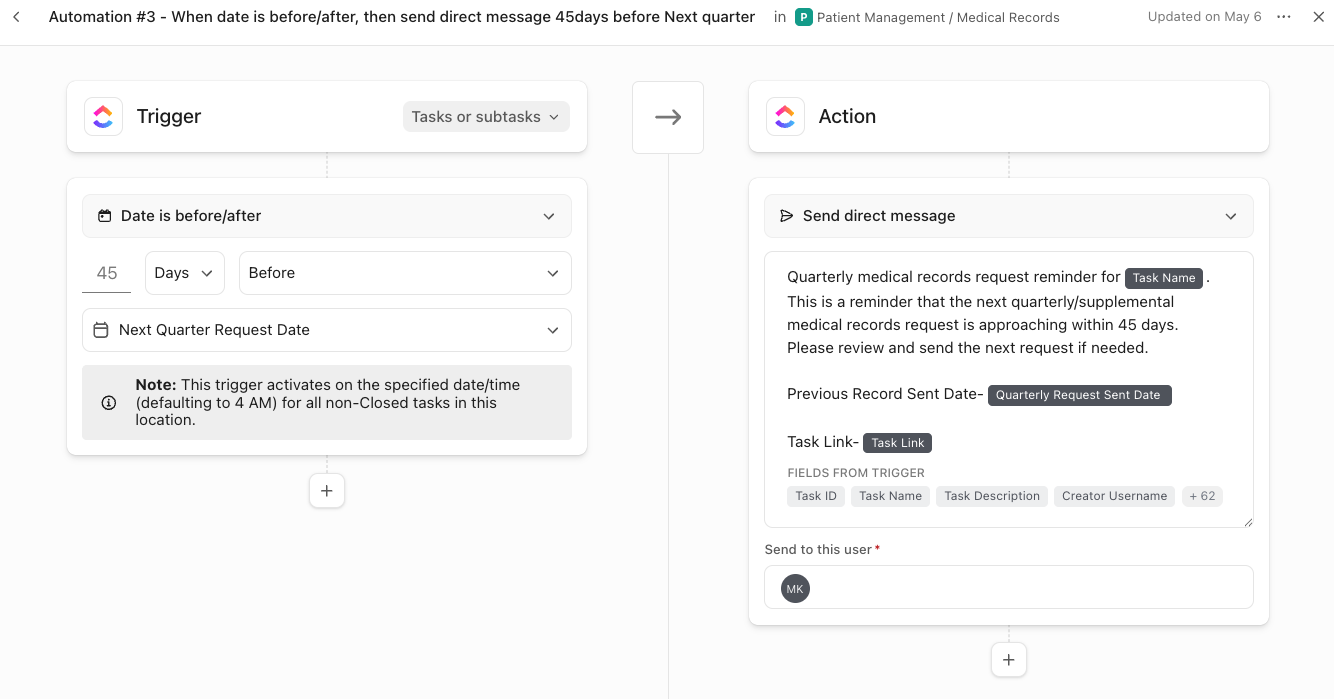 Automations fire 45 days before the next records request date and again when that date arrives, giving the medical records team lead time on every quarterly cycle instead of tracking deadlines from memory.
Solution 6: An appointments system with automatic rollups
We built an Appointments List that pulls directly from the Patient List, so date of birth, law firm, and other identifying fields populate automatically instead of being retyped for every appointment. Dedicated views for Today’s Appointments and Overdue Appointments, alongside a Calendar view, give nurses an at-a-glance read on what needs attention without digging through a spreadsheet.
 Dedicated views for Today’s Appointments and Overdue Appointments, alongside a Calendar view, give nurses an at-a-glance read on what needs attention without digging through a spreadsheet.
Solution 7: Automated travel and surgery safeguards
We built dedicated travel and surgery tracking directly into the Patient List, with fields for travel status, travel date, hotel reservation status, funding status, surgery type, and surgery date. Automations notify the team 5 and 3 days before a travel date, on the travel date itself, and 3 days before a scheduled surgery, closing the exact gap that once left a patient without a confirmed hotel for out-of-state care.
Solution 8: A patient intake form connected to the chart
We built a Patient Intake Form that populates the Patient List directly, carrying over demographics, injuries, past case-related providers, and health outcome goals the moment a new patient is added. This removed the manual re-entry that previously happened between the initial intake and the ongoing patient chart.
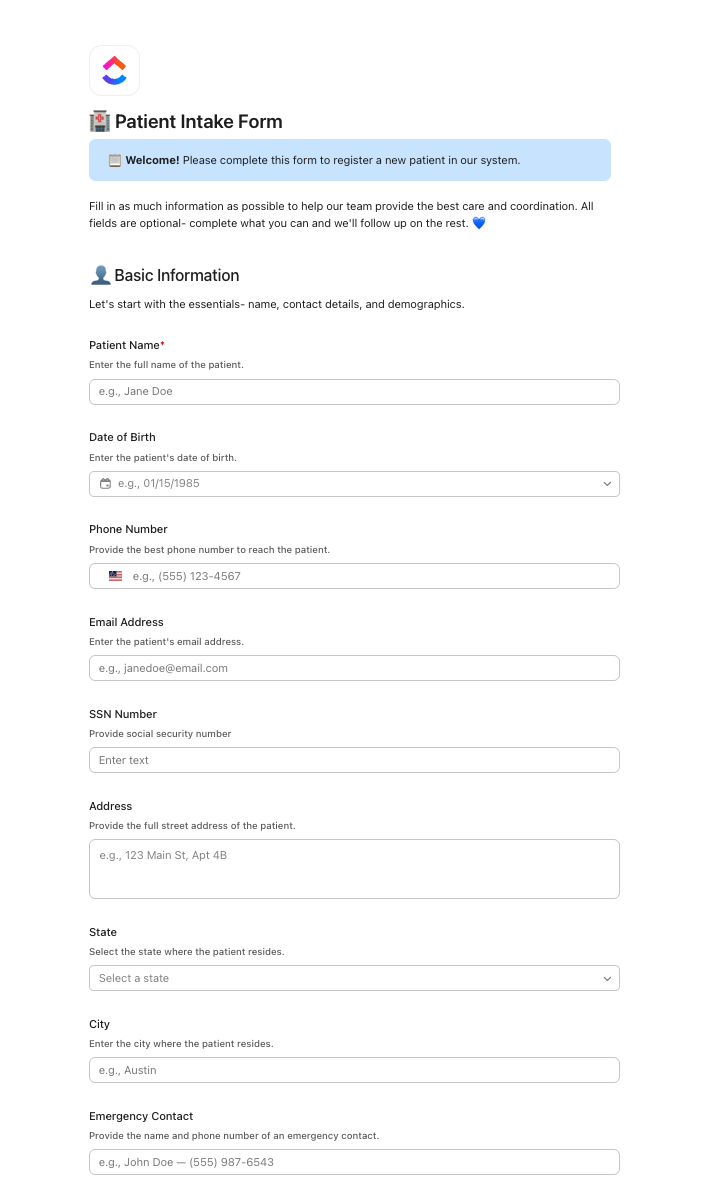 This removed the manual re-entry that previously happened between the initial intake and the ongoing patient chart.
Solution 9: Private management and attorney views
We built a dedicated, private Management view for Melissa and a separate Attorney view showing only the fields relevant to case status and medical records progress. This gives leadership a real-time read on the entire operation and gives attorneys a self-serve way to check on a case without a phone call or a manually formatted update.
Solution 10: An email triage list
We built an Email Triage list that automatically pulls in new emails so the team can see what needs a reply and respond directly from ClickUp, without switching over to a separate inbox to manage client and provider communication.
Solution 11: A resources hub for training and SOPs
We built a Resources Hub with a Training folder covering ClickUp basics and internal processes, along with an SOPs list containing training videos and a Docs section with reusable templates. New hires now have a self-serve knowledge base instead of relying entirely on shadowing an existing team member.
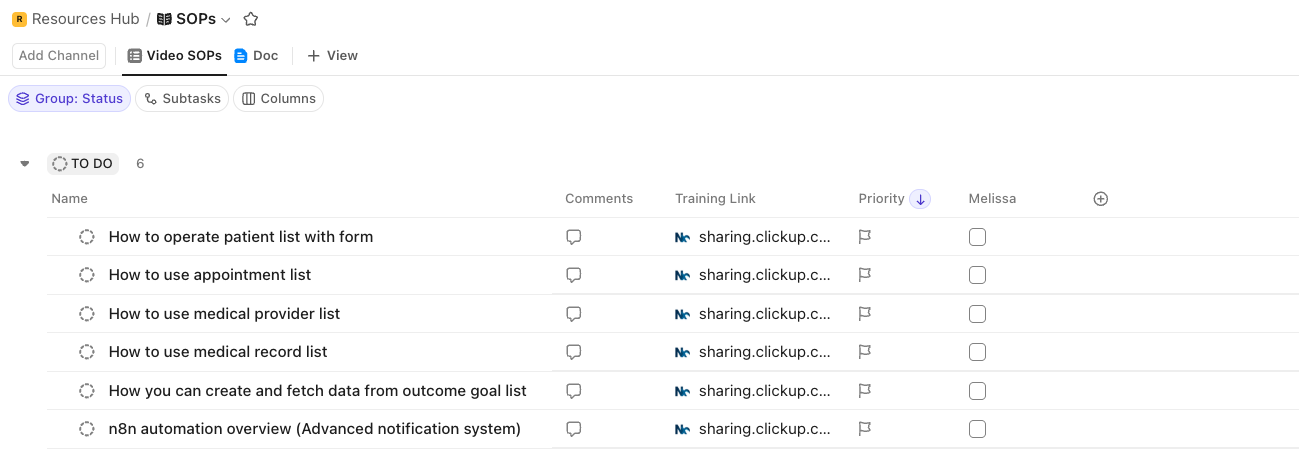 New hires now have a self-serve knowledge base instead of relying entirely on shadowing an existing team member.
Full implementation summary
- Two-space ClickUp architecture: Patient Management and Resources Hub organizing every list around how care and records actually flow.
- Centralized relational patient list: Single source of truth for every patient, connected to appointments, providers, outcome goals, and medical records.
- Automated outcome goals: Health outcome goals populate automatically based on the injury selected, no free text required.
- Medical provider database with automatic n8n handoff: Linking or unlinking a provider triggers an instant notification and a labeled subtask, “provider added” or “provider removed,” for the medical records team.
- Deadline-driven medical records list: 45-day advance reminders and deadline-date alerts for every quarterly records request.
- Appointments system with rollups: Date of birth, law firm, and other fields populate automatically, with Today’s and Overdue views.
- Travel and surgery safeguards: Automated alerts 5 and 3 days before travel, and 3 days before surgery.
- Patient intake form: Populates the patient chart directly, removing manual re-entry.
- Private management and attorney views: Real-time visibility for leadership and self-serve case updates for law firms.
- Email triage list: Client and provider emails managed directly inside ClickUp.
- Resources hub: Centralized SOPs, training videos, and templates for onboarding new staff.
Results in detail
27+ hours reclaimed every week
Automated provider notifications, deadline reminders, and travel and surgery alerts removed the manual cross-checking that used to eat into the team’s week. Nurses and the medical records team no longer spend time flagging providers by hand, tracking deadlines from memory, or re-entering intake data into a separate chart. Those reclaimed hours now go toward patient care and faster medical records turnaround.
100% of patient and medical records data centralized
What used to live across six disconnected Excel sheets, patient information, medical records reconciliation, deadline tracking, and the provider database, now lives in one connected ClickUp system. A change made in one place updates everywhere it is linked, closing the gap that used to let details drift out of sync between medical management and medical records.
Zero missed provider-to-records handoffs
An n8n automation now creates a labeled “provider added” subtask under Medical Records the moment a provider is linked to a patient, and a matching “provider removed” subtask when a provider is unlinked, replacing a manual red-cell flag that depended on someone noticing it. Every provider change now generates its own tracked, timestamped task for the records team, removing the single biggest point of risk in the old workflow.
Deadlines tracked instead of remembered
The 45-day advance reminder before each quarterly records request, plus alerts on mediation, trial, and expired deadlines, replaced a system with no built-in lead time. The medical records team now gets ahead of every cycle instead of reacting to it.
A safety net for travel and surgery
Automated notifications 5 and 3 days before a travel date, on the day of travel, and 3 days before surgery directly address the incident that first exposed the gap: a patient traveling out of state with no hotel booked. That kind of near-miss is no longer possible under the new system.
Founder freedom
Melissa no longer has to be the single point of oversight holding every deadline, every provider update, and every case status in her head. The Management view gives her a real-time read on the entire operation, the Attorney view lets law firms check on a case without calling her directly, and the automations catch the details that used to depend entirely on someone remembering to look.


Scaling a global clothing manufacturer is complex. Crease Group partnered with Camel Tech to implement

Learn how a landscaping business automation system replaced email chaos, centralized operations, and helped a

Residential child care organisations often face operational chaos as they scale, with information scattered across

Selected resource
Enter your email and we’ll send the resource directly to your inbox.
Check your inbox
We’ve received your request and will send the resource to your email.
Please check your spam or promotions folder if you don’t see it shortly.