
Get My Course helps students and working professionals in Australia gain nationally recognised qualifications in aged care, disability support, early childhood education, mental health, and community services. Their RPL pathway allows candidates to convert real work experience into formal certifications – making them a critical player in Australia’s community workforce pipeline. Behind their strong student-facing reputation, the company was running on disconnected tools, informal tracking systems, and no clear operational foundation. Every department managed its own processes in isolation, and the CEO had no reliable way to see what was actually happening across the business day to day.
The 5 Problems That Create Chaos in Online Education Companies
These are the exact operational bottlenecks that were holding Get My Course back – and they are the same problems most growing online course and education businesses face when trying to scale.
1. No Project Management System
Get My Course had no dedicated project management tool before this engagement. Tasks surfaced in calls and Slack messages but had no home – no due dates, no owners, no follow-up. The CEO described meetings where assignments were made and then simply forgotten because nothing was written down anywhere that the whole team could see. When every decision lives in someone’s memory or buried in a Slack thread, accountability becomes impossible. For an education company managing a complex student journey from lead to certificate, this is how things fall through the cracks at scale.
2. Scattered Documentation Across 100+ Google Files
Get My Course had over 100 Google Sheets and Docs spread across the organization with no consistent structure. Different teams had their own files, naming conventions varied, and even the people who built those files struggled to find what they needed. Team in customer success was maintaining a separate Notion workspace just to track certificates and reviews accurately because the Zoho data was unreliable. When your SOPs, databases, and process documentation live across dozens of disconnected files, training new staff is slow, handoffs are messy, and operational knowledge stays stuck with specific people instead of the business.
3. Zero Task Visibility for Leadership
The CEO had no reliable way to see what any individual team member was working on at any given time. Checking in meant asking in Slack, joining a meeting, or relying on someone to proactively share an update. For a company with five to seven department heads and fifteen to twenty support staff, that is not a system – it is a series of informal check-ins that consumes leadership time without producing reliable information. Without visibility, capacity planning is guesswork and identifying bottlenecks happens only after something breaks.
4. No Accountability After Calls and Meetings
Get My Course ran regular meetings across departments but had no system to capture and track what came out of them. CEO noted directly that the CEO would forget what had been assigned because nothing was recorded anywhere actionable. Action items stayed in call recordings or in people’s heads. The completions team was coordinating a multi-step student process – welcome calls, document submission, RTO liaison, certificate release, payment collection – with no task infrastructure to track any of it. When discussions produce no traceable outputs, the same problems surface again and again in the next call.
5. Tool Fragmentation Across Every Department
Each department at Get My Course was using a different combination of tools. Marketing used Go High Level and Zoho. Sales used Zoho CRM. Customer success tracked escalations and certificates in a personal Notion account. HR and recruitment were in Zoho. Individual leaders used Google Calendar for time blocking. Meetings happened across Slack, Zoom, Google Meet, and WhatsApp depending on who was involved. One of the employee described spending time every week exporting data from Zoho, importing it into Notion, and manually fixing columns just to get an accurate count of certificates issued that month. This kind of fragmentation does not just waste time – it makes it structurally impossible to implement ClickUp for an education company without first deciding where each function belongs.
How Camel Tech Removed the Chaos and Systemized the Entire Operation
Camel Tech worked with Get My Course to design and build a complete operations system from the ground up. Here is exactly how we implemented ClickUp for this online education company – covering workspace structure, CEO visibility, automation, knowledge management, and Slack integration.
Solution 1: Five-Department ClickUp Workspace Architecture
We built Get My Course’s ClickUp workspace around five core departments: Finance, Marketing, Sales, Completions, and Customer Success. A separate Templates space was created alongside the department spaces to house reusable task and project templates. Every department follows the same internal structure, which keeps navigation consistent whether you are looking at marketing campaigns or customer escalations.  This standardized architecture is the foundation that makes the entire system work – without it, ClickUp becomes another place where chaos accumulates.
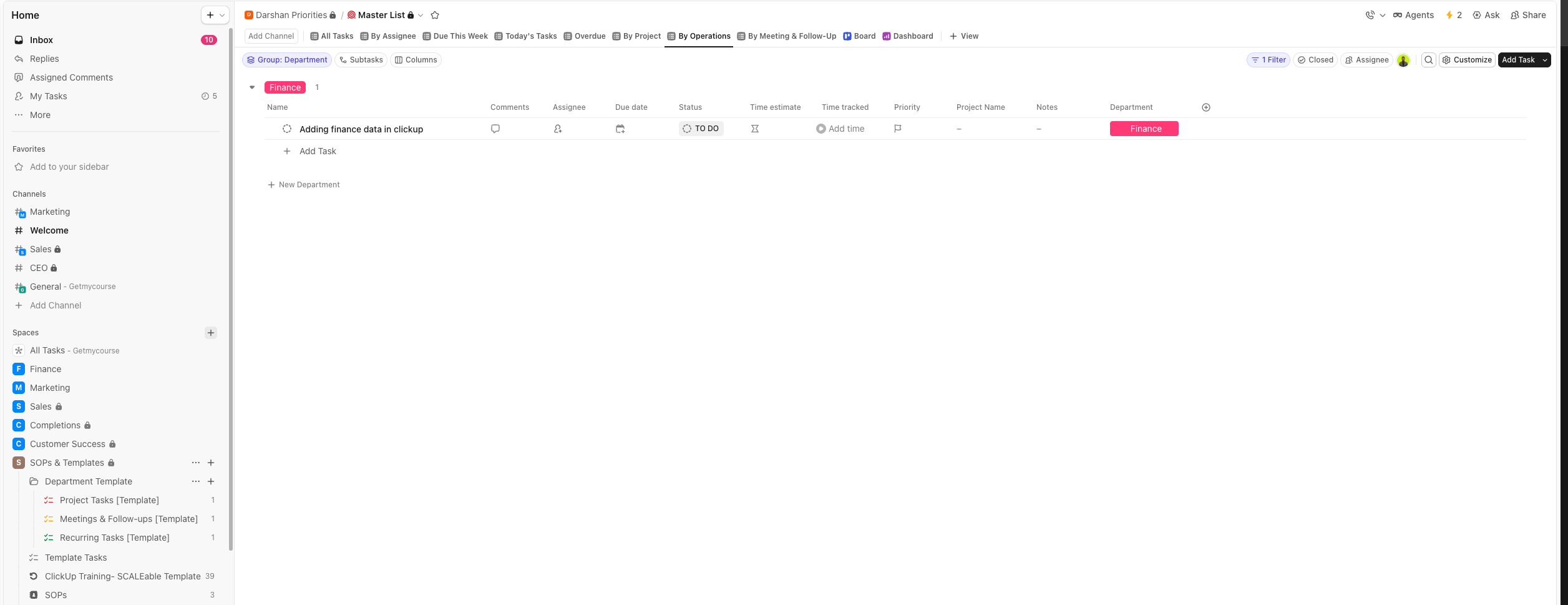 This standardized architecture is the foundation that makes the entire system work – without it, ClickUp becomes another place where chaos accumulates.
Solution 2: Three-List Structure Per Department
Inside each department, we created three purpose-built lists. The Project Tasks list houses one-off projects and initiatives. The Meetings and Follow-ups list captures all scheduled meetings and required follow-up actions, with the work category automatically set and the meeting type as the only manual field the team needs to fill in. The Recurring Tasks list manages all repeating work – tasks in this list automatically recreate themselves after completion so the team never has to manually rebuild daily or weekly tasks. This three-list structure keeps work organized by type and prevents the list clutter that makes most ClickUp workspaces hard to use after a few weeks.
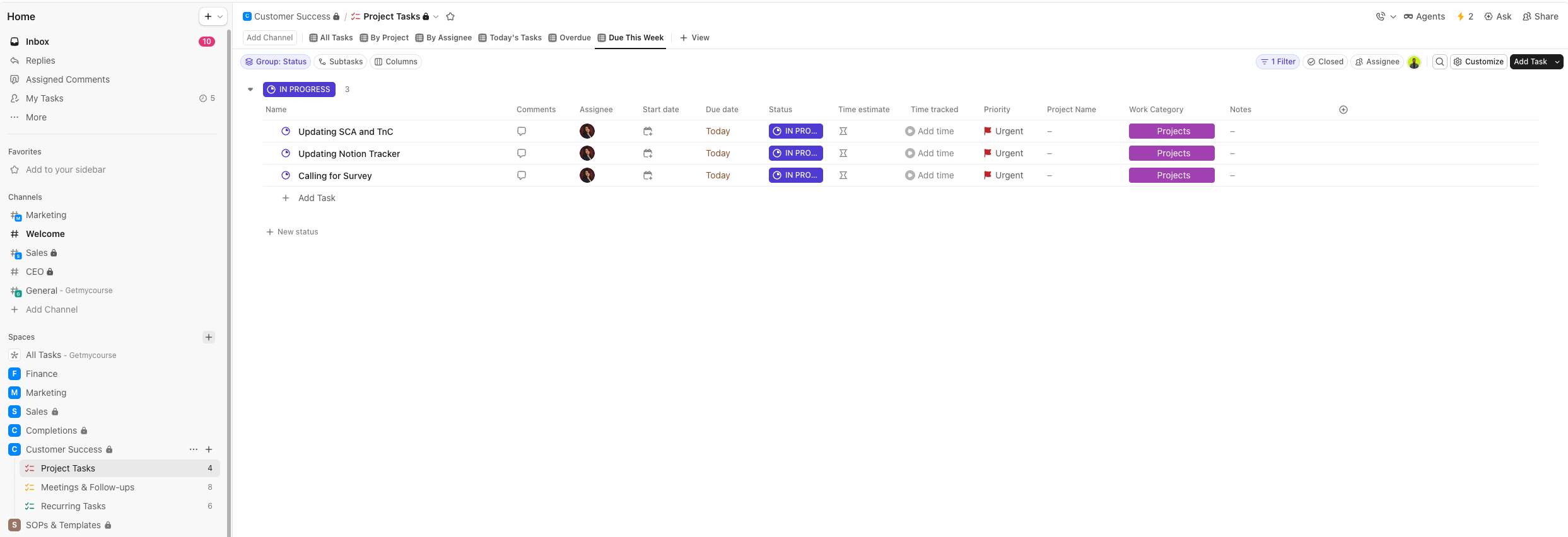 This three-list structure keeps work organized by type and prevents the list clutter that makes most ClickUp workspaces hard to use after a few weeks.
Solution 3: Automations for Category and Department Assignment
We set up automations in the Project Tasks and Meetings lists so that the category field and department field are assigned automatically when a task is created. This removes a manual step that most teams skip anyway, which means reports and filters stay accurate without relying on people to fill in fields consistently. For a team adopting ClickUp for the first time, reducing the number of required manual inputs is what drives adoption – people use systems that do not create extra work for them.
Solution 4: Full Cross-Department Visibility
We built a Master Department list that aggregates tasks from every department into a single view. The CEO can filter by assignee to see every task assigned to any specific leader, filter by status to see what is overdue or in progress, and filter by due date to see what is coming up this week. Individual leaders also have their own My Tasks view showing only their assignments. Before this, Leader had no way to check what employees, or any other department head was working on without asking directly. Now that information is available in seconds from a single master list.
Solution 5: Automated Daily Slack Reports via Make
We connected ClickUp with Slack using Make automations. Each day, an automated report is sent to the CEO’s Slack channel showing that day’s pending tasks matched to their assignees, and a separate summary of overdue tasks so nothing sits unnoticed. Individual team members also receive Slack notifications when tasks are assigned to them and when tasks are approaching their due dates. This was a specific requirement from CEO, who checks Slack as his primary communication channel. By delivering the information where the CEO already works, the system gets used – instead of becoming another dashboard no one opens.
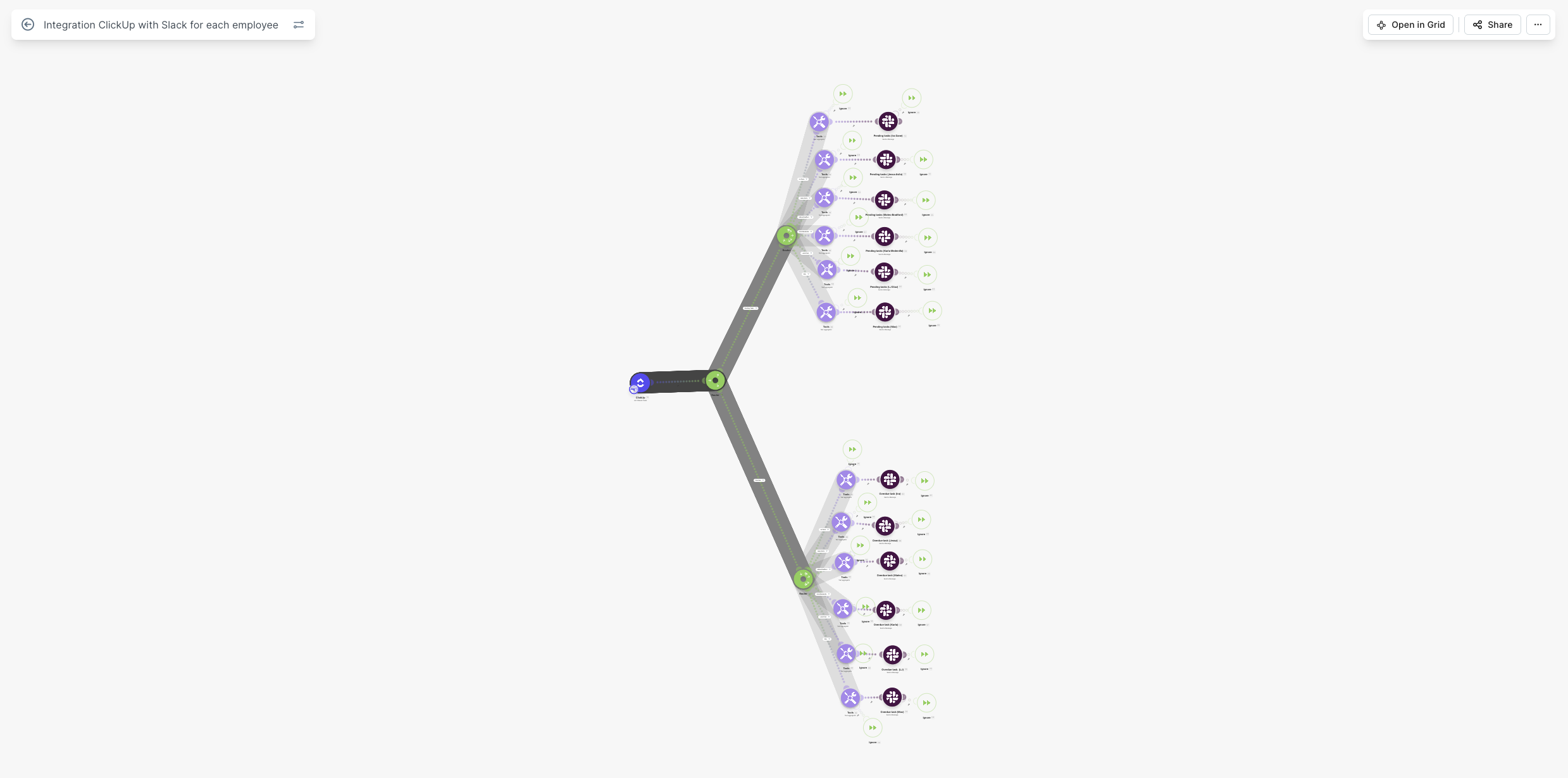 By delivering the information where the CEO already works, the system gets used – instead of becoming another dashboard no one opens.
Solution 6: Structured Notion Knowledge Base
We rebuilt Get My Course’s Notion from a loose collection of personal task lists into a structured company-wide knowledge base. The home view has a navigation bar that directs users to five core areas: Operations (with department-specific sections for Finance, Marketing, Sales, Completions, and Customer Success), Databases, Brand and Assets, and additional reference sections. We built out several core databases including Master SOPs, Team Directory, Onboarding Checklist, Brand Library, Tech Stack, Community Policy, and Meeting Rhythm. Each department section uses linked views so HR-related SOPs, for example, surface automatically inside the HR section without requiring anyone to manually maintain a separate list.
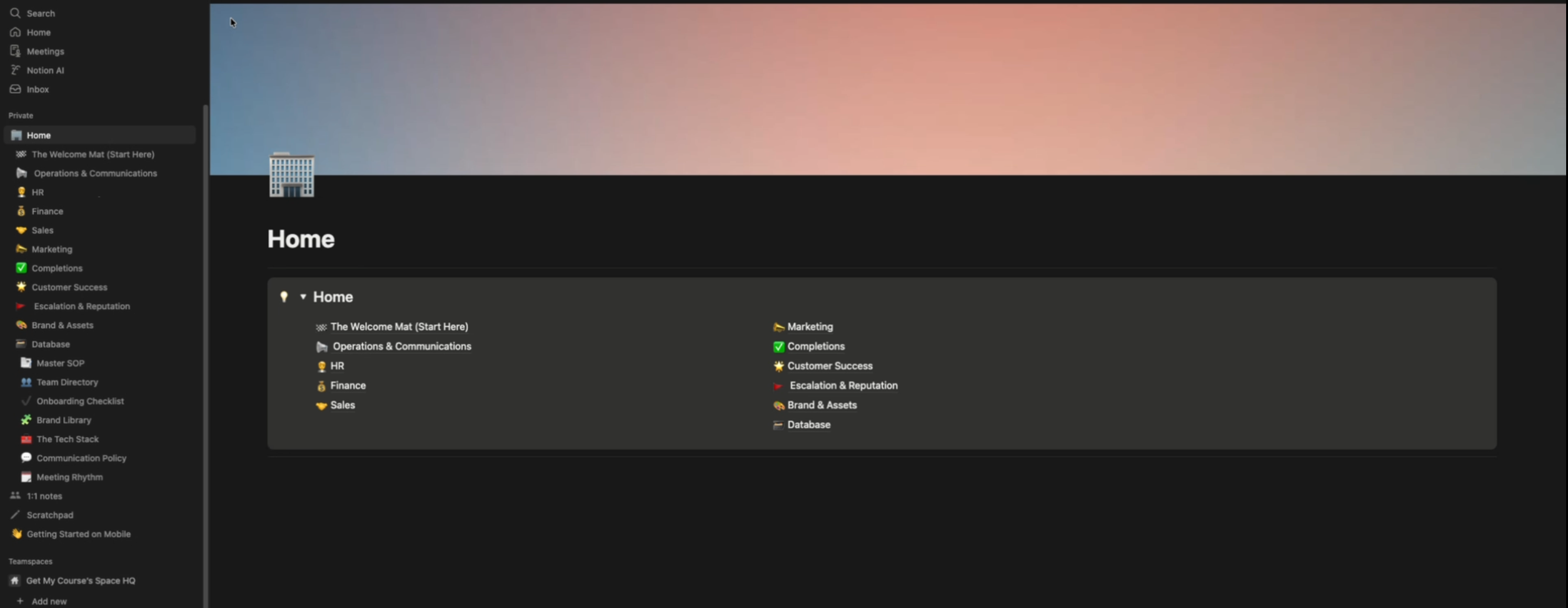 Each department section uses linked views so HR-related SOPs, for example, surface automatically inside the HR section without requiring anyone to manually maintain a separate list.
Solution 7: Database Templates With Auto-Apply Logic
We created page templates for each major database in Notion so that when a new entry is created – a new employee, a new SOP, a new onboarding record – the template is automatically applied. This keeps every record consistent in structure and ensures the team never starts a new page from a blank slate. The same template logic was implemented across Finance, Sales, Marketing, and Customer Success. We also built the escalation and reputation management sections, which were previously managed by one of the employee in a separate personal Notion account with no standardized structure.
Solution 8: Training, Walkthroughs, and Handover
We built a ClickUp training list inside the workspace itself and produced video walkthroughs covering the entire system – how to use each list, how recurring tasks work, how to read the CEO master list, and how to navigate Notion. A live training session was run with team members covering daily task management, how to add content to the knowledge base, and how to maintain the workspace going forward. The Get My Course team is now migrating their historical Google Docs and Sheets content into Notion using the structure we built.
Full Implementation Summary
- Five-Department Workspace Architecture: Finance, Marketing, Sales, Completions, and Customer Success organized with a separate Templates space.
- Three-List Structure per Department: Project Tasks, Meetings and Follow-ups, and Recurring Tasks – standardized across all five departments.
- Automated Field Assignment: Category and department fields set automatically on task creation – no manual input required.
- CEO Master List: Master Department list aggregating all tasks from all departments with filters by assignee, status, and due date.
- Daily Slack Automation via Make: Automated daily reports for pending and overdue tasks sent to CEO’s Slack channel. Individual notifications for task assignments and due dates.
- Structured Notion Knowledge Base: Rebuilt from scratch with department sections, core databases, and navigation home view.
- Database Templates with Auto-Apply Logic: Templates applied automatically on new record creation across all major databases.
- Escalation and Reputation Management: Dedicated Notion sections replacing personal spreadsheets with a standardized, shared structure.
- ClickUp Training List and Video Walkthroughs: In-workspace training resource covering all system components for ongoing team reference.
- Live Training and Handover Session: Hands-on session with leadership covering daily task management, Notion usage, and workspace maintenance.
Results in Detail
Leadership Knows What Is Happening at All Times
The CEO now has a single place to check the status of every project and task across all five departments without sending a Slack message or waiting for a meeting. The Master Department list shows every leader’s assignments in real time. Filtering to a specific team member takes seconds. This kind of visibility was not possible before – and for a CEO coordinating finance, marketing, sales, completions, and customer success simultaneously, it changes how decisions get made.
Nothing Falls Through the Cracks After Calls
Every action item from a meeting now has a task in ClickUp with an owner, a due date, and a status. The Meetings and Follow-ups list captures these automatically as part of normal workflow. CEO no longer relies on memory or Slack scroll-back to follow up on what was assigned. The completions team – which manages a multi-step student journey involving document collection, RTO coordination, and certificate release – has recurring tasks that reset automatically after completion, so nothing gets missed because someone forgot to recreate a task.
Daily Visibility Without Daily Check-Ins
The automated Slack reports deliver a daily summary of pending and overdue tasks to the CEO every morning without anyone generating a report manually. Each team member is matched to their tasks in the report so the CEO can see at a glance who has what outstanding. This removes one of the core drains on leadership time in most growing companies – the manual status update cycle that consumes hours each week without producing any real work.
Documentation Is Now One Place, Not One Hundred
Over 100 Google Docs and Sheets are being migrated into a structured Notion knowledge base built on the architecture we designed. Departments no longer maintain their own disconnected files. The Master SOPs database, Team Directory, Onboarding Checklist, and Brand Library give the entire team a single source of truth. New records auto-populate from templates, which means the structure holds even as the team grows and new people are added.
Founder Freedom
CEO came into this project checking every status update through Slack and relying on call recordings to remember what had been assigned. He now starts each day with an automated task summary in his Slack channel and can check any team member’s workload from the CEO master list in under a minute. The systems handle the reporting. The team handles the work. That is what it looks like when you implement ClickUp for an online education company correctly – the founder gets time back, not more overhead.

What began as a Salesforce migration became a complete business transformation. See how Camel Tech
Learn how Camel Tech implemented ClickUp for a medical case management company, automating workflows, centralizing
Learn how a landscaping business automation system replaced email chaos, centralized operations, and helped a

Selected resource
Enter your email and we’ll send the resource directly to your inbox.
Check your inbox
We’ve received your request and will send the resource to your email.
Please check your spam or promotions folder if you don’t see it shortly.